
Hubdrive HR for Microsoft Dynamics 365
Hubdrive HR for Microsoft Dynamics 365
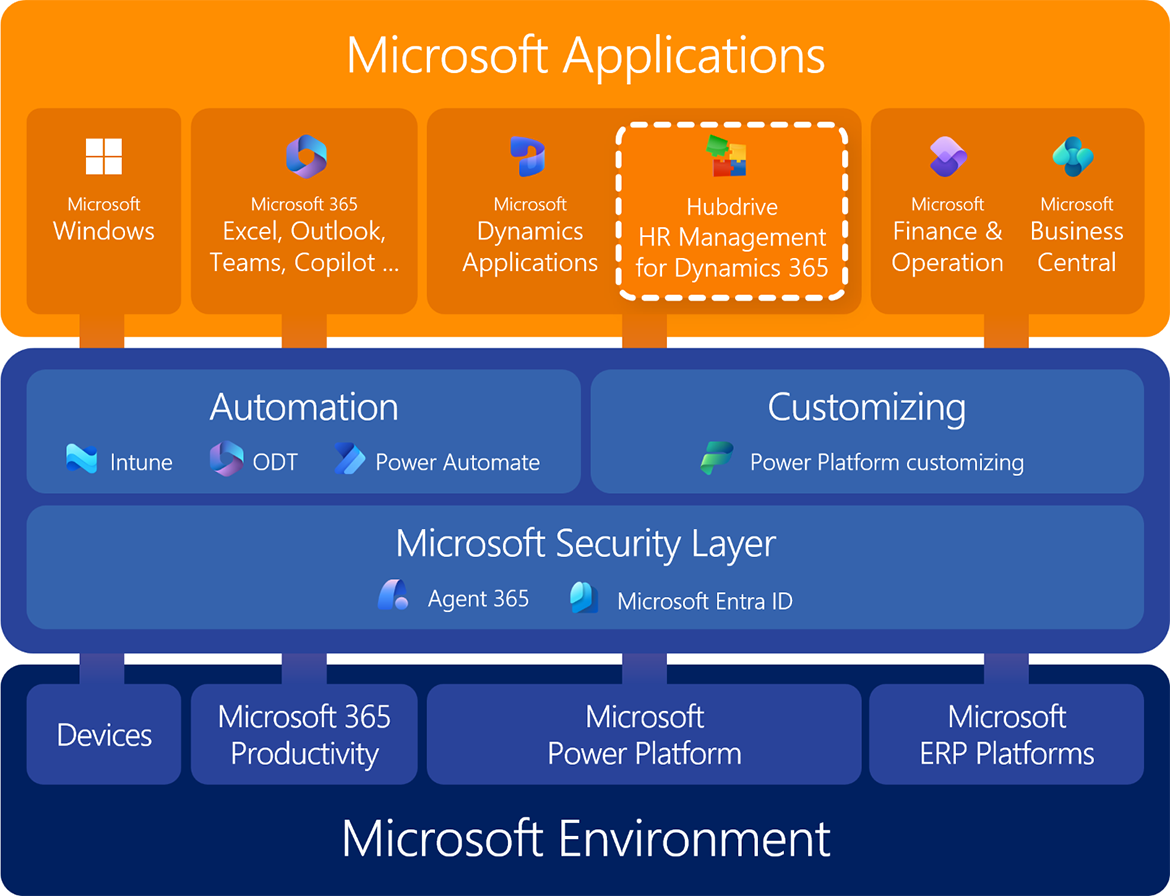
- Hubdrive HR is a certified Managed ISV solution built 100% on the Microsoft Power Platform, the same foundation as Microsoft's own Dynamics 365 business apps.
- It operates entirely on your existing Microsoft cloud infrastructure, including Entra ID, security structures and lifecycle management, so there is no need for an additional HR platform.
- Microsoft itself embeds Hubdrive in Microsoft 365 apps such as Teams, Outlook, Copilot, OneDrive and SharePoint, so IT doesn't have to roll out third-party apps or run integration projects.
- Automation, customizing and extensions are handled exclusively with familiar Microsoft tools such as Power Automate, Power Apps, Power Pages and Intune. Your customizations sit in a separate layer and are preserved during updates.
- Reporting and analytics are delivered through the familiar Microsoft Power BI, using HR data directly from Dataverse or a data lake, with Microsoft Fabric where needed. The security layer is considered throughout.
- Hubdrive HR is available for all four Microsoft platforms: Microsoft 365, Power Platform, Business Central and Finance & Operations. This puts your existing Microsoft licenses to work for end-to-end HR Management.
4244 | IT | | technische-positionierung

Advantages for the IT department at a glance
- Hubdrive integrates seamlessly with your Microsoft IT infrastructure.
Hubdrive is part of your Microsoft Power Platform and therefore integrates seamlessly with the Microsoft IT infrastructure. - Hubdrive and Microsoft provide strong investment security.
Microsoft uses the Power Platform itself as the technological foundation for developing its own business applications and AI. In addition, Microsoft officially recommends the platform as a development environment for ISVs, partners and customers. - Implementing Hubdrive HR is faster and more cost efficient.
Existing Microsoft infrastructure is leveraged, with only minimal extensions required. In addition, Hubdrive HR can be implemented using an efficient best practice approach. - Operating Hubdrive HR is more cost effective and less complex.
Hubdrive uses existing Microsoft infrastructure and familiar Microsoft tools for security, administration, reporting, customization, automation and deployment. - Extensions are implemented on the platform using familiar Microsoft tools.
Enhancements or customizing can be created on the Power Platform by yourself or your local Partner. There is no need to develop specialist expertise in a traditional HR system. - With Hubdrive HR, customers can harness the potential of AI faster and more securely.
Hubdrive leverages your existing Microsoft security framework—including Azure ID and lifecycle management. Third-party AI is integrated via an interface that prevents bypassing the Microsoft security layer. - Hubdrive HR is significantly easier to secure.
Hubdrive simplifies governance and security by leveraging your existing Microsoft infrastructure and provides global support through the international Microsoft partner network. - The overall cost of Hubdrive HR for IT is significantly lower.
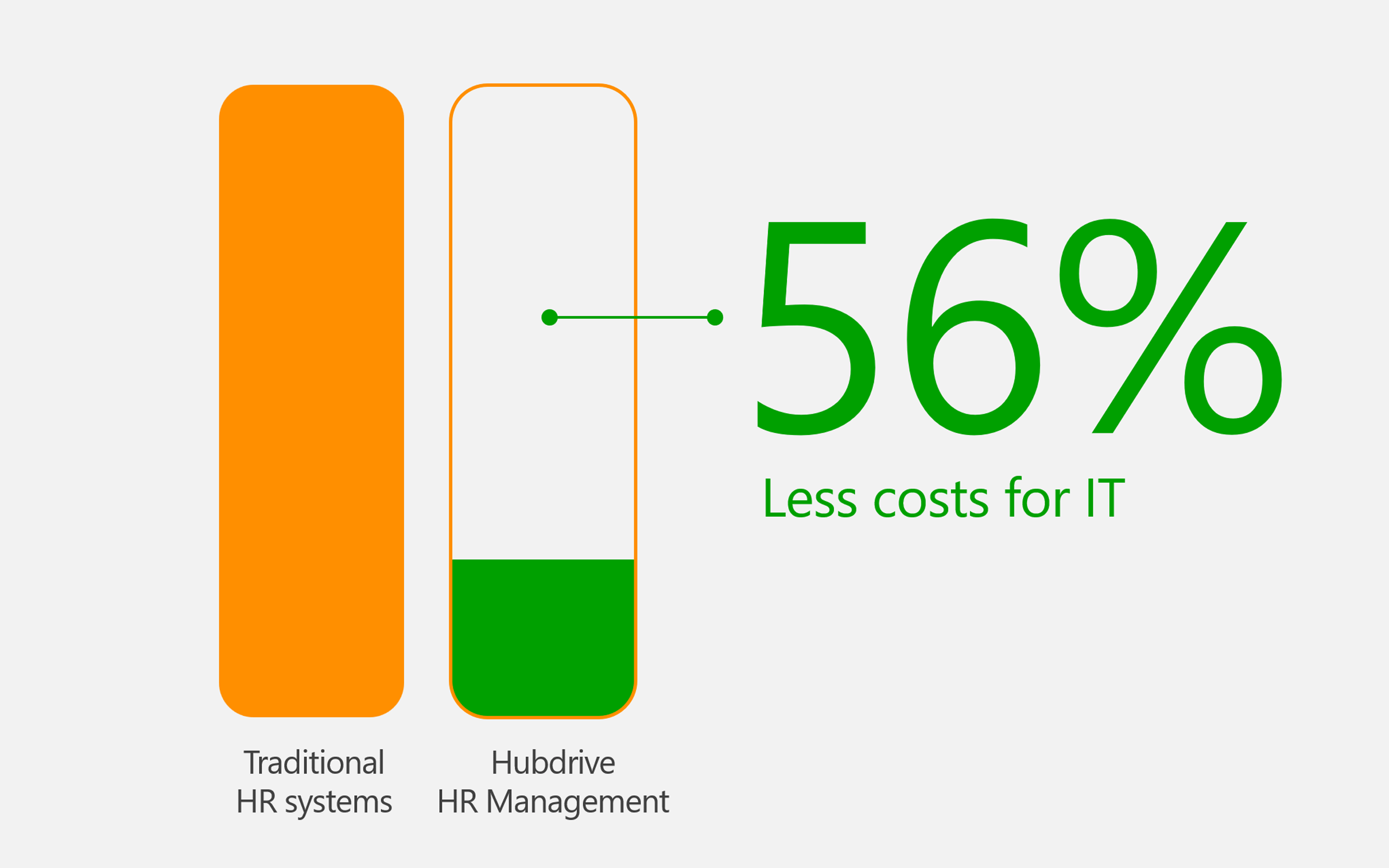
For IT Departments with Microsoft Strategy Hubdrive results in up to 56% lower costs compared to traditional HR systems.
3678 | IT | 00 - Intro | it-vorteile
Hubdrive integrates seamlessly with your Microsoft IT infrastructure
A unified, fully integrated and familiar platform instead of isolated solutions and data silos
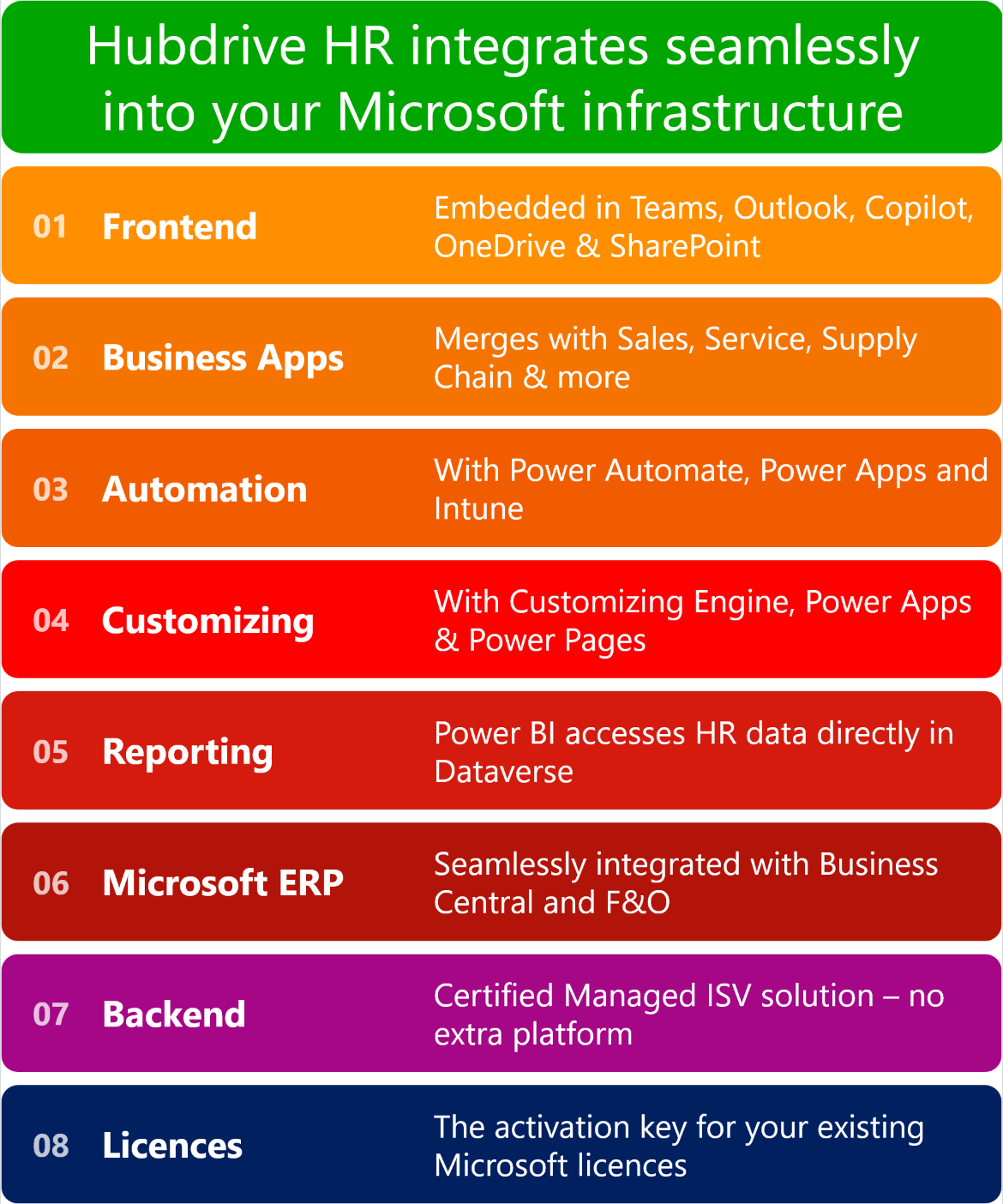
Hubdrive integrates seamlessly with your Microsoft IT infrastructure at every level
- Frontend
Hubdrive is embedded directly by Microsoft into Microsoft 365 applications such as Teams, Outlook, Copilot, OneDrive and SharePoint. IT does not need to deploy or maintain additional third‑party applications - Microsoft Business Software
Hubdrive HR integrates seamlessly with your Microsoft 365 productivity tools and Microsoft Dynamics business solutions, enabling HR data to be used across departments—without additional interfaces or complex, high-risk integration projects - Automation
All automation in Hubdrive is handled exclusively through familiar Microsoft tools such as Intune, Power Automate and Power Apps. IT does not need to learn any proprietary tools - Customizing
Hubdrive HR is customized in the familiar Microsoft Customizing Engine and the layer architecture keeps every customization update-safe. IT doesn’t have to learn any proprietary tools. - Extensions
Also Extensions are also built with familiar Microsoft tools: Microsoft Power Apps, Power Pages and Copilot Studio. Again, IT doesn’t have to learn any proprietary tools. - Security
Hubdrive HR relies exclusively on your existing Microsoft security layer with Entra ID. IT manages permissions, data storage and compliance centrally with familiar Microsoft mechanisms, with no additional security infrastructure. - Reporting & Analytics
At Hubdrive, IT builds reports and dashboards with the familiar Microsoft Power BI, which accesses HR data directly in Microsoft Dataverse. The security layer is fully respected. This makes it easy to combine HR metrics with data from Sales, Finance or ERP. Here too, IT doesn’t have to learn any proprietary reporting tools. - Microsoft ERP systems
For organizations using Business Central or Finance and Supply Chain Management, Hubdrive HR integrates seamlessly into the existing Microsoft ERP systems and extends them with comprehensive HR management - Cloud-Backend
Hubdrive HR is a certified managed ISV solution on the Power Platform and integrates seamlessly into your existing Microsoft cloud infrastructure across all layers. There is no need to build an additional platform, as is typically required with traditional HR systems - Microsoft Licensing
Organizations that adopt Hubdrive strengthen the use of their existing Microsoft licenses and infrastructure. Hubdrive acts as the activation layer for this existing investment
3677 | IT | 00 - Intro | it-positionierung

Layer 1 of 10: Frontend
Hubdrive is embedded by Microsoft directly into Microsoft 365 apps
- Hubdrive HR is the only HR solution on the market where all employees can complete their HR tasks not only in the browser but also directly within familiar Microsoft 365 apps such as Teams, Outlook, OneDrive, Microsoft Copilot or Microsoft To Do.
- Hubdrive is embedded by Microsoft directly into Microsoft 365 applications.
- This means IT does not need to deploy or maintain additional applications from another vendor or implement integrations.
- Hubdrive also does not require its own mobile app, as it is fully embedded within Microsoft Power Platform apps.
- Tasks such as leave requests, sick leave notifications or approvals can be handled directly in Microsoft Teams. Training sessions for onboarding or development appear in the familiar Outlook calendar. Copilot can answer self service requests – even through voice input.
- Task lists for HR are available in Microsoft To Do, Outlook, Planner or Loop. Time tracking can also be completed directly within familiar Microsoft apps.
4018 | IT | | m365
Layer 2 of 10: Microsoft Business Software
Integrated Work instead of IT Islands and Data Silos
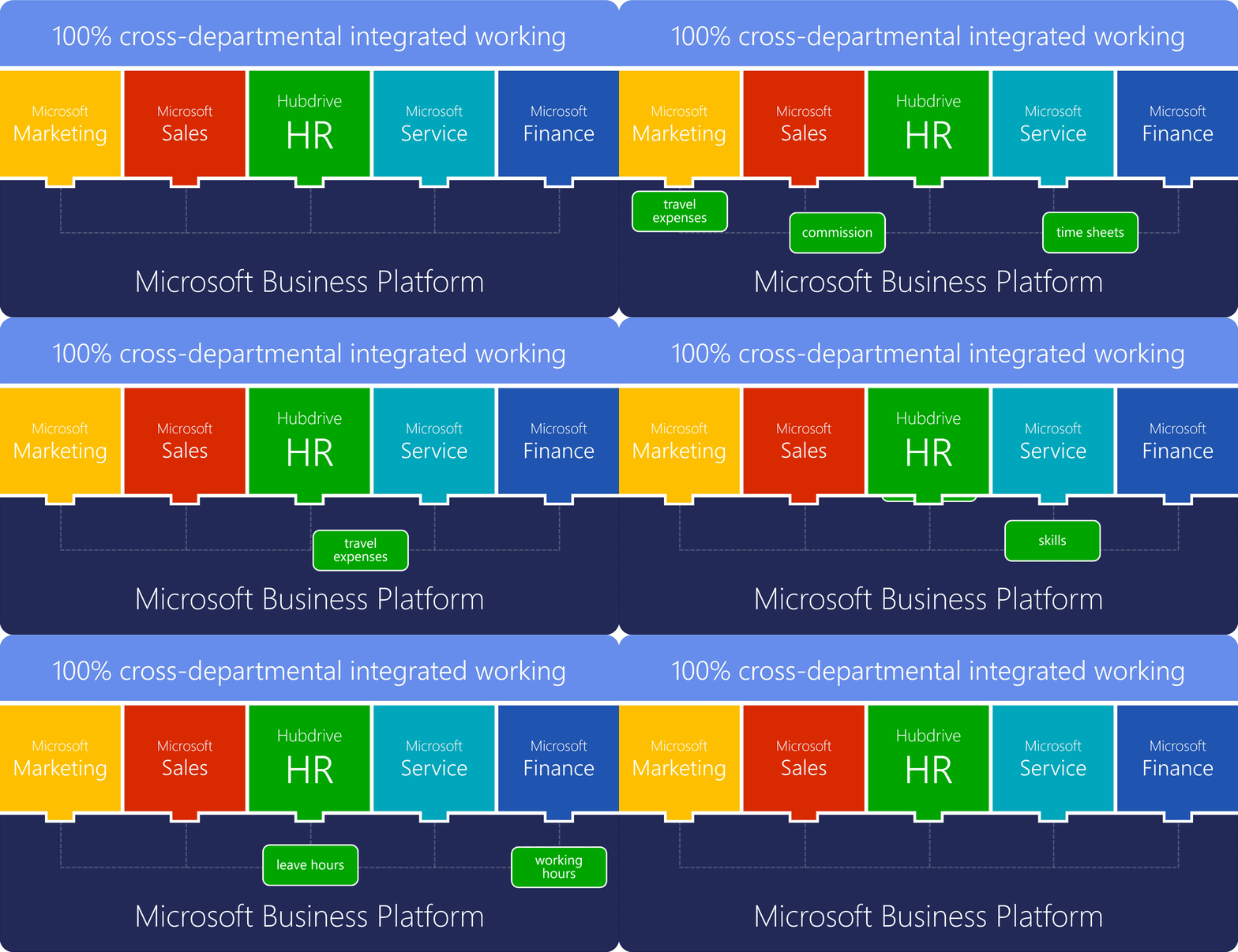
- For Working efficiently requires information to flow across departmental boundaries: travel expenses from Marketing to Finance, timesheets from HR to Finance, commissions from Sales to HR, or skill profiles from HR to Service.
- Hubdrive HR integrates seamless with your Microsoft 365 productivity tools and Microsoft Dynamics business solutions. This allows HR data to be used across departments—without additional interfaces and without time-consuming, high-risk integration projects.
- Information is available right where it’s needed. Processes can be automated company-wide, rather than being limited by departmental and system boundaries.
- For IT departments with a Microsoft strategy, this creates an integrated system landscape with less complexity and lower maintenance costs.
- Traditional HR systems are additional new IT silos. Connecting them to other areas of the company requires integration projects - which entail additional costs, training needs, technical risks, and ongoing maintenance requirements.
4019 | IT | | business-apps
Layer 3 of 10: Automation
Automation with familiar Microsoft tools
- Hubdrive HR is built entirely on the Microsoft Power Platform, enabling IT to rely exclusively on proven Microsoft tools such as Intune, ODT, Power Automate and more for automation.
- The automation tools of traditional HR systems are typically limited to processes within their own HR platform and cannot support organization‑wide workflows.
- With Microsoft automation tools, your IT team already manages the configuration of Windows environments, processes in Microsoft 365, workflows in business applications and, where applicable, operations within Microsoft ERP systems.
- By using Hubdrive, these proven automations can be seamlessly extended to HR processes – enabling a consistent, organization‑wide automation strategy.
- In practice, organizations achieve up to 42% higher levels of automation, resulting in significant efficiency gains, fewer errors, shorter cycle times and more capacity for strategic work in HR and IT.
- IT teams do not need to learn additional proprietary technologies from another HR platform. They can continue using the Microsoft skills and tools they already know and are certified in.
4020 | IT | | automatisierung
Ebene 4 von 10: Customizing
Customizing with the familiar Microsoft Customizing Engine
- Hubdrive HR is built 100% on the Microsoft Power Platform. IT therefore customizes the HR solution with the Microsoft Customizing Engine, Power Apps and Power Automate.
- Forms, fields, list views, workflows and dashboards can be adapted via drag & drop in just a few minutes, with no programming skills required.
- IT staff who know Power Platform customizing, or are certified in it, can customize Hubdrive HR right away. There is no need to build specialist skills for a proprietary HR system.
- Thanks to the layer architecture of the Power Platform, all customizations reside in a separate layer and are preserved through Microsoft and Hubdrive updates.
- Instead of waiting in the vendor’s change request queues for months, IT decides for itself: implement customizations in-house, delegate them to an IT-savvy HR employee, or hand them to a Microsoft partner.
4247 | IT | | customizing

Layer 5 of 10: Extensions
Extensions with Power Apps, Power Pages and Copilot Studio
- No standard software covers every requirement. With Hubdrive HR, IT closes the missing 5–10% itself, using the familiar Microsoft tools Power Apps, Power Pages, Power Automate and Copilot Studio.
- IT can quickly build its own mini apps, for example for e-bike leasing, summer party registrations or AI agents for freelancer HR requests. Both low-code and pro-code are possible.
- All extensions run on the same data foundation in Microsoft Dataverse and use the existing security layer. Additional point solutions, interfaces and duplicate data are no longer needed.
- Extensions built with Microsoft tools are up to 5.5 times faster and cheaper to implement than with traditional HR systems. Those systems rely on proprietary technology that requires costly specialist knowledge.
- IT can build extensions in-house or draw on the global network of certified Microsoft partners. These partners can support immediately, without any Hubdrive-specific training.
4022 | | | customizing-erweiterungen
Ebene 6 von 10: Security
Security through your existing Microsoft security layer
- Hubdrive HR is a certified Managed ISV solution on the Microsoft Power Platform. It relies exclusively on your existing security infrastructure, including Entra ID, MFA and Conditional Access.
- IT manages roles, permissions and security groups centrally with familiar Microsoft mechanisms. Down to field level, only the right people see the right HR data: in the browser, in Teams, in Power BI and in AI queries via Copilot.
- Every customer gets a dedicated environment in their own Microsoft tenant with an exclusive Dataverse database. That includes a free choice of data region, their own encryption keys (BYOK) and no “noisy neighbor” risks.
- Hubdrive HR inherits all security and compliance standards of Microsoft Azure and Dynamics 365. These include AES-256 encryption, role-based access control, audit logs, ISO 27001, SOC 2 and GDPR compliance.
- Traditional HR systems bring a separate security infrastructure with its own user management and compliance audits. With Hubdrive, IT avoids this extra effort and doesn’t have to learn any proprietary security tools.
4246 | IT | | security
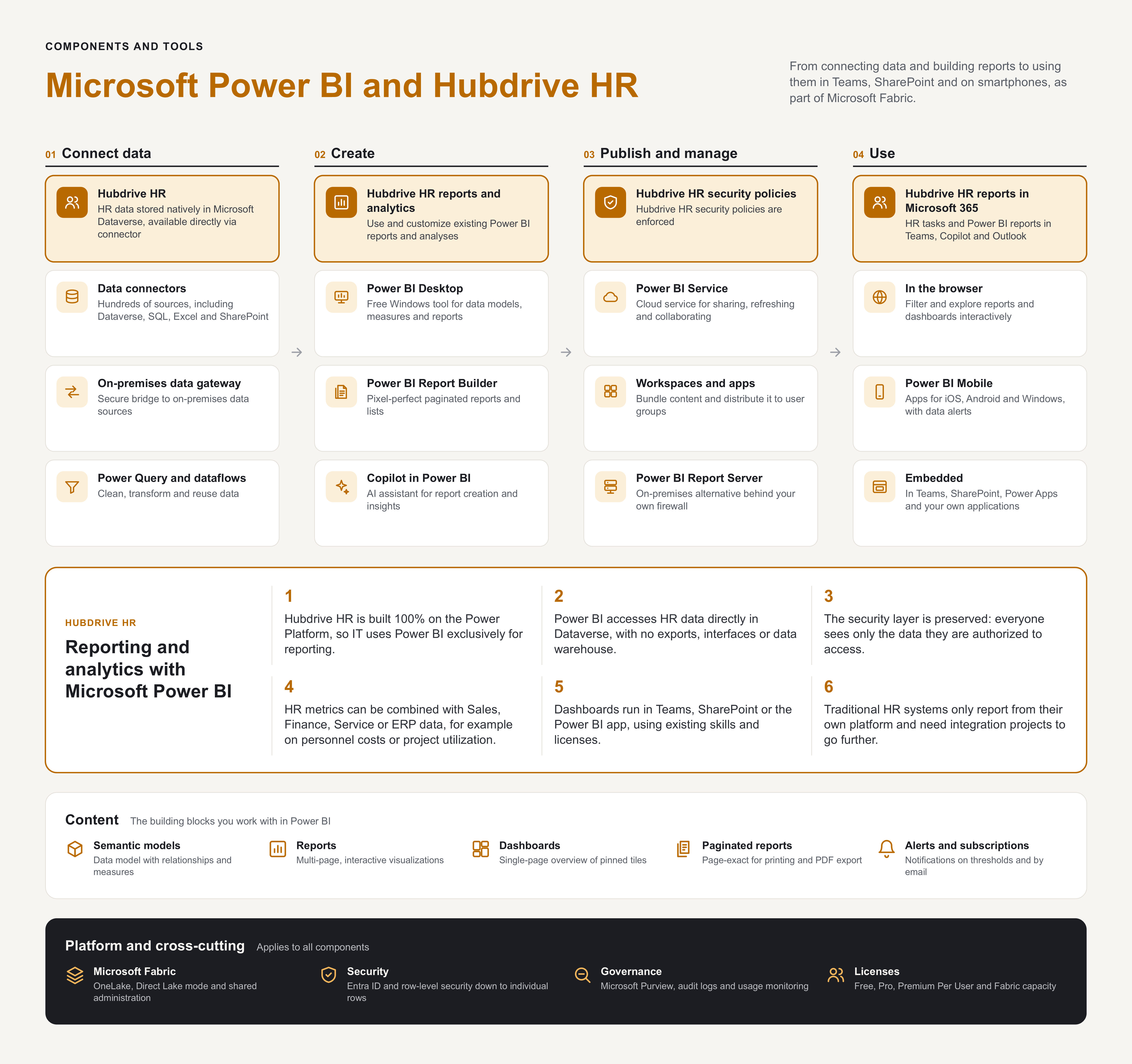
Layer 7of 10: Reporting & Analytics
Reporting and Analytics with Microsoft Power BI
- Hubdrive HR is built 100% on the Microsoft Power Platform, so IT relies exclusively on the proven Microsoft Power BI for reports and dashboards.
- Power BI accesses HR data directly in Microsoft Dataverse or a data lake, using Microsoft Fabric where available. There is no need for time-consuming data exports, interfaces or an additional data warehouse.
- The existing security layer is fully respected, so managers and HR only see the data in reports that they are authorized to access.
- HR metrics can be combined company-wide with data from Sales, Finance, Service or the Microsoft ERP system. This enables cross-departmental analyses, for example on personnel costs, project utilization or revenue per employee.
- Dashboards are available directly in familiar Microsoft apps such as Teams, SharePoint or the Power BI app. IT doesn’t have to learn any proprietary reporting tools and can simply keep using existing Power BI skills and licenses.
- The reporting tools of traditional HR systems are generally limited to their own HR platform and require additional integration projects for company-wide analyses.
4245 | | |

Layer 8 of 10: Microsoft ERP-Systems
Hubdrive HR merges seamlessly with Microsoft ERP systems
- Hubdrive HR extends Microsoft ERP systems such as Business Central and Finance and Supply Chain Management with professional HR management – from recruiting and employee administration or workforce management to talent management and HR self services.
- Hubdrive is built on the Microsoft Power Platform and integrates fully with Microsoft ERP systems across all layers.
- Users remain in their familiar environment. IT continues to use familiar Microsoft tools for administration, automation, customization and extensions.
- Leverage the full capabilities of your Microsoft Dynamics 365 platform for HR as well and stay within the familiar Microsoft ecosystem.
Learn more
3620 | IT | |

Layer 9 of 10: Cloud Backend
Hubdrive HR integrates seamlessly into your existing Microsoft cloud infrastructure
Hubdrive HR is built 100% on the Microsoft Power Platform. For IT departments, this delivers deep integration with the Microsoft ecosystem and a secure, standardized, and maintainable HR architecture—combined with a high degree of flexibility and global support.
- Your existing Microsoft cloud infrastructure forms the foundation, with Azure Active Directory and Entra ID providing single sign-on.
- Application Lifecycle Management and Identity Lifecycle Management make operating, maintaining, and updating the HR solution significantly easier.
- Cloud-based deployment and automated updates are managed through the Microsoft Admin Center.
- The Power Platform sits on top of this foundation as the central development and automation layer, which also includes Copilot Studio and Dataverse.
- The next layer contains the Microsoft Dynamics 365 business apps and Hubdrive HR as a native solution.
- Your individual customizations and extensions reside in a separate layer above, ensuring that your customizations are never overwritten during updates.
- At the top are Microsoft 365 apps such as Teams, Outlook, SharePoint, and OneDrive, where Microsoft directly embeds and delivers Hubdrive functionality.
4021 | IT | | infrastruktur-integration
Layer 10 of 10: Microsoft Licenses
Deeper utilization of existing Microsoft licenses
Organizations that adopt Hubdrive make more effective use of their existing Microsoft licenses and infrastructure. Hubdrive acts as the activation layer for this existing investment stack.
| License type | Already available | Activated with Hubdrive |
|---|---|---|
| Microsoft 365 / Office 365 | In most cases | Teams, Outlook, Word, Excel for ad hoc reporting |
| Power Automate | Often available | Workflow automation for all employees |
| Power Apps (per user/app) | Partially available | Self service portals and manager applications |
| Dynamics 365 / BC / F&O | Available for target organizations | Full integration with existing ERP and CRM |
| Microsoft Copilot | Increasingly available | AI‑supported HR processes with no additional effort |
4070 | | | lizenzen
Hubdrive and Microsoft provide strong investment security.
Charles Lamanna, Corporate Vice President at Microsoft: “The Power Platform is the future of Microsoft business solutions and AI (artificial intelligence).”
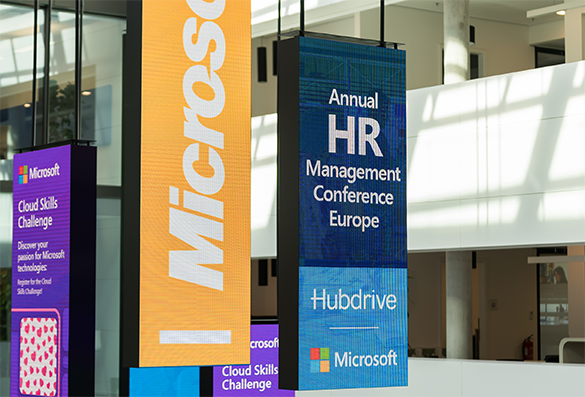
Microsoft Power Platform is the strategic future of Microsoft
Charles Lamanna, Corporate Vice President for Business Applications at Microsoft, shared a rare and exclusive look into Microsoft’s strategic roadmap at the Annual HR Management Conference.- His clear message to customers and partners: “Build your own solutions on the Microsoft Power Platform!”
- Reason: The Power Platform is Microsoft’s platform of the future. Business solutions like Hubdrive HR or the Microsoft Dynamics Business Solutions that run on it give customers maximum investment security, strong innovation, the lowest TCO and high flexibility.
- In short: As the only complete HR solution on the forward‑looking Microsoft Power Platform, Hubdrive HR is the most future‑proof investment for customers with a Microsoft strategy.
3640 | IT | 01 - Top 3 | it-microsoft-strategie
Strategic use of emerging AI potential
- With Hubdrive HR, your organization can leverage Microsoft AI capabilities for HR as well. You can get started immediately. Activation and configuration of Microsoft Copilot take only a few hours.
- Security is ensured by the Microsoft platform. AI can immediately use authorized data to deliver intelligent responses and enable powerful automations.
- Through an existing Microsoft standard interface, additional AI solutions can also be integrated within a few hours while maintaining security.
- By choosing Hubdrive, the long‑term strategic use of both current and future AI potential is ensured. This is essential to guide your organization successfully through the increasingly dynamic environment ahead.
3743 | CEO | 01 - Top 3 | ceo-ki-potential
Implementing Hubdrive HR is faster and more cost-effective
Hubdrive requires only minor enhancements to your existing infrastructure
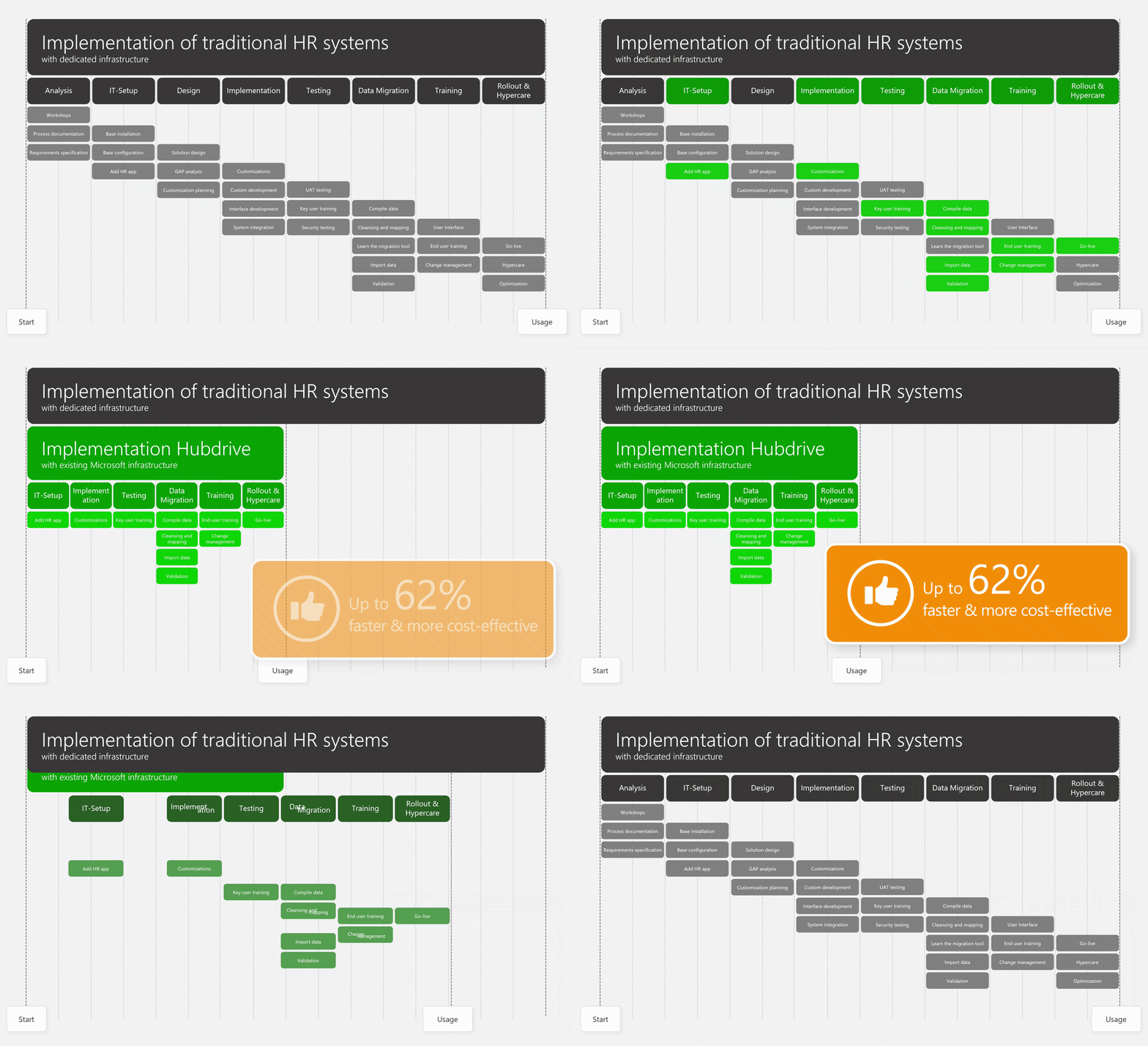
The implementation of Hubdrive HR is 62% faster
The implementation of Hubdrive HR is up to 62% faster and much easier than with classic HR systems – mainly for two reasons.
- Reason for IT: Hubdrive HR runs fully on the Microsoft Power Platform, needs only small extensions to your existing infrastructure and uses the Microsoft 365 apps already in place like Teams, Outlook, OneDrive and Copilot with no extra installation or rollout effort.
- Reason for HR: Hubdrive skips initial process analyses on purpose. Key users learn the Hubdrive HR standard at the very start of the implementation. They define a few precise adjustments and then roll out the solution close to the standard – Excel sheets and former HR silo solutions become unnecessary fast.
3847 | IT | | it-best-practice-implementation

With Hubdrive HR you save up to 72% in project and consulting costs
Hubdrive HR gives your IT department 72% lower project and consulting costs compared to classic HR systems. But how is that possible?
- Hubdrive HR runs 100% on the Microsoft Power Platform, which reduces IT project and consulting costs.
- IT staff do not need additional certifications for deployment and maintenance because they don’t need to learn extra technologies.
- Adjustments are very easy to complete. Extensions can also be built by you as low-code/no-code apps at low cost.
- If you want to use external resources, you can access certified experts from more than 500,000 Microsoft partners worldwide who can support you right away with no Hubdrive HR training.
- This large supply creates competition and fair prices.
3636 | IT | 02 - Weitere |
Low effort for the technical implementation for IT
- Companies with a Microsoft strategy need only small extensions to their existing infrastructure for the technical implementation of Hubdrive HR
- Deployment requires only an import of the Hubdrive HR solution and a simple basic configuration
- Your IT team doesn’t need extra certifications for implementation, adjustments, automations or maintenance because no additional technologies are required
- Your team can start right away with Power Automate to build automations, use the Microsoft Customizing Engine for adjustments or create reports with Power BI
- Classic HR systems outside the Microsoft environment require much more additional infrastructure. Costs, complexity and implementation times increase significantly
3845 | IT | 01 - Top 3 |
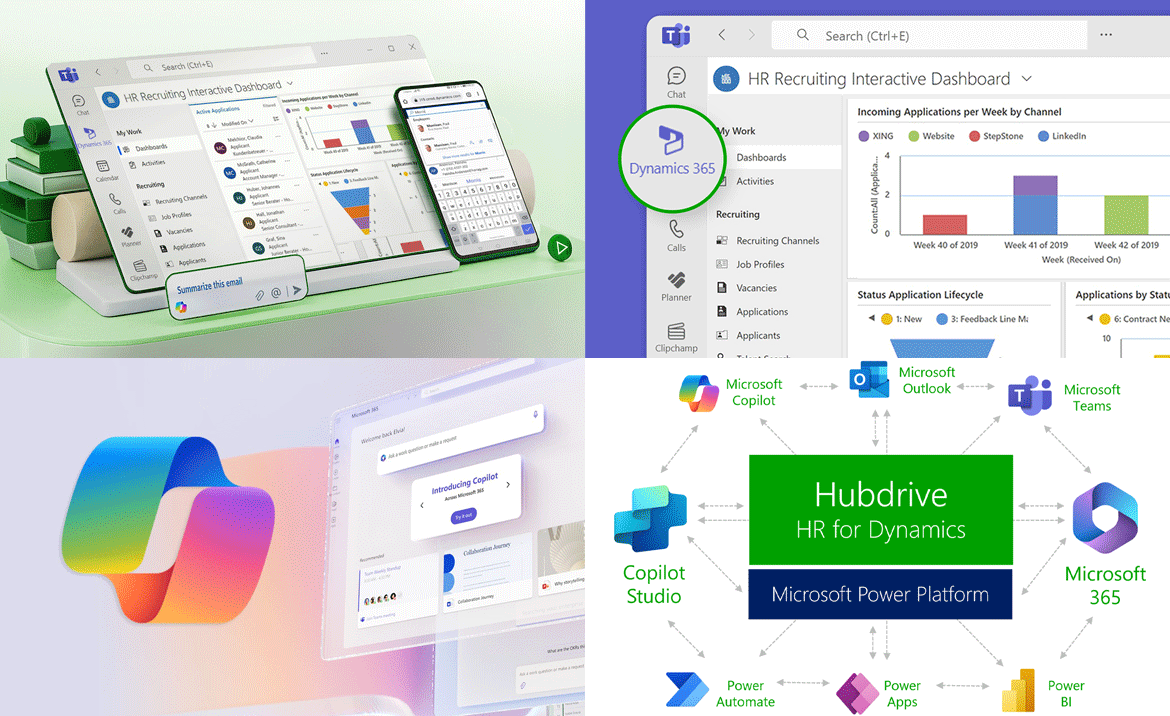
Minimal effort for IT during the rollout
- With Hubdrive HR, employees, managers and HR complete their HR tasks not only in the web browser but also directly in the familiar Microsoft 365 apps Teams, Outlook, Copilot, OneDrive, SharePoint and more. Customers with Microsoft technology already have the needed Microsoft apps installed and configured.
- Hubdrive HR works without the installation and rollout of proprietary third‑party apps. Most companies already have the needed infrastructure like Microsoft 365 and Entra ID.
- The close cooperation between Hubdrive and Microsoft ensures maximum comfort for employees. Training effort is low. Employees feel confident in the familiar Microsoft look and feel.
3846 | IT | 01 - Top 3 |

Flexibility in the Step-by-Step Activation of Modules
The implementation of Hubdrive HR can be handled with a high degree of flexibility thanks to its 16 modules. Organizations can start with any module and digitalize their HR processes step by step. The IT department is not overloaded.
- The entry point is deliberately designed to be low threshold. Organizations can start with exactly the area where the need for action is greatest, for example workflows related to time tracking or employee administration.
- With the first module, the existing Microsoft infrastructure is extended to include any missing components if needed. After that, things move much faster. Additional modules can then be activated within minutes.
- Newly enabled features are immediately available to employees in Outlook, Teams, OneDrive or on their smartphone, and to IT in Power Automate and Power BI.
- The experience gained from implementing the first module can be leveraged for subsequent modules.
- Hubdrive HR can therefore be expanded modularly – for example to include recruiting, digital employee files, talent management or learning management – all the way to a full Human Capital Management solution.
- Customizations and extensions can be made at any time for each module, either by the customer or by their preferred Microsoft partner.
- The technical architecture of the Microsoft platform is designed for scalable and demand‑driven evolution. Organizations can continuously adapt the solution to meet growing business requirements. For example, additional languages can be added or country‑specific adjustments can be implemented for new locations in other countries. The possibilities are extensive.
Investments remain controlled and grow in line with the organization. This allows companies to benefit from the digitalization of their HR processes step by step and to expand their HR solution flexibly – without the need to invest in complex and expensive all‑in‑one packages upfront.
3999 | IT | | it-inseln-flexibel

Experienced Customer Success Manager included in every subscription
- Only Hubdrive HR gives the HR lead and the IT lead a personal contact at the manufacturer – included in the subscription at no extra cost
- Your Customer Success Manager guides the implementation, supports you with best practices and helps you with ongoing optimization
- This reduces project risks and delivers a faster ROI than classic HR systems that only offer reactive support
3635 | IT | 02 - Weitere |

1000 prebuilt interfaces for your third‑party systems
Integrating third‑party systems is often a major challenge for companies – technically complex and financially risky. In the Microsoft ecosystem this effort is much lower. Microsoft provides SMBs with a large library of more than 1,000 proven, prebuilt interfaces to a wide range of third‑party software solutions.
- ERP systems like SAP, DATEV and Abas plus common office, reporting and industry solutions are connected fast and with little effort
- Companies use proven standard interfaces instead of expensive custom integration projects
- The interfaces are tested and used worldwide so technical risks and error sources stay low
- Companies can test the interfaces in advance to gain confidence in function and reliability
- The cost of a standard interface is far lower than maintaining a custom‑built interface
Use these advantages and reduce your standalone IT islands in the company
3686 | IT | 02 - Weitere |
The operation of Hubdrive HR is cheaper and less complex
Hubdrive uses existing Microsoft infrastructure and familiar Microsoft tools for security, administration, reporting, customization, automation and deployment.

Reliable updates with fast access to new features
- With traditional HR systems, every update carries risk: updates can break the customizations you have made. Restoring them requires complex and time‑consuming work from IT.
- Hubdrive HR uses the modern architecture of the Microsoft platform. The core application is clearly separated from your customizations such as fields, workflows and dashboards.
- This means that with Hubdrive HR, updates are no longer a concern. Instead, they continuously deliver new features that help you further improve your HR processes.
3666 | Management | 03- Zusätzliche | mg-updates

You can continue using your existing Microsoft skills and tools
Companies with a Microsoft strategy gain clear advantages with Hubdrive HR over classic HR systems. Hubdrive HR runs 100% on the Microsoft Power Platform. You can continue using your existing Microsoft skills and tools:
- Power Automate for company-wide process automation
- The Microsoft Customizing Engine for drag & drop adjustments
- Power BI for reporting, interactive dashboards and self‑service analytics
- Development of individual business Power Apps
- Workflows, approvals and end‑to‑end automation
- Dataverse as the central data model with tables, relationships and security
- Copilot Studio for chatbots and agents
No new specialist skills for an isolated HR island system based on unknown technology are needed. Your team continues working in the familiar Microsoft environment.
Young IT professionals especially want to work with modern Microsoft technologies and earn certifications instead of investing time in legacy systems.
3632 | IT | 02 - Weitere | it-skills

Automation 42% higher than with classic HR systems
With Hubdrive you reach up to 42% higher automation with less complexity compared to classic HR systems outside the Microsoft ecosystem. How does that work?
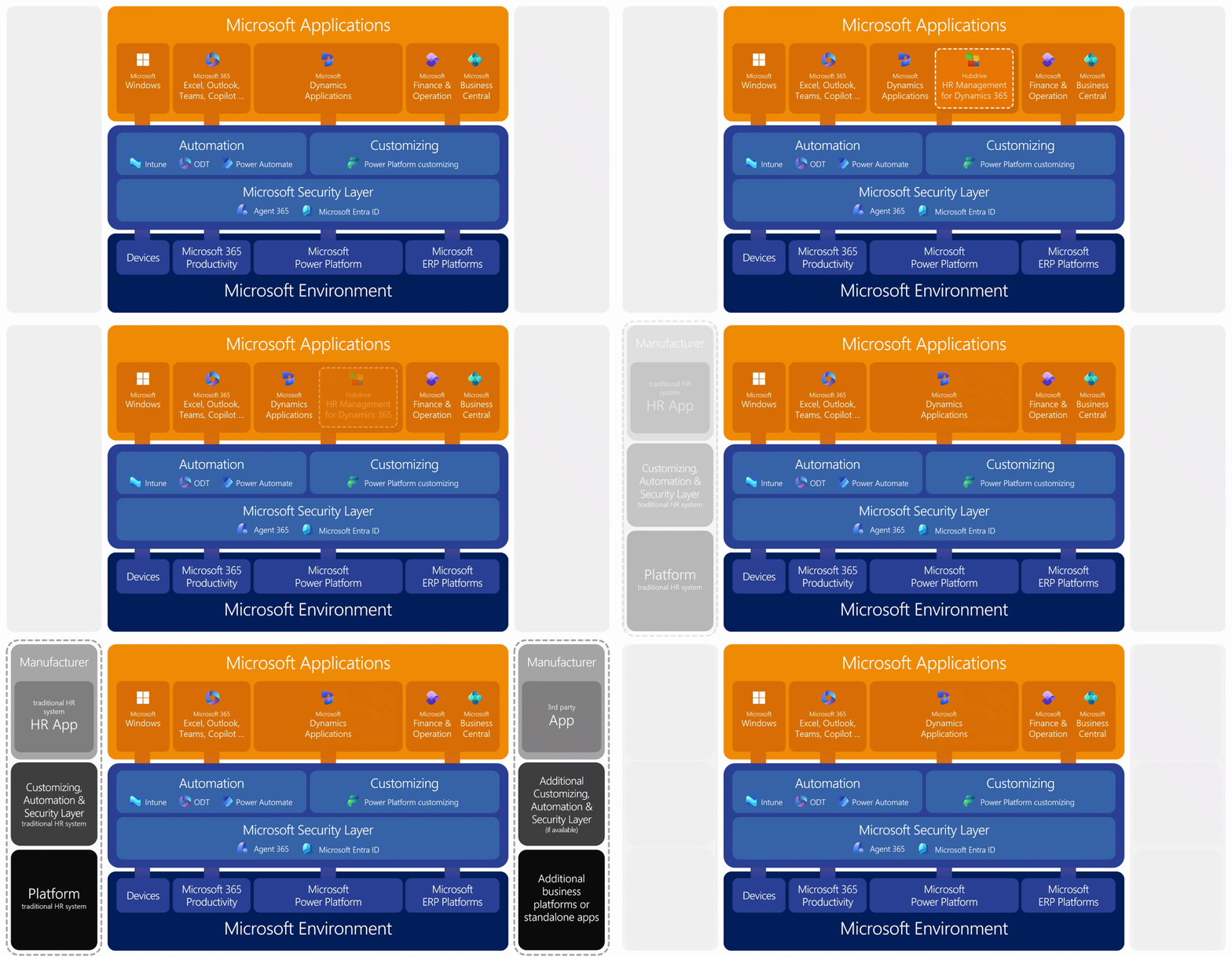
- You already use Microsoft – for example Windows on your devices, Microsoft 365, SharePoint, Teams and maybe the Power Platform or even one of the Microsoft ERP systems.
- You use the familiar Microsoft tools Intune, ODT and Power Automate for automation.
- What changes when you add Hubdrive HR? You add one more business app next to your Microsoft Dynamics apps. Your existing automation tools continue to run without change – no new vendor, no extra training and no extra maintenance for the added automation.
- What changes when you add a classic HR system? You must build a complete extra HR platform and learn, configure and maintain a completely separate automation.
With Hubdrive you keep using your company-wide automation and avoid an extra IT island for automation.
3690 | IT | 02 - Weitere | it-automatisierung

Familiar Microsoft Customizing Engine for the HR solution
- Customizing in Hubdrive HR works the same as in all other Power Platform apps like Sales, Marketing or Service – through the Microsoft Customizing Engine, Power Apps and Power Automate
- IT staff don’t need to learn an extra technology for adjustments. They use all existing Microsoft skills and tools instead of building new specialist knowledge for an isolated HR island system
- Implementation and operation of the HR solution are faster, simpler and more cost effective with Hubdrive from day one
3736 | IT | 02 - Weitere | it-one-customizing

Overview of possible adjustments done by the customer
Business departments, IT or IT‑savvy HR staff can use the Microsoft Power Platform and Hubdrive HR to make the following adjustments on their own.
Adjustment of forms and fields:
Customers can change the layout of forms, for example the arrangement of fields. They can add, remove or modify fields in input forms to align them with business needs.
Change workflows and approval processes:
Teams can adjust and automate recurring processes and approval steps with drag and drop to increase efficiency and transparency.
Adjust lists and data views:
Business departments can configure lists and design views so they show exactly the information that matters to them.
Create departments and organizational structures:
Customers can create departments in the system and map the organizational structure, which simplifies administration.
Create and adjust dashboards:
The HR department can adjust Hubdrive dashboards or create their own dashboards tailored to their specific needs.
3693 | IT | 02 - Weitere |

Customization of forms and fields
One of the most fundamental customization options is modifying forms and fields. Customers can adjust the layout of input forms themselves, for example by changing the arrangement of fields. This helps improve usability and optimize data entry.
Field customization:
Fields in input forms can be added, removed or modified to better align forms with business requirements. This is especially useful when internal processes change or when new information needs to be captured.
Layout customization:
The layout of forms can be adjusted to meet the specific needs of users. This may include arranging fields, grouping information or highlighting important data.3993 | IT | | anpassen-felder-forumlare
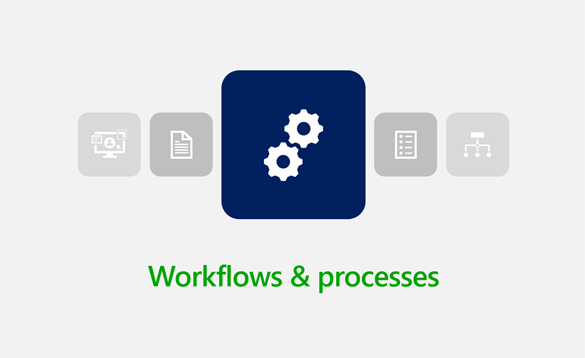
Modification of processes and workflows
Recurring processes and approval workflows can be easily customized and automated. This significantly increases the efficiency and transparency of HR processes.
Automation:
By automating processes, manual tasks can be reduced and errors minimized. This saves time and resources and enables HR teams to focus on strategic activities.
Workflow customization:
Customizing workflows makes it possible to optimize approval processes and ensure that all relevant stakeholders are involved. This increases the transparency and traceability of HR processes.
Drag & Drop:
Using drag and drop makes workflow customization significantly easier. Even employees without programming skills can quickly and easily adapt complex processes.3994 | IT | | anpassen-workflows

Customization of lists and data views
Business departments can configure lists and customize views to display exactly the information relevant to them. This makes it quick and easy to access the data they need.
Filtering:
Filtering data makes it possible to display only relevant information. This simplifies the search for specific records and reduces information overload.
Sorting:
Sorting data allows information to be displayed in a specific order. This can be based on criteria such as date, name or department.3995 | IT | | anpassen-listen

Creation of departments and organizational structures
The foundation is formed by the organizational structures, security groups, roles and permissions that customers have already created in Azure ID and Microsoft 365.
Department creation:
Creating departments makes it possible to group employees according to their organizational units. This simplifies administration and enables department-specific reports and analyses to be created.
Organizational structure:
Mapping the organizational structure within the system makes it possible to represent the relationships between departments and employees. This simplifies the planning and coordination of projects and tasks.3996 | IT | | anpassen-organisationen

Creation and customization of dashboards
The HR department can customize Hubdrive dashboards or create its own dashboards tailored to its specific needs. Using drag and drop, dashboards can be created in a very short time to increase transparency and support better decision-making.
Dashboard customization:
Customizing dashboards makes it possible to display the most important metrics and information at a glance. This simplifies the monitoring of HR processes and enables quick responses to changes.
Custom dashboards:
Creating custom dashboards allows the specific needs and requirements of the HR department to be addressed. This may include, for example, visualizing employee satisfaction, turnover or recruiting success.
Drag & Drop:
Using drag and drop makes creating and customizing dashboards significantly easier. Even employees without programming skills can quickly and easily build complex dashboards.3997 | IT | | anpassen-dashboards

24/7 support, maintenance and investment security in all time zones through the Microsoft Partner Network
- The large partner network makes reliable support, adjustments and maintenance of business solutions built on the Microsoft Power Platform possible in every time zone around the world
- Customers receive ongoing improvements, regular training and fast service, which increases satisfaction and reduces risks during change projects
- Comprehensive service level agreements can be offered.
3691 | IT | 02 - Weitere | it-wartung
Stronger stability for updates through the layer architecture
- Hubdrive HR delivers much stronger update stability through the layer architecture of the Microsoft Power Platform than classic HR systems. Your own adjustments are fully isolated from the Hubdrive HR core (Power Platform standard)
- Adjustments from Microsoft, Hubdrive and your own customizations sit in separate layers that build on each other
- When you delete a field in Hubdrive HR the system only hides it in your layer
- New fields or workflows in your layer have no negative impact on the Hubdrive layer below
- Hubdrive cannot overwrite your adjustments because you manage them one layer above
- Microsoft and Hubdrive updates do not put your customizations at risk while classic systems often require extensive regression tests and adjustments after updates
3633 | IT | 02 - Weitere |
Extensions are made quickly and easily via the familiar Microsoft tools
Enhancements or extensions can be created on the Power Platform by yourself or your local Partner. There is no need to develop specialist expertise in a traditional HR system.

Hubdrive HR extends itself with drag & drop
No standard software covers 100% of individual needs. Companies usually buy expensive add‑on tools (island solutions) to fill the gaps in their standard business software. The result is data islands, many extra vendors and interface headaches.
With Hubdrive, customers build the missing 5–10% on their own – on the same data layer in the platform and with drag & drop. On their own or with a partner if they want.
- Example fleet management: A customer needs a specific feature for e‑bike leasing that Hubdrive does not include in the standard? Just build a small mini app inside the Power Platform
- Example events: A small app for summer party registration? Created with a few clicks
All data lands in the same Dataverse, the shared database of the Power Platform. No interfaces, no duplicate data, full security.
3742 | IT | 02 - Weitere | it-erweitern

Hubdrive lets you adjust and extend the HR solution on your own with low-code/no-code
- Only Hubdrive HR runs 100% on the Microsoft Power Platform. You can adjust forms, workflows, dashboards and automations with drag and drop and low-code/no-code
- IT staff who already work with customizing on the Microsoft Power Platform or who are certified can also adjust Hubdrive HR
- Details of the Hubdrive solution such as the data model, HR processes and security are available in the free e‑learning documentation from the manufacturer
- The layer architecture ensures that your own adjustments and extensions are safe during updates. This eliminates classic change request queues. Dynamics partners can help right away if needed
- Effort, risk and complexity for the IT department and the operation of the HR solution drop significantly compared to classic HR systems
3637 | IT | 02 - Weitere |
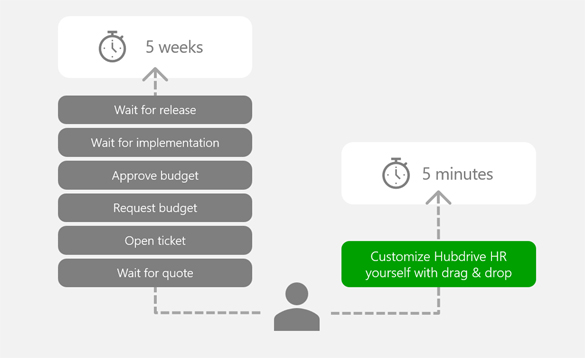
The end of “change request” queues
- You know the pain as an IT leader. A process changes – for example a new field for “home office equipment” must be added to the onboarding form. With classic competitors of Hubdrive a bureaucratic nightmare begins: create a ticket, wait for a quote from the vendor, approve the budget, then wait months for the next release.
- With Hubdrive you change the field yourself in 5 minutes. The low‑code technology behind it (Microsoft Power Apps) lets you adjust elements with drag & drop.
- You decide who does the customizing: your IT team, an external partner or an IT‑savvy HR employee.
- In every case it’s faster, safer and easier. The layer architecture keeps your adjustments safe during updates.
3696 | IT | 02 - Weitere | it-ende-warteschlangen

Hubdrive HR is easier to scale internationally than classic HR systems
- Hubdrive HR Management runs on the Microsoft Power Platform, so Microsoft Dynamics partners can implement and adjust it with ease. Partners use their existing Microsoft expertise with no special technology training, which enables low‑cost and fast go‑lives
- The global Microsoft Dynamics Partner Network with more than 17 million employees offers strong availability of skilled professionals in every country and every industry
- These experts know Power Apps, Power Automate, low‑code, Dataverse and Copilot Studio. They handle local HR requirements and legal rules with confidence. Classic HR systems need expensive specialist knowledge, but everything stays within the familiar Microsoft environment with Hubdrive HR
3689 | IT | 02 - Weitere |

Independence from external service providers
Most HR systems create heavy dependence on the vendor or its implementation partners for adjustments. Even tiny changes require an expensive external developer. This drives up the total cost of ownership over time.
- Hubdrive democratizes adjustments. The solution is based on the Microsoft Power Platform standard, so customers can make and manage changes themselves in an update-safe way. Helpful tips and checklists are available in the free Hubdrive Learning Center
- Use internal resources. Many IT departments already have experience with the Microsoft Power Platform. You don’t need costly specialists for proprietary niche languages
- Protect your budgets. Money previously spent on customization consulting can now go into strategic HR initiatives like employer branding
3687 | IT | 02 - Weitere |
With Hubdrive, customers can harness the potential of AI faster and more securely
Hubdrive leverages your existing Microsoft security framework - including Azure ID and lifecycle management. Third-party AI is integrated via an interface that prevents bypassing the Microsoft security layer.
Using AI faster and more securely
With Hubdrive HR, AI is faster and more secure out of the box (Copilot, AI Builder) compared to classic HR systems.
- Microsoft Copilot and AI Builder are native parts of the Microsoft Power Platform.
- You can build chatbots, automatic document processing and prediction models right away with no extra complexity, infrastructure or new security concepts.
- The security layer of the Power Platform is always in place.
- Classic HR systems offer only proprietary AI snippets or external AI integrations with clear drawbacks.
3627 | IT | 03- Zusätzliche |

Evaluating AI safely with Hubdrive HR
- Employees in all departments enjoy experimenting with AI – they test different tools, create summaries or explore automations. The problem: HR systems contain extremely sensitive data. Generative AI also uses this data without you noticing. That leads to major data protection violations.
- Hubdrive HR works differently. Every AI request – whether through the browser, Teams, SharePoint, Claude or ChatGPT – must always pass through the security layer of the Microsoft Power Platform first. Only data that the experimenting employee is allowed to access is passed through.
- The result: Your employees explore AI features with ease and test automations without data protection risks. In classic HR systems, evaluating AI options is a data protection adventure. With Hubdrive HR it’s safe innovation: only the right people see the right data.
3729 | IT | 02 - Weitere |
Hubdrive HR is significantly easier to secure
Hubdrive simplifies governance and security by leveraging your existing Microsoft infrastructure and provides global support through the international Microsoft partner network.

A company-wide security layer
- Hubdrive HR is a managed ISV solution on the Microsoft Power Platform. It uses only the security layer you already have – Entra ID
- Permission control, data storage and compliance run only through these known Microsoft mechanisms in your cloud environment with no noisy neighbor risks
- Hubdrive HR creates a secure, standardized and easy-to-maintain HR architecture for IT departments through its deep integration in the Microsoft ecosystem
- Your team doesn’t need extra certifications for deployment and maintenance because no additional technologies are required
- Classic HR systems deliver separate security infrastructure. Hubdrive helps you avoid this extra effort
3738 | IT | 02 - Weitere | it-one-security
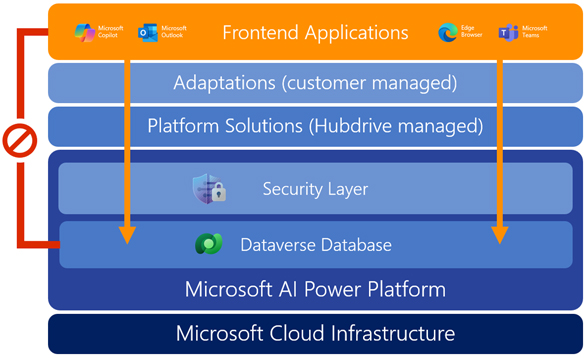
Hubdrive HR delivers more security & compliance by design (ISO 27001, GDPR, SOC 2)
- Hubdrive HR inherits all Microsoft Azure and Dynamics 365 security standards: AES‑256 encryption, role-based access controls (RBAC), audit logs and data residency options
- You stay in control of Entra ID, MFA and Conditional Access. Classic HR systems require separate compliance audits
3628 | IT | 03- Zusätzliche |

Every Hubdrive customer gets maximum data sovereignty in a dedicated environment
- Every Hubdrive customer receives a dedicated cloud environment in their own Microsoft tenant with an exclusive SQL database in Dataverse – physically and logically separated from other customers
- Unlike most SaaS providers that store data from many customers on a shared server (row‑level security), Hubdrive HR gives you full data control and lets you choose the region where your data is stored, for example EU‑West for GDPR‑compliant storage
- The advantages are clear: full isolation, your own encryption keys (BYOK), independent backups, Entra ID security without noisy neighbor risks or provider access to other customers’ data
3629 | IT | 03- Zusätzliche |
The overall cost of Hubdrive HR for IT is significantly lower
For IT-Departments with Microsoft Strategy Hubdrive results in up to 56% lower costs compared to traditional HR systems.
The 8 key cost savings of Hubdrive HR for IT compared to traditional HR systems
By leveraging the existing Microsoft platform, Hubdrive HR is significantly more cost-effective for IT compared to traditional HR systems.
- 62% faster implementation thanks to the use of the existing Microsoft platform and a best practice implementation approach.
- 78% fewer IT silos, resulting in lower integration, maintenance and hosting costs.
- 72% lower project and consulting costs during implementation through drag-and-drop customization, extensions and automations on the familiar Microsoft Business Platform.
- 68% less maintenance effort for the HR solution because Hubdrive is embedded into the existing Microsoft infrastructure and no additional technology silos need to be maintained.
- 64% lower integration costs with ERP, payroll and third-party systems due to the greater availability of proven standard connectors.
- 54% lower support and change costs because the reduced complexity also benefits employees, allowing them to work within familiar Microsoft 365 applications.
3992 | IT | | it-ersparnis
You can continue using your existing Microsoft skills and tools
Companies with a Microsoft strategy gain clear advantages with Hubdrive HR over classic HR systems. Hubdrive HR runs 100% on the Microsoft Power Platform. You can continue using your existing Microsoft skills and tools:
- Power Automate for company-wide process automation
- The Microsoft Customizing Engine for drag & drop adjustments
- Power BI for reporting, interactive dashboards and self‑service analytics
- Development of individual business Power Apps
- Workflows, approvals and end‑to‑end automation
- Dataverse as the central data model with tables, relationships and security
- Copilot Studio for chatbots and agents
No new specialist skills for an isolated HR island system based on unknown technology are needed. Your team continues working in the familiar Microsoft environment.
Young IT professionals especially want to work with modern Microsoft technologies and earn certifications instead of investing time in legacy systems.
3632 | IT | 02 - Weitere | it-skills
Contact

Schedule a personal meeting
Interested in learning how your HR department can benefit from Microsoft & Hubdrive HR? Book a personal consultation with us to explore your options.
3655 | Kunde | |