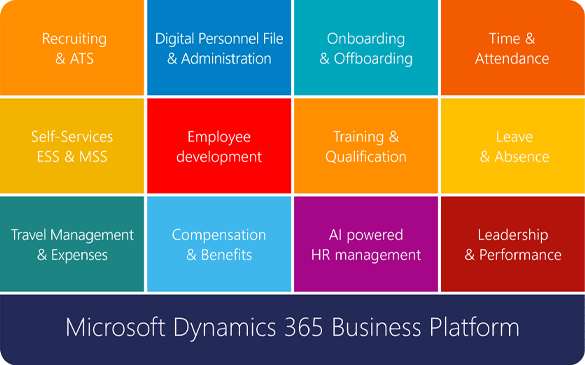
Slide left Slide right


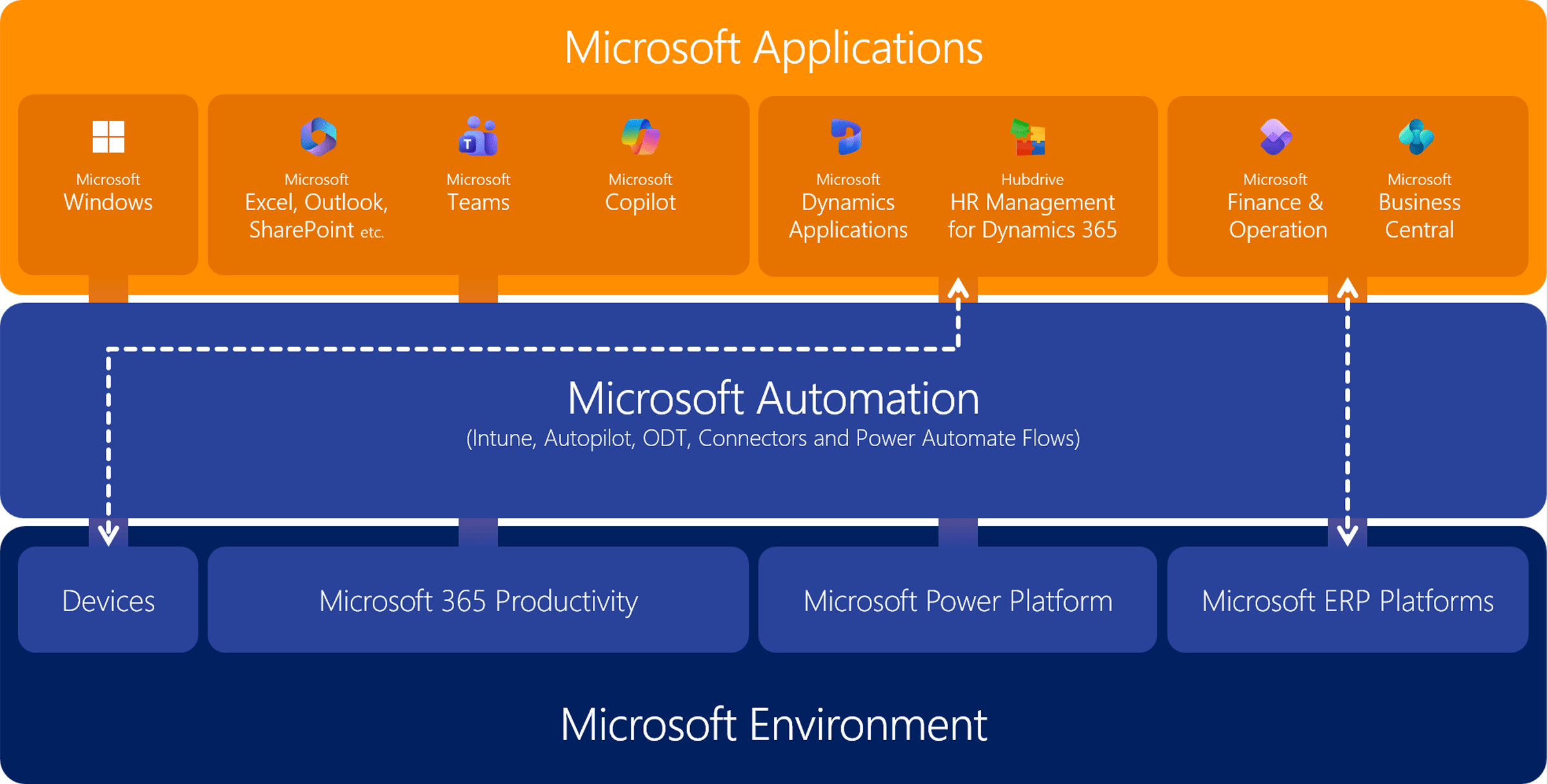
Hubdrive positioning as a complete HR management solution for customers with a Microsoft strategy

  • Hubdrive HR is the complete solution for HR management based on the Microsoft Business Platform. The full employee lifecycle is supported – from recruiting and employee administration to employee development.
  • The modular solution is scalable and can be used either to complement an existing HR system or as a full‑featured Human Capital Management solution.
  • Hubdrive HR stands apart from other HR systems thanks to its deep integration within the Microsoft ecosystem, delivering significant advantages for HR departments as they digitalize their HR processes.
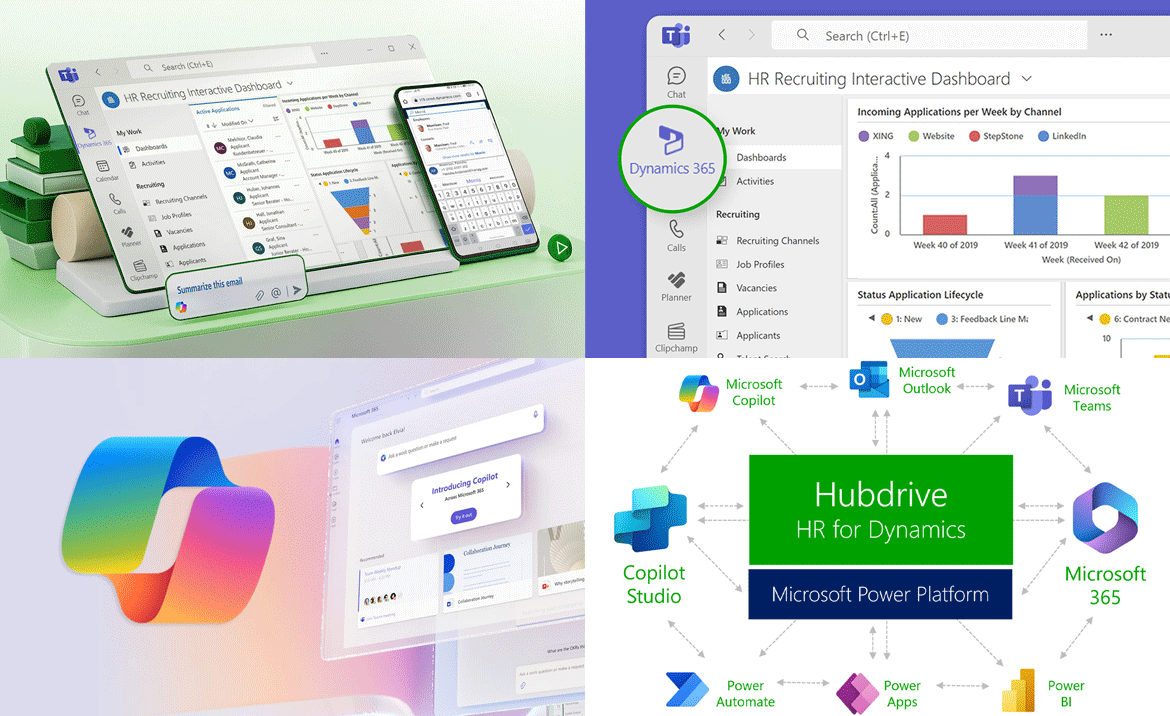
  • Hubdrive HR is the only HR solution on the market where HR teams, managers and employees complete HR tasks not only in the browser but also directly in familiar Microsoft 365 apps like Teams, Outlook, OneDrive, Microsoft Copilot or Microsoft To Do.
  • Hubdrive HR is built on the Microsoft Business Platform. Since most organizations already use Microsoft 365, Teams, Outlook, or SharePoint, no new IT infrastructure or lengthy system‑integration projects are required – resulting in minimal change‑management effort.

3667  |  HR  |  00 - Intro  |  

The search for the right HR software – from administrator to strategist

  • HR departments face enormous pressure today. They must attract talent, drive change, design processes, use AI and reduce their own stress level. At the same time, many teams still work with classic HR systems, Excel lists and solutions that slow them down.
  • Do you want to change this and are now looking for HR software that makes your daily work easier, reduces the workload in your day-to-day tasks and improves collaboration with managers and employees?
  • The choice is huge and many providers promise a lot. The challenge of finding the best HR solution is large. Where exactly are the differences and which HR software is really the best fit for your company?
  • We guide you through the central focus areas and show with real examples how Hubdrive helps you master the challenges.
  • At the end of each focus area you’ll find practical examples from HR that show how Hubdrive HR differs from classic HR systems.
  • We show you the differences – you decide what works best for you.

3873  |  HR  |    |  

Overcome today's challenges with Hubdrive & Microsoft

Mastering current challenges


3874  |    |    |  

Reduce stress levels in the HR department by eliminating major time drains!


  • With Hubdrive and Microsoft, stress in the HR department is significantly reduced.
  • Hubdrive enables company‑wide automation, not just within the HR department. In addition, automations can be adjusted flexibly and independently.
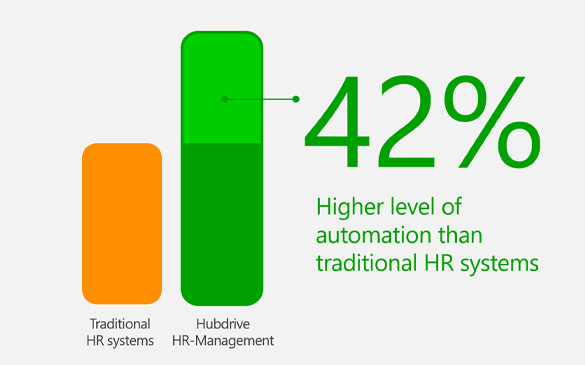
  • Overall, the level of automation increases by approximately 42% compared to traditional HR systems.
  • As a result, you save a substantial amount of time and your processes become more reliable and secure

Learn more
3927  |  HR  |    |  

When change outpaces adaptability master it with a more flexible HR solution in the Microsoft ecosystem!


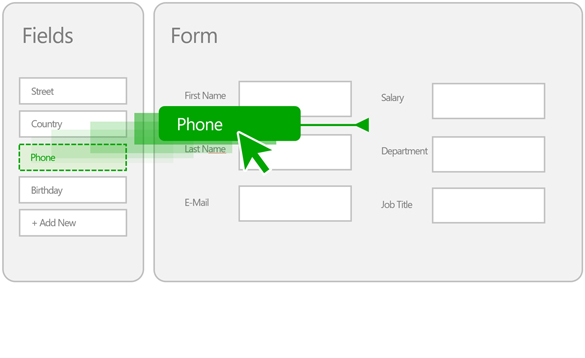
  • With Hubdrive, you can adapt processes, dashboards, views, forms and the organizational structure yourself – quickly and intuitively using drag‑and‑drop.
  • Hubdrive’s high degree of flexibility ensures that your HR department doesn’t just react to change, but actively sets the pace.
  • This allows you to implement regulatory changes, reorganizations or new locations in a very short time – while remaining fully operational at all times.
  • With Hubdrive, HR becomes a true driver of change.

Learn more
3928  |  HR  |    |  

Close ongoing gaps in digital processes simply and once and for all with the Microsoft Business Platform!

  • After digital transformation, you no longer work with disconnected IT islands. Instead, you rely on a shared business platform for your entire organization..
  • Within this platform, all HR data is consolidated – in real time – across the HR department, across all business units and extending to external partners.
  • Take this step together with Hubdrive and Microsoft and future‑proof your HR landscape.
  • Integrated ways of working are engaging for employees. You are perceived as an innovative employer – one your teams are proud of.

Learn more
3929  |  HR  |    |  

Turn inefficient use of AI into real value with integrated AI!

  • With Hubdrive, employees can test AI completely risk‑free. The AI only accesses data that each employee is already authorized to see – no more and no less. This allows you to unlock the full value of AI without putting data protection at risk.
  • With traditional HR systems, complex permission and security concepts often have to be rebuilt manually and at great effort. With Hubdrive, AI leverages the established Microsoft security mechanisms from Windows, Microsoft 365 and the Power Platform – including centralized identity management and consistent role‑ and permission models.
  • In addition, Hubdrive provides proven best‑practice scenarios and preconfigured HR processes, enabling you to use AI features productively in everyday HR work right away – without lengthy project phases or trial‑and‑error experimentation.

Learn more
3930  |  HR  |    |  

When HR falls behind technological possibilities catch up with best‑practice implementation!

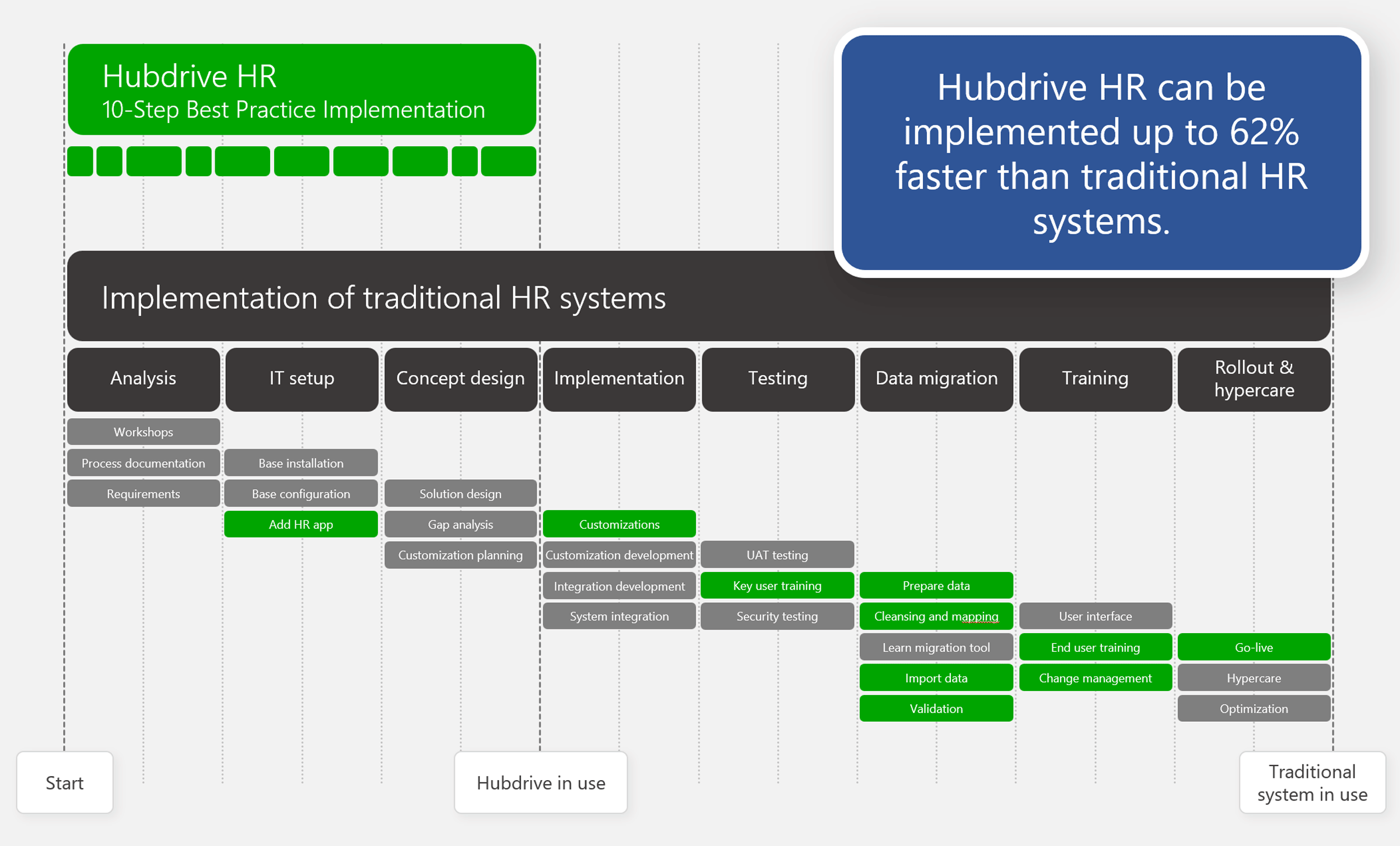
  • Implementing Hubdrive HR is up to 62% faster and simpler than with traditional HR systems, because employees, managers and HR teams handle their tasks directly within familiar Microsoft 365 apps such as Teams, Outlook, OneDrive and Microsoft Copilot – without requiring additional third‑party applications.
  • With Hubdrive, proven Best‑Practice workflows are already built into the solution and HR teams can adapt and configure the system themselves using intuitive drag‑and‑drop tools.
  • Traditional HR systems, by contrast, require separate infrastructure, additional training and often lead to months‑long integration projects.

Learn more
3931  |  HR  |    |  

Attract and retain talent with innovative, familiar software that employees value and trust!

  • Hubdrive may be one of the most innovative HR solutions available today. It is the only solution that allows both managers and employees to complete their HR tasks not just in a browser, but natively within familiar Microsoft 365 apps such as Teams, Outlook, OneDrive, Microsoft Copilot and Microsoft To Do – making a clear contribution to employee satisfaction.
  • Your employees work within a fully integrated Microsoft environment: data is entered once, automations run end‑to‑end and system silos and disconnected solutions are eliminated. This leads to noticeable relief in day‑to‑day work, higher satisfaction, stronger retention and a genuine sense of pride in working for an innovative organization.
  • IT benefits as well: by relying on familiar Microsoft technology instead of additional specialized systems, organizations avoid unnecessary infrastructure and significantly reduce operational overhead.

Learn more
3932  |  HR  |    |  

Address constantly changing requirements with fully integrated skills management!

  • Artificial intelligence, automation and new business models are transforming roles faster than traditional training programs can keep up.
  • Hubdrive supports HR in managing this dynamic by embedding skills management directly into the Microsoft ecosystem and structuring it across the entire employee lifecycle.
  • The solution combines deep Microsoft integration, a complete skills lifecycle, proven HR best practices and a clear connection between strategy and day‑to‑day HR operations.
  • Skill gaps become visible and can be systematically closed through training and development.

Learn more
3933  |    |    |  

Significantly reduce stress levels in the HR department
by eliminating major time drains!

Hubdrive and Microsoft simplify automation and reduce stress in HR

  • Automation significantly reduces stress in HR. When routine tasks are fully automated – across HR, business units and employees – your team no longer has to manage manual workflows and gains valuable time to focus on higher‑value work.
  • Most HR systems today offer automation but only within the HR solution itself. Hubdrive HR goes a step further. 
  • With Hubdrive, HR teams can create and adjust automations themselves using familiar Microsoft drag-&-drop interfaces. Existing workflows can be modified in minutes – far faster and more flexibly than with traditional HR systems.
  • Prefer not to manage automations within HR? Hubdrive offers another clear advantage: internal IT teams can use the Microsoft automation tools they already know. Unlike traditional HR systems, no new or proprietary automation tools are required.
  • When your organization changes, Hubdrive HR adapts just as quickly. Processes are updated within minutes – ensuring change never outpaces adaptability.


3741  |  HR  |  02 - Weitere  |   hr-befreiung

Hubdrive and Microsoft make company‑wide automation easier – unlocking even greater time savings.

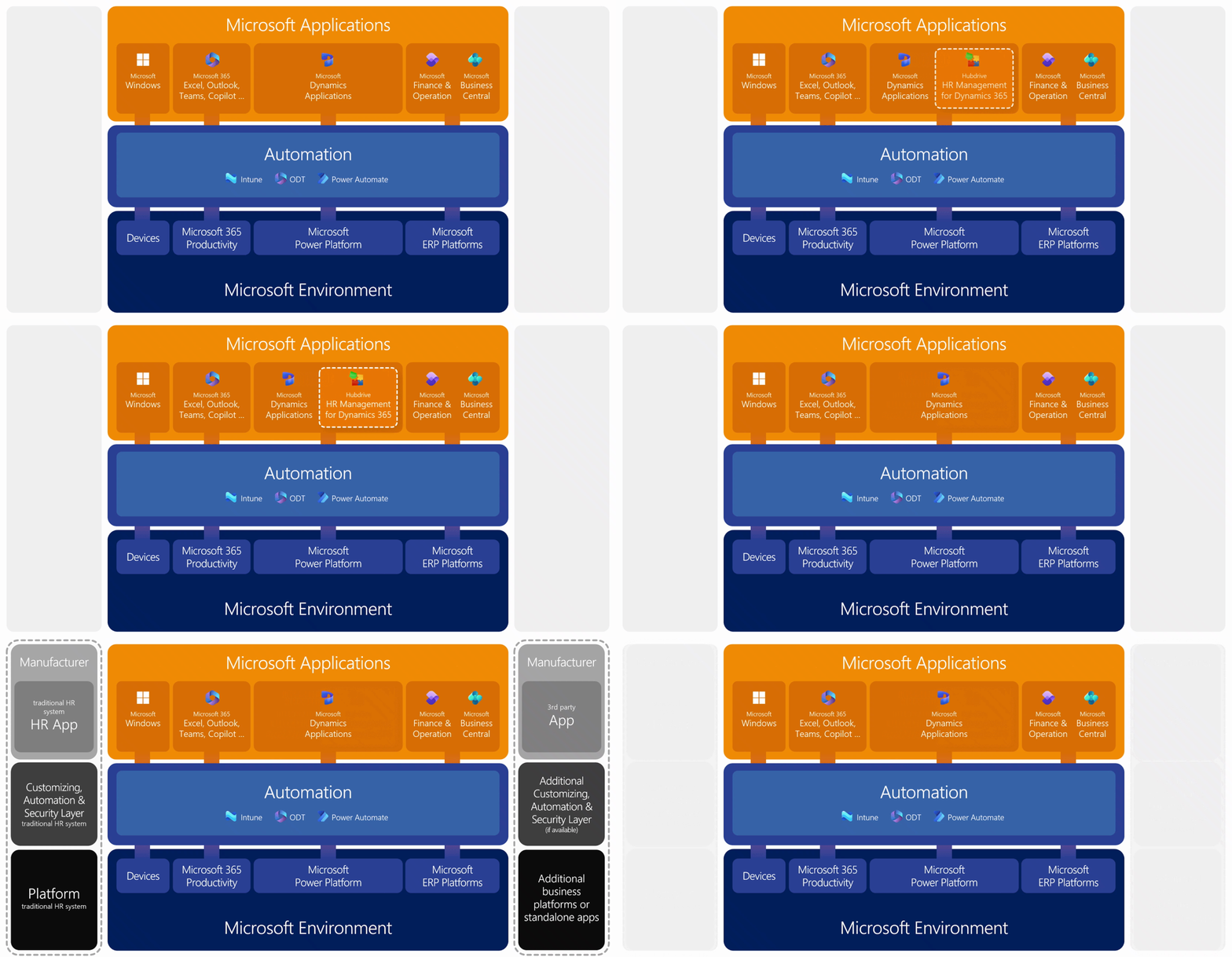
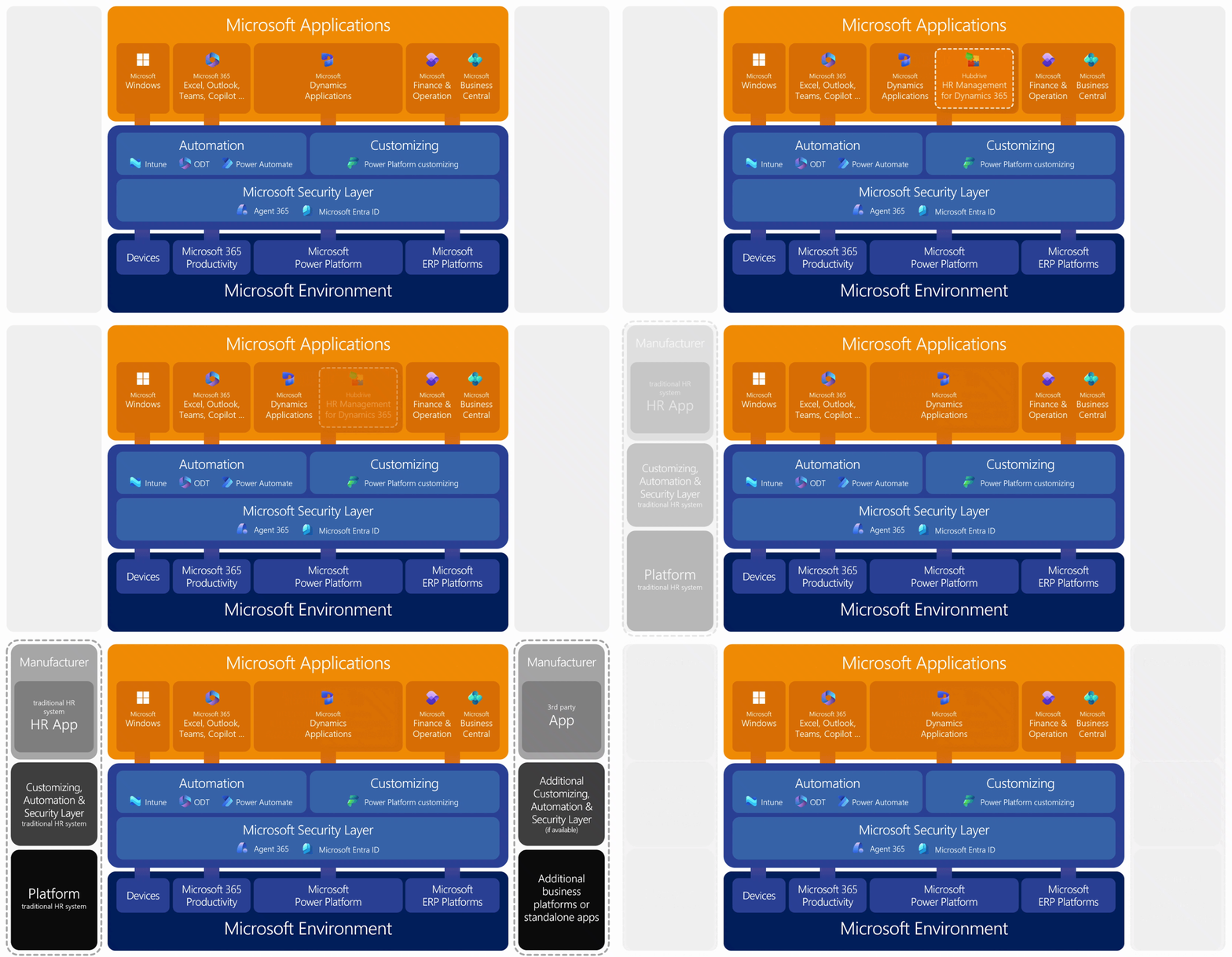
  • The greatest potential lies in automation that goes beyond internal HR processes and extends to collaboration with business units and employees. With traditional HR solutions, HR teams typically use the vendor‑provided HR automation tools, while IT continues to rely on familiar Microsoft automation tools. This results in two separate automation environments moving forward. In the animation, this can be seen on the left under “Vendor layer.”
  • With Hubdrive HR, the situation is fundamentally different: all workflows are consistently orchestrated using established Microsoft automation tools. This means you can continue using your existing, company‑wide Microsoft automations – now extended to all HR processes.
  • Existing automations for Windows operating systems, Microsoft 365, Microsoft‑based ERP solutions and custom applications built on the Microsoft Business Platform can be seamlessly integrated and selectively expanded.
  • If, instead, you choose a traditional, non‑Microsoft‑based HR system, these integrated capabilities are either not available at all or only to a very limited extent – and usually require significant additional effort.

3876  |  HR  |  02 - Weitere  |  

Examples of end‑to‑end automation with Hubdrive & Microsoft

In the Microsoft world, all components connect with each other – including automation. Here are a few daily examples that aren’t possible with traditional HR systems.


  • When an employee’s personnel record indicates they will be working in Sales, their entire onboarding process is created automatically. All training sessions for the first weeks at the company are scheduled and appear directly in the employee’s Outlook calendar.
  • During recruiting, shared appointments between the candidate, HR and the hiring department are automatically scheduled in Outlook – including room bookings and offer status. Requests related to the hiring process appear natively in Microsoft Teams, where HR and department managers can conveniently exchange key information directly in the chat.
  • As part of onboarding, the new employee receives their equipment, including a notebook. Automation detects a visual impairment stored in the personnel record and automatically adjusts the Windows display contrast on the device.
  • During device setup, the new employee’s location is identified, the correct printer drivers are installed automatically and the device is assigned to the appropriate floor and location within the building.
  • Changes such as department transfers or new job titles are fully synchronized between employee management in your Microsoft directory (Entra ID) and the Hubdrive personnel record – automatically and in real time.

These automations extend the many existing workflows already in place across ERP systems, Microsoft 365 and Office 365 applications and apps built on the Microsoft Business Platform.

Choosing a traditional, non‑Microsoft‑based HR system means these options are simply not available. With Hubdrive HR in the Microsoft ecosystem, you unlock powerful automation capabilities – delivering significantly greater efficiency with far less effort.


3698  |  IT  |  02 - Weitere  |  

Unlock the benefits of digitalization faster with ready‑to‑use best practices

Hubdrive HR delivers immediate value to businesses because proven, field-tested HR best practices with extensive automation are already included in the solution.

  • Companies do not need to design HR processes from scratch. All standardized workflows are available out of the box as practical templates and can be adopted as‑is if desired.
  • Each process comes with a clearly documented, step‑by‑step approach that makes it easy for employees to get started. Where helpful, linked e‑learning materials support onboarding and adoption.
  • If specific requirements exist, the best‑practice workflows and automations can be independently adapted to match individual ways of working.
  • Hubdrive best practices are continuously refined based on feedback from hundreds of customers – providing clear guidance, improving efficiency and increasing operational confidence.

3740  |  HR  |  02 - Weitere  |   hr-best-pratices

With Hubdrive, overall automation is 42% higher than with traditional HR systems

With Hubdrive HR in the Microsoft ecosystem, you unlock convenient, consistently high‑level automation – both within the HR department and beyond.

  • Within HR, all routine tasks can be automated using familiar Microsoft tools via drag‑and‑drop. This speed and flexibility allow your team to gain valuable time, reduce stress and adapt HR processes to changing requirements within minutes.
  • Across the organization, Hubdrive enables automation not only in HR but across all relevant business processes. Thanks to the seamless integration of company‑wide Microsoft automation tools, processes are automated end to end – without creating isolated automation silos through additional HR systems – resulting in even greater time savings across the business.

As a result, the overall level of automation with Hubdrive is 42% higher than with traditional HR systems. You achieve a greater degree of automation with significantly less complexity compared to conventional solutions outside the Microsoft ecosystem.

With Hubdrive HR, you save valuable time through a higher level of automation. This is our contribution to reducing stress in your HR department.


3877  |  HR  |    |   hr-auto-kpi

When change outpaces adaptability
master it with a more flexible HR solution in the Microsoft ecosystem!

The ease of customization with Hubdrive puts HR back in the driver's seat

  • Organizations are changing faster than ever. Changes in structures, roles, locations and legal requirements are now part of everyday business.
  • In traditional HR systems, processes are rigidly configured. Any organizational or regulatory change results in time‑consuming adjustment projects that require support from developers or even external service providers.
  • Hubdrive HR works differently. With Hubdrive, HR teams or IT staff can adjust processes, dashboards, views, forms and the organizational structure themselves in minutes using drag & drop. This frees HR from IT dependencies, change request backlogs and reliance on external providers.
  • With Hubdrive, HR becomes a true driver of change. Necessary changes are implemented and adopted across the organization much faster than traditional HR solutions.
  • As a result, Hubdrive gives you valuable time for effective change management – allowing you to better support your employees more effectively through ongoing transformation.

3871  |  HR  |    |  

The end of “change request” backlogs

  • HR leaders and IT leaders know the pain: a process changes – for example, a new field for “home‑office equipment” needs to be added to the onboarding form.
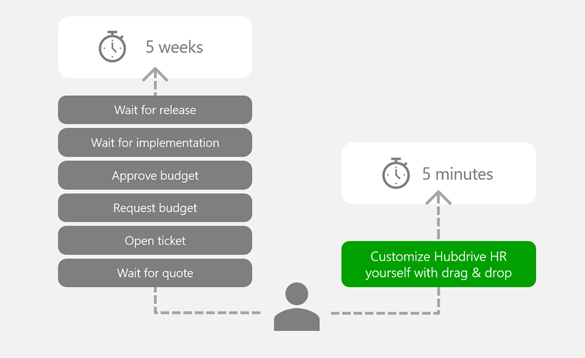
  • With traditional HR systems and competitors, this often triggers a bureaucratic nightmare: opening a ticket, waiting for a quote from the vendor, approving the budget and then waiting weeks for the change to be delivered in the next release.
  • With Hubdrive, you add the field yourself in just five minutes. Built on the innovative Microsoft Business Platform, Hubdrive enables customers to make adjustments easily on their own using intuitive drag‑and‑drop tools.
  • No coding is required. What once demanded programming skills is now as simple as creating a PowerPoint slide. Details for IT
  • The value: your HR software adapts to your speed – not the other way around. You can respond to market changes in real time.

3697  |  HR  |  02 - Weitere  |   hr-ende-warteschlangen

Five concrete examples of how Hubdrive helps you implement change faster and more independently

  • Adding a new approval level to the leave process
    Executive management wants certain roles to have vacation requests approved not only by the direct manager but also by the department head. With Hubdrive, an HR team member can extend the existing workflow by an additional approval step using drag‑and‑drop – no development project, no waiting for internal IT and no external service providers required.
  • Introducing a new location structure 
    Your company opens a new location and reorganizes teams. In Hubdrive HR, you can update the organizational structure directly in the interface: create new locations and departments, assign employees via drag‑and‑drop and update reporting lines. Changes are immediately reflected in all relevant processes and reports.
  • Adapting a form to new legal requirements
    A new regulation requires additional fields in the onboarding form, such as consent or specific declarations. An HR team member adds new fields, adjusts required inputs and includes tooltips. Everything happens in the familiar Microsoft interface, without code and in less than one hour. Updates are instantly available in self-services and workflows.
  • Creating a new management dashboard
    Executive leadership wants existing dashboards for turnover, open positions and sick leave extended to include insights for a new branch location. In Hubdrive HR, your HR or IT team updates dashboards independently, adjusts tiles and charts via drag‑and‑drop and makes them available to a specific management group – without a separate BI project or external support.
  • Pilot project for AI-powered talent development
    HR wants to test AI-based development recommendations for a specific group, such as high potentials. In Hubdrive HR, a dedicated view is created for this group. Skill and career path fields are adjusted and an AI-based recommendation element is added to the form. HR and IT refine the setup iteratively without changing the core system.

3872  |    |    |  

Ongoing gaps in digital processes
close them easily and once and for all with the Microsoft Business Platform!

The old world of IT islands

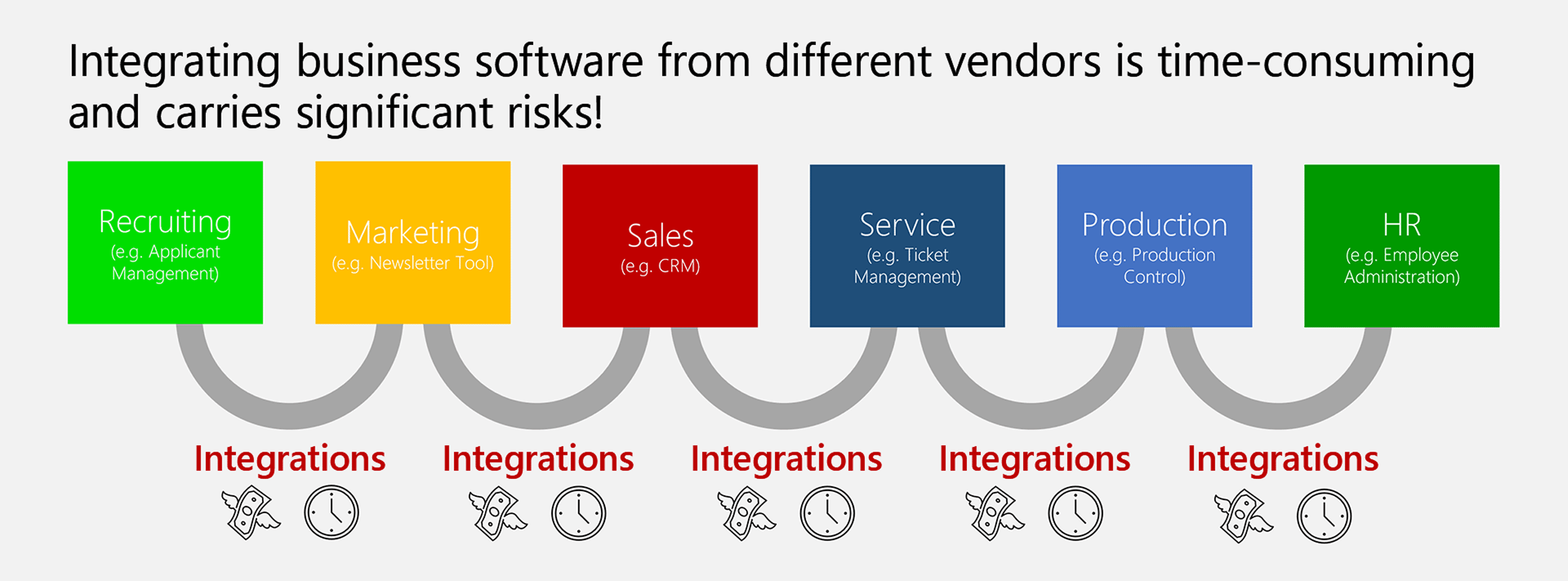
  • IT environments in many organizations are still highly fragmented. Across business units, numerous applications from different vendors are used, with little integration and limited ability to communicate across the organization. As a result, collaboration with HR often relies on isolated solutions, countless Excel files, paper‑based processes, and outdated software.
  • In reality, workflows do not stop at these system boundaries. Project managers look for the right skills for their projects, but have no direct access to employees’ skills stored in HR records. Vacation requests take weeks because approvals never reach the applications managers use every day – such as Microsoft Teams and Microsoft Outlook. Commission data from sales is required for employee evaluations in talent management, but is not seamlessly available there.
  • In these siloed IT environments, further processing of information often requires re‑entering data into yet another system. In addition, all of these isolated solutions must be maintained, secured and updated individually.

3878  |  HR  |    |   hr-alte-welt

Accept inefficiency or take on unrealistic integration projects

  • As a “permanent workaround”, information is maintained multiple times and passed on in Excel or even on paper. This is inefficient and frustrating for employees.
  • The typical response to this dilemma has been integration projects, where IT tries to connect the many isolated solutions by building interfaces through complex custom development.
  • In practice, however, integration projects are expensive, complex, time consuming and risky. In many cases, the interfaces cost more than the applications themselves because they must be developed or reworked individually for each customer.
  • When something breaks, no one feels responsible, as everything comes from different vendors. Until now, you have essentially only had two options: continue working inefficiently or start expensive integration projects.

3879  |  HR  |    |   hr-integrationsprojekte

Only with Hubdrive HR can you share data across departments immediately without integration projects

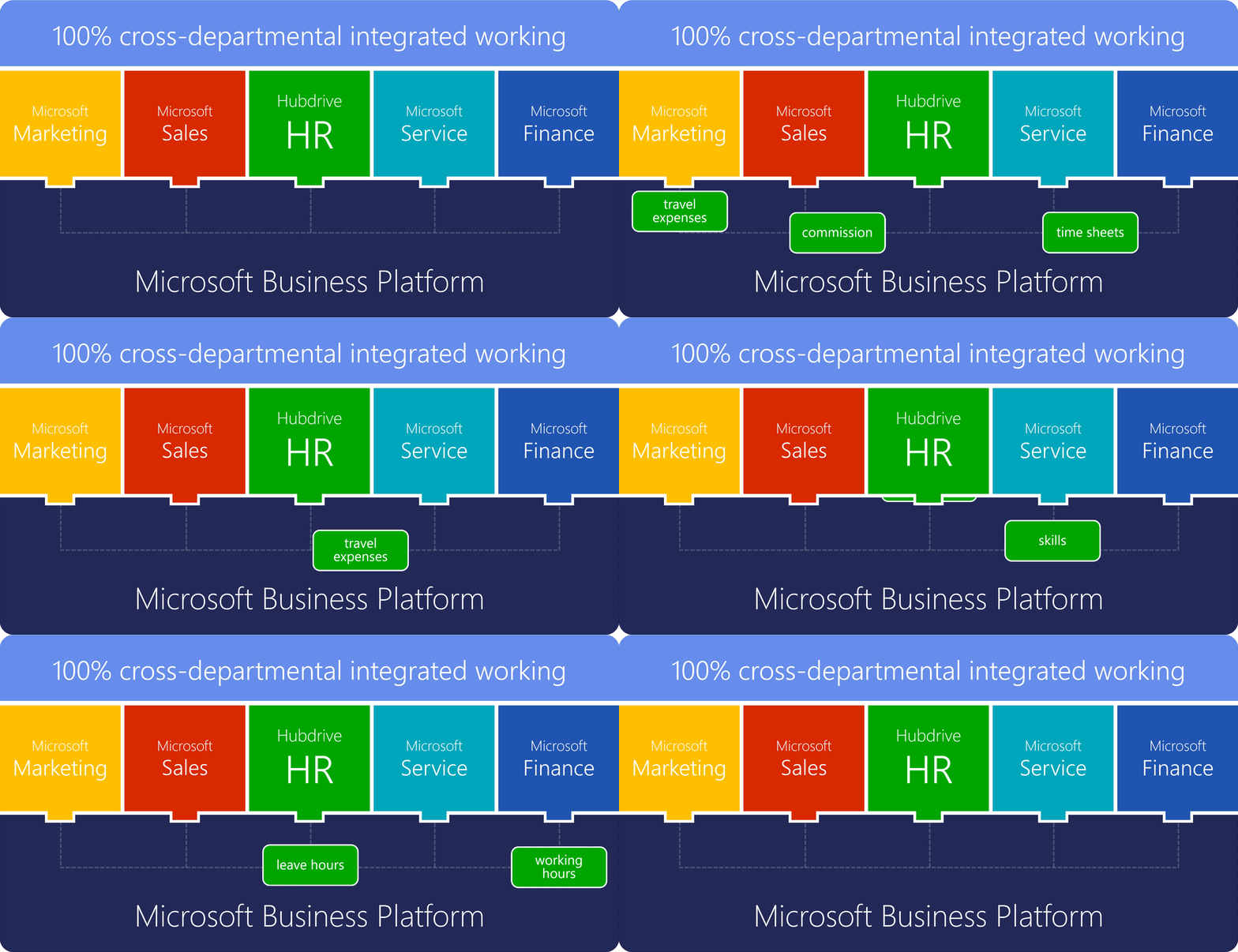
  • With Hubdrive HR, you can immediately exchange data across departments without complex technical integration projects to connect isolated systems.
  • Traditional HR systems create additional IT silos with separated data storage, complex interfaces, duplicate data entry and a proliferation of Excel files.
  • Hubdrive HR, on the other hand, is fully built on the Microsoft Business Platform, just like Dynamics 365 Sales, Finance, Customer Service and Project Operations. As a result, HR data flows automatically across departments.
  • You can start using Hubdrive immediately after installation and exchange data across the entire organization with full integration while activating automations. Existing departmental boundaries disappear.
  • In addition, the number of Excel files is significantly reduced, allowing HR to save up to 90% of the time previously spent managing isolated file structures. Hubdrive HR creates a single source of truth. Duplicate data entry is eliminated.

3622  |  Kunde  |    |  

Don’t create another IT island for HR

Has your organization already committed to a business platform? Then you should carefully consider whether an isolated HR solution makes sense. A standalone HR system creates the same problems as any other IT silo: disconnected processes, duplicate data maintenance and lack of transparency across departments.

  • Effective HR requires access to data from other business units such as skills, projects or sales figures and at the same time needs to feed information back. This is only possible on a shared platform, not within an island.
  • IT islands lead to high integration and maintenance costs. Interface projects are expensive, complex and often unstable. For HR, this would be a costly dead end.
  • Modern HR processes such as recruiting, talent management and workforce planning depend on seamless, automated workflows across the entire organization. An isolated HR solution prevents exactly that.

When evaluating Hubdrive HR, it is worth consulting your IT department to determine whether your organization has adopted a Microsoft strategy. Clear indicators include the use of Microsoft Windows, Microsoft 365, Office 365 with Outlook and Teams or even one of the Microsoft ERP systems.


3881  |  HR  |    |   hr-keine-inseln

Hubdrive HR complete solution on the Microsoft Dynamics 365 Business Platform

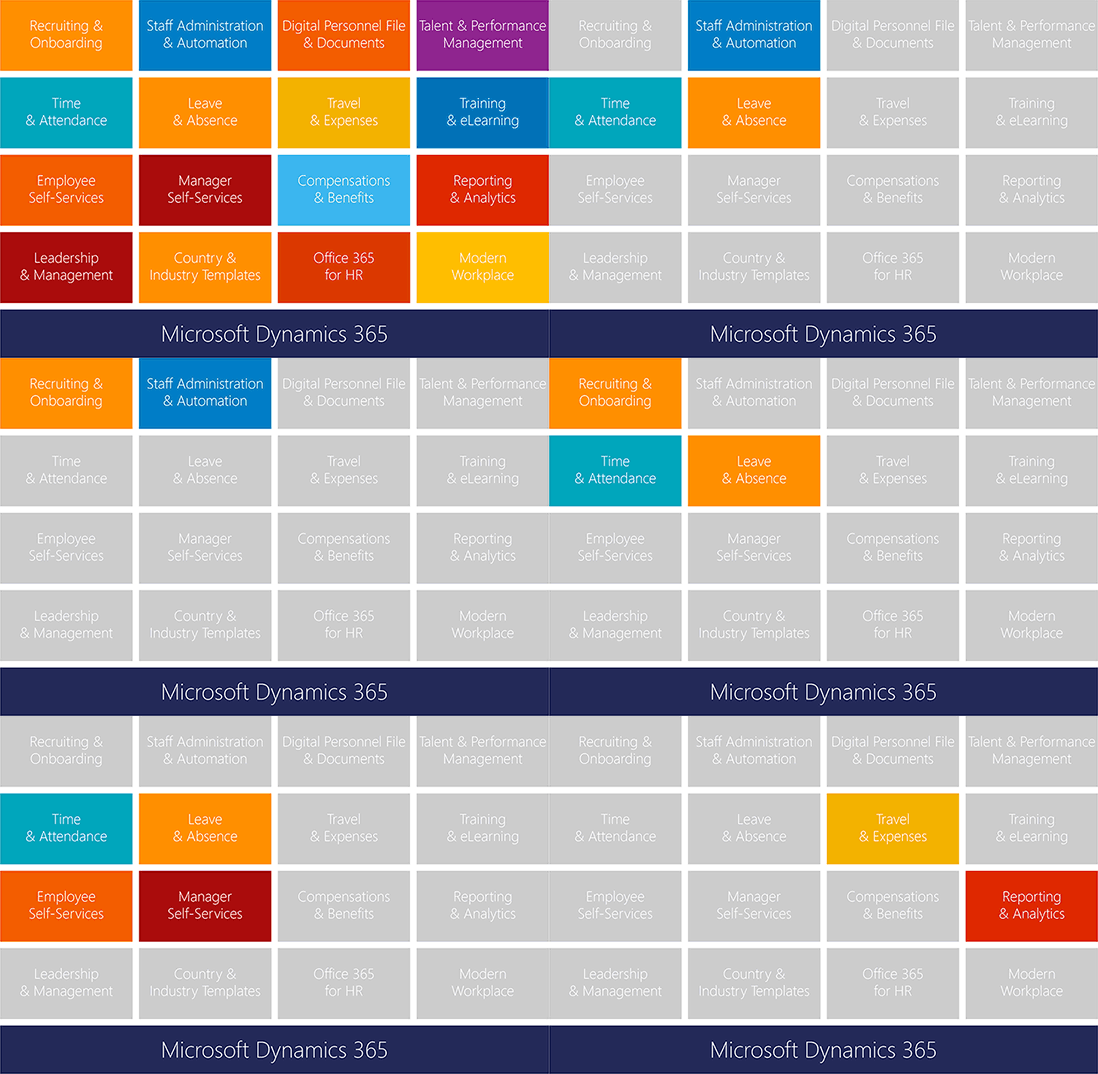
  • Hubdrive HR is a complete solution for human resources management based on the Microsoft Dynamics 365 Business Platform. It supports the entire employee lifecycle, from recruiting and employee administration to employee development.
  • The solution is modular in design and flexibly scalable, ranging from extending an existing HR system to serving as a full Human Capital Management solution.
  • Hubdrive HR differs from other HR systems through its deep integration into the Microsoft ecosystem, delivering extensive advantages for HR departments in the digitalization of their HR processes.

3882  |  HR  |    |   hr-komplett

Integrated ways of working are fun
Example: leave request

  • Let’s take a simple leave request as an example. Every employee submits these requests several times a year. They are forwarded directly within the department to the team lead, who reviews and decides on the request.
  • HR needs to maintain full visibility of all leave requests, so the process should automatically be reflected in reporting.
  • The finance department also requires an overview of remaining leave balances, as these need to be accounted for in year‑end closing.
  • In this example, three departments are already involved — the business unit, HR and Finance.
  • As you have seen, all of this can be handled within the Microsoft Dynamics 365 Business Platform. This allows your leave management — and all other workflows — to run fully automated across departmental boundaries. No duplicate data entry and no need for paper.

3883  |    |    |   hr-spass-integration

Integrated ways of working are fun
Example: travel management

  • Louisa McMaster is an HR specialist at Bear Logistics and is responsible for travel management.
  • Sales representative Finlay Cregg has been entering travel requests independently since the introduction of Hubdrive HR. The request is sent directly to team lead Charles, who can conveniently approve it in Microsoft Teams or Outlook. What used to take a week now often takes just minutes.
  • After approval, Louisa automatically receives all the information needed to book flights, rental cars and hotels. The A1 assignment certificate is requested at the same time and follow‑up questions have become rare.
  • Through self‑services, Finlay has access to all travel data at any time, uploads receipts via smartphone and has daily allowances calculated automatically — these are a favorite feature. Expenses flow directly into financial accounting and are now reimbursed weeks earlier, much to the satisfaction of the household.
  • Frank, as head of the department, did not have to invest any budget in integration projects. All Hubdrive HR features were fully integrated and available from day one.

3884  |  HR  |    |   hr-reise

Turn inefficient use of AI
into real value with integrated AI!

Microsoft AI innovations are immediately available to Hubdrive customers

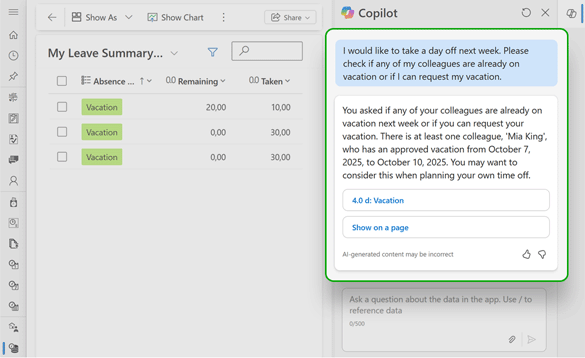
  • All new AI capabilities from Microsoft are available to you in Hubdrive HR right away. No complex technology is required – everything works simply, securely and conveniently. For example, you can use Microsoft Copilot exactly where you already use it in Microsoft 365 or Dynamics 365.
  • The security features of the Microsoft platform remain fully active at all times – Microsoft ensures the highest security standards already during the development of its AI solutions. This means you can start using AI in HR immediately and without concerns.
  • With traditional HR systems, by contrast, the use of AI is often expensive, less capable and requires additional, complex security measures.

3674  |  HR  |  02 - Weitere  |   hr-ki-sofort

With Hubdrive HR, HR departments can evaluate AI with confidence

  • How could this happen? Quite simply: AI processes all available information to deliver the best possible results. This includes data from poorly secured internal systems and open Office documents such as Excel files, Word documents, PDFs and more.
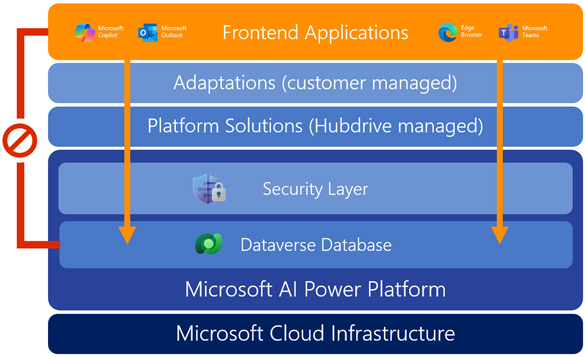
  • With Hubdrive HR, things are different. Every AI request – whether made via browser, Teams, SharePoint, Claude, or ChatGPT – must first pass through the security layer of the Microsoft Power Platform. Only data that the experimenting employee is authorized to access is made available.
  • The result: employees can explore AI features playfully and test automations without data‑protection risks. With traditional HR systems, evaluating AI capabilities often feels like a data‑privacy gamble. With Hubdrive HR, it becomes secure innovation – ensuring that only the right people see the right data.

3673  |  HR  |  02 - Weitere  |  

HR self‑service with AI‑based chat

  • Der vollautomatisierte Chat von Hubdrive entlastet HR massiv, weil er Standardanfragen von Mitarbeitenden rund um die Uhr selbst beantwortet und so Zeit für strategische Aufgaben freimacht.
  • Er ist direkt in die Microsoft‑Welt integriert, nutzt aktuelle HR‑Daten nach Berechtigungen und liefert dadurch konsistente, rechtssichere Antworten und unterstützt nebenbei Upskilling und Change, indem er Mitarbeitende zu passenden Informationen und Trainings führt.
  • Der vollautomatisierte Chat von Hubdrive ist ein Hebel, um die drei großen Herausforderungen vieler HR‑Abteilungen – Anfragenflut, Fachkräftemangel und hoher Veränderungsdruck – gleichzeitig anzugehen, indem er Routineaufgaben automatisiert, Mitarbeitende besser informiert und HR strategisch entlastet.


3941  |  HR  |    |   hr-ki-chat

When HR falls behind technological possibilities
catch up with best‑practice implementation!

The implementation of Hubdrive HR is up to 62% faster and easier than with traditional HR systems

  • Hubdrive HR is built on the Microsoft Business Platform – almost all organizations already use Microsoft 365, Teams, Outlook or SharePoint.
  • You don’t need any new IT infrastructure or lengthy system integration projects therefore avoiding change-management challenges.
  • With Hubdrive, proven Best Practice workflows are already built into the solution, enabling HR teams to adapt and extend the system themselves using intuitive drag‑and‑drop tools.
  • This eliminates the complexity of months‑long development projects involving your IT department or external service providers.
  • A dedicated customer success manager provides confidence and supports you with experience from hundreds of implementations at no extra cost.
  • All of this makes deploying Hubdrive HR significantly faster and more reliable overall.

3699  |  HR  |  00 - Intro  |   hr-implementierung
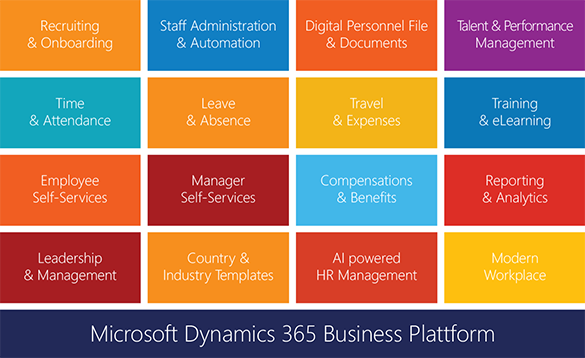
Hubdrive HR lässt sich deutlich flexibler, schneller und mit deutlich geringeren Kosten erweitern

  • Hubdrive HR besteht aus 16 Modulen – Recruiting, Personalverwaltung, Zeitwirtschaft, Talentmanagement, Learning, Performance uvm. Sie entscheiden selbst, mit welchem Modul Sie starten – z. B. Zeiterfassung oder digitaler Personalakte oder Urlaubsverwaltung. Anschließend können Sie kontinuierlich erweitern.
  • Weitere Module werden jeweils in wenigen Minuten von Ihrer IT aktiviert. Denn Hubdrive HR basiert komplett auf der meist schon vorhandenen Microsoft-Infrastruktur.
  • Die freigeschalteten Funktionen erscheinen sofort bei den Mitarbeitern in Outlook, Teams, OneDrive oder auf dem Smartphone und bei Ihrer IT sofort in Power Automate und Power BI. Die Erfahrung aus der Einführung des ersten Moduls kann für das nächste Modul genutzt werden.
  • Das Implementierungsrisiko ist gering, die Projekte bleiben klein und überschaubar, Budgets werden geschont und Quick Wins werden möglich.
  • Bei klassischen HR-Systemen gibt es viel mehr Abhängigkeiten und Komplexität beim Rollout.

3668  |  HR  |  01 - Top 3  |   hr-geringe-kosten-erweitern

With Hubdrive HR, implementation requires minimal effort from the IT department

  • With Hubdrive HR, employees, managers and HR complete their HR tasks directly in familiar Microsoft 365 apps. Customers using Microsoft technology already have the required Microsoft apps installed and configured. Hubdrive HR does not require the installation of proprietary apps.
  • In addition, most companies already have the necessary infrastructure in place, such as Microsoft 365 and Entra ID. As a result, extensive technical setup is largely unnecessary.
  • For the technical implementation of Hubdrive HR, only a single step is required: importing the solution into the Microsoft Power Platform. Once approved, all functionality is immediately available to all employees – in Teams, on smartphones, in Outlook and in OneDrive.
  • This allows HR and IT teams to focus on desired customizations, create automations with Power Automate and build reports with Power BI.
  • Traditional HR systems, by contrast, require separate infrastructure, additional training and often lead to months‑long integration projects.

3634  |  HR  |  02 - Weitere  |   it-verschmolzen

Bei Hubdrive HR hat jeder HR-Leiter dauerhaft einen persönlichen Customer Success Manager

  • Mit der Entscheidung für Hubdrive HR erhalten Ihr HR-Manager zusammen mit Ihrem IT-Leiter einen dauerhaften persönlichen Ansprechpartner – komplett ohne Extrakosten.
  • Ihr Hubdrive Customer Success Manager begleitet Sie gerne über Jahre hinweg beim Erreichen nachweisbarer Verbesserungen im Personalmanagement.
  • Er unterstützt Sie kontinuierlichen von der Lösung konkreter Herausforderungen bis zur vollständigen Ausschöpfung des Digitalisierungspotenzials von Hubdrive HR und von KI im HR-Umfeld.

3669  |  HR  |  01 - Top 3  |   hr-csm

Attract and retain talent
with innovative, familiar software that employees value and trust!

Talente wechseln zu innovativen Unternehmen mit modernem Skill-Management

Bewerber heute suchen nicht nur einen Job – sie suchen Entwicklung, Klarheit und Perspektive. Genau hier spielt Hubdrive HR seinen Vorteil aus.


  • Talente wollen wissen, wohin sie sich entwickeln können. Unternehmen, die mit Hubdrive HR klare Skill-Profile und Karrierepfade abbilden, können im Bewerbungsgespräch konkret zeigen: „Das sind die Kompetenzen, die Sie bei uns aufbauen werden." Das ist überzeugender als vage Versprechen.
  • Wer einen systematischen Skill-Life-Cycle vorweisen kann, signalisiert: Wir lassen unsere Mitarbeitenden nicht stehen. Gerade High Potentials wählen Arbeitgeber danach aus, ob sie in ihre Entwicklung investieren.
  • Modernes HR = modernes Unternehmen: Die Microsoft-Integration von Hubdrive HR ist für Bewerber ein indirektes Signal: Dieses Unternehmen arbeitet digital, effizient und zukunftsorientiert. Das zieht technikaffine Talente an.
  • Strukturierte HR-Prozesse „out of the box" bedeuten für Bewerber: schnelle Rückmeldungen, klare Kommunikation, keine chaotischen Abläufe. Der erste Eindruck zählt – auch umgekehrt.
  • Wertschätzung durch individuelle Passung: Wenn Unternehmen Skill-Gaps kennen und gezielte Angebote machen können, fühlen sich Bewerber gesehen – nicht wie eine Nummer, sondern wie ein Mensch mit konkretem Potenzial.


3944  |  HR  |    |   hr-talente-halten

Mit Hubdrive HR können Mitarbeiter ihre HR-Aufgaben direkt in den vertrauten Microsoft 365-Apps erledigen

Hubdrive HR ist die einzige HR-Lösung am Markt, bei der die Personalabteilung, Führungskräfte und alle Mitarbeiter ihre HR-Aufgaben außer im Browser auch direkt in den vertrauten Microsoft 365-Apps Teams, Outlook, OneDrive, Microsoft Copilot oder Microsoft To Do erledigen können.

Das bedeutet mehr Komfort für Mitarbeiter, keine zusätzlichen Passwörter, kaum Trainingsaufwand und somit effizienteres Arbeiten.

  • HR-Aufgaben wie Urlaubsanträge, Krankmeldungen oder Genehmigungen können direkt in Microsoft Teams bearbeitet werden.
  • Trainingstermine für Onboarding oder Weiterbildung stehen im vertrauten Outlook-Kalender. Copilot kann Self-Services-Anfragen beantworten – sogar per Spracheingabe.
  • Aufgabenlisten für HR stehen in Microsoft To Do, Outlook, Planner oder Loop.
  • Auch die Zeiterfassung kann direkt in den vertrauten Microsoft-Apps erfolgen.

Die enge Zusammenarbeit von Hubdrive und Microsoft sorgt für ein Höchstmaß an Komfort, Sicherheit und Stabilität. Workplace-Anwendungen wie Excel, Teams und Outlook verschmelzen nahtlos mit den Business-Anwendungen der Abteilungen. Es gibt keine separaten Hersteller, Apps, Logins oder Systemwechsel.


3670  |  HR  |  01 - Top 3  |   hr-vertraute-umgebung

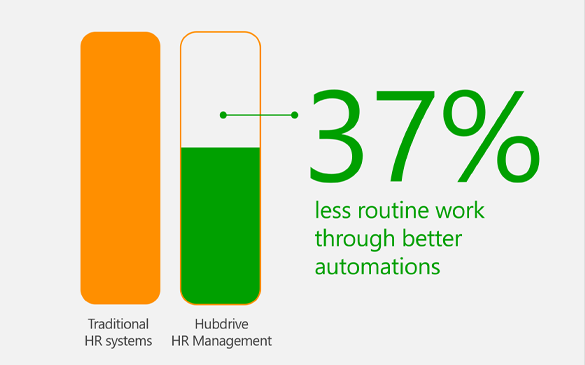
Zufriedene Mitarbeiter durch 37 % weniger Routinearbeit

  • Mit Hubdrive HR erledigen Ihre Mitarbeitenden im Vergleich zu klassischen HR-Systemen bis zu 37% weniger Routinearbeit – das schafft Freiräume für Aufgaben, die wirklich zählen.
  • Sämtliche Arbeitsabläufe werden konsequent über die etablierten Microsoft-Automatisierungstools gesteuert. Sie nutzen also Ihre bestehenden, unternehmensweiten Microsoft-Automatisierungen einfach weiter – jetzt nur noch intensiver auch für alle HR-Prozesse.
  • Dadurch sinkt der tägliche Stresspegel, während erlebte Produktivität, Anerkennung und Sinnhaftigkeit der Arbeit steigen.
  • Gleichzeitig bleibt mehr Zeit für persönliche Interaktion, kreative Lösungen und Weiterentwicklung – die wichtigsten Treiber für zufriedene und engagierte Mitarbeiter.

3942  |  HR  |    |  

Mehr Zufriedenheit auch in der IT-Abteilung

  • Hubdrive basiert zu 100 % auf der innovativen Microsoft Business Platform – vorhandene Microsoft-Skills, -Zertifizierungen und -Tools können Mitarbeitende in der IT-Abteilung einfach weiter nutzen.
  • Statt Spezialkompetenzen für oftmals veraltete Technologien klassischer HR-Systeme aufbauen zu müssen, arbeitet Ihre IT in der vertrauten innovativen Microsoft-Technologiewelt weiter.
  • Gerade jüngere IT‑Fachkräfte schätzen es, moderne Microsoft-Technologien produktiv einzusetzen und ihr Profil mit gefragten Zertifikaten zu stärken – statt Zeit in Legacy-HR-Systeme zu investieren. So wird Hubdrive HR auch für die IT zum Zukunftsprojekt, auf das man fachlich wie persönlich stolz ist.

3943  |  HR  |    |   hr-zufriedenheit-it

Address constantly changing requirements
with fully integrated skills management!

Skill-Management, das mit dem Wandel Schritt hält

Künstliche Intelligenz, Automatisierung und neue Geschäftsmodelle lassen Rollen sich schneller verändern als klassische Weiterbildungsprogramme nachkommen. Hubdrive unterstützt Sie intensiv beim Meistern dieser Herausforderungen. Dabei unterscheidet sich Hubdrive HR vor allem in diesen 4 Bereichen:


  • Einzigartige Microsoft-Integration für Skill-Management
  • Vollständiger Skill-Life-Cycle in einem System
  • Operative HR-Best Practices „out of the box“
  • Brücke zwischen Strategie und HR-Alltag

Hubdrive unterstützt Sie entlang des gesamten Employee Life Cycle dabei, Skill-Gaps sichtbar zu machen und systematisch durch Aus- und Weiterbildung zu schließen.


3934  |  HR  |    |   hr-skil-management

Einzigartige Microsoft-Integration für Skill-Management

  • Mit Hubdrive finden Skill-Management und Mitarbeiterentwicklung direkt dort statt, wo Ihre Teams ohnehin arbeiten: in Microsoft Teams, Outlook, Copilot oder im Browser – ohne zusätzliche HR- oder Lerninseln.
  • Führungskräfte und Mitarbeitende bearbeiten Ziele, Schulungen und Feedback in vertrauten Oberflächen, was die Akzeptanz deutlich erhöht und Change-Aufwände reduziert.
  • Alle Skill- und Entwicklungsdaten liegen im selben Datenspeicher wie Ihre übrigen Business-Daten, etwa Projekte oder Ressourcenplanung.
  • So beantworten Sie Fragen wie „Welche Skills fehlen uns für die geplanten Projekte der nächsten sechs Monate?“ auf Knopfdruck – ohne aufwendige Schnittstellen-Projekte.

3936  |  HR  |    |   hr-skill-management

Vollständiger Skill-Life-Cycle in einem System

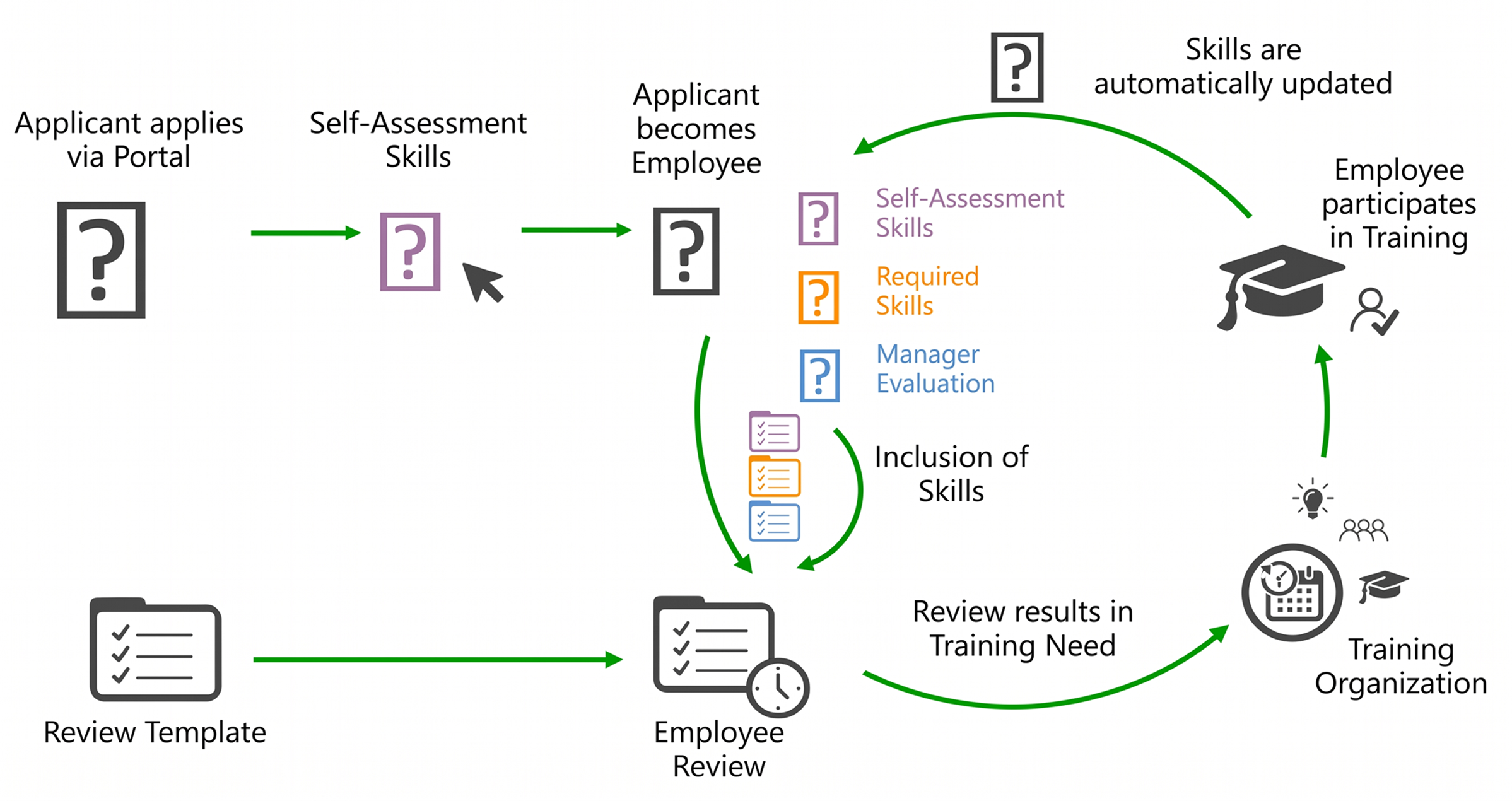
  • Hubdrive bildet den gesamten Skill-Life-Cycle durchgängig ab – von Skill-Anforderungen im Stellenprofil über Bewerbung und Onboarding bis hin zu Zielvereinbarungen, Trainings, Zertifikaten, Nachfolgeplanung und Projektbesetzung.
  • Fähigkeiten begleiten die Mitarbeitenden vom ersten Kontakt als Bewerber durch alle Entwicklungsphasen und werden in der digitalen Personalakte zentral fortgeschrieben.
  • Skills sind dabei kein Anhängsel eines separaten Learning-Tools, sondern Kernbestandteil aller HR-Prozesse.
  • Mitarbeitergespräche, Entwicklungspläne, Trainings, Zertifikate und Projektbesetzungen greifen auf dasselbe, stets aktuelle Kompetenzprofil zu – die Basis für fundierte Personalentscheidungen

3937  |  HR  |    |   hr-skill-life-cycle

Operative HR-Best Practices „out of the box“

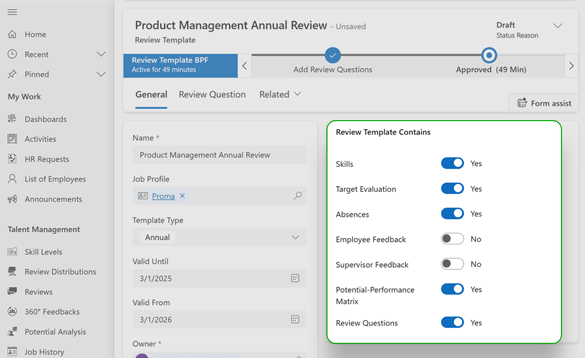
  • Mit Hubdrive starten Sie nicht bei Null: Vorkonfigurierte Skill-Profile, Entwicklungsdialoge, Schulungs-Workflows, 360°‑Feedback, Schulungskalender und Reports sind an echter HR-Praxis ausgerichtet und sofort einsetzbar. So bringen Sie Ihr Skill-Management schnell produktiv zum Laufen, statt lange Konzepte zu modellieren.
  • Gleichzeitig bleibt das System maximal anpassbar: HR kann Prozesse, Formulare, Sichten und Auswertungen für Skills und Entwicklung kinderleicht per Drag & Drop selbst verändern und so eng an Unternehmensstrategie, Fachbereichsrealität und Kultur koppeln.
  • Dieser Mix aus Best Practice und Flexibilität macht Hubdrive zum operativen Enabler für Upskilling und Reskilling.

3938  |  HR  |    |   hr-templates

Brücke zwischen Strategie und HR-Alltag

  • Hubdrive übersetzt strategische Initiativen wie „Cloud-Skills aufbauen“, „Führung 4.0“ oder „KI-Kompetenzen stärken“ in konkrete, nachverfolgbare Maßnahmen.
  • Zielvereinbarungen, Lernpfade, Trainingspläne, Zertifikate und Skill-Updates in der Personalakte. Aus Schlagworten werden damit klare To-dos für Führungskräfte, Mitarbeitende und HR – inklusive Fristen, Verantwortlichkeiten und Erfolgskontrolle.
  • Dashboards und Auswertungen zeigen transparent, wie sich Skill-Gaps über die Zeit schließen – auf Ebene von Personen, Teams und Organisation.
  • So wird Talent- und Kompetenzmanagement von einer punktuellen Maßnahme zum kontinuierlichen, datenbasierten Steuerungsinstrument gegen Fachkräftemangel, Skills-Gap und für wirksames Upskilling und Reskilling.

3939  |  HR  |    |   hr-strategie-alltag

Schedule a personal meeting

Interested in learning how your HR department can benefit from Microsoft & Hubdrive HR? Book a personal consultation with us to explore your options.


3655  |  Kunde  |    |  

Dyn ST EN