Release Notes Rollup Update 51

June 05, 2026

Time & Attendance

Track time faster for projects and processes

Features

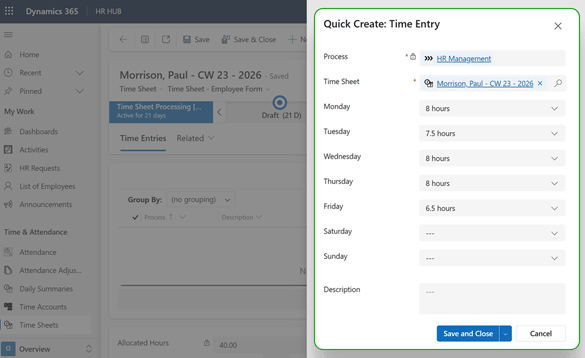
With the new quick entry feature, time for projects and processes can be entered or corrected directly in the time record.

Benefits

  • Save time with the new quick entry screen
  • Easier handling by capturing time directly in the time record
  • Add or correct working hours for multiple days at once

Technical requirements

The new features are available from RU51 without any additional configuration.
Update Hubdrive HR

Leave & Absence

Improved usability for leave entitlements

Features

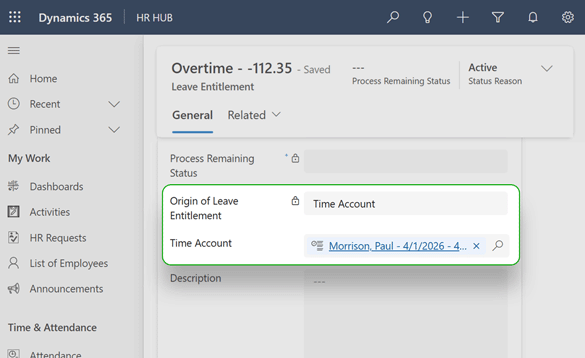
When opening leave entitlements based on time accounts, such as overtime, users can now open the related time account with a single click.

Benefits

  • Save time and work more efficiently through direct access to the related time account
  • Instantly identify the correct time account, even with infrequent use

Technical requirements

The new features are available from RU51 without any additional configuration.
Update Hubdrive HR

Talent & Performance Management

Organize employee reviews more easily

Features

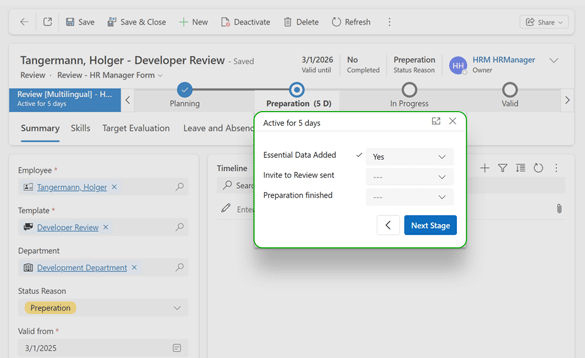
Managers are guided through every step with the required fields in the Business Process Flow.

Benefits

  • Save time with faster data entry
  • Higher manager satisfaction thanks to easier handling
  • Fewer data entry errors

Technical requirements

The new features are available from RU51 without any additional configuration.
Update Hubdrive HR

Recruiting

Save costs on job portals

Features

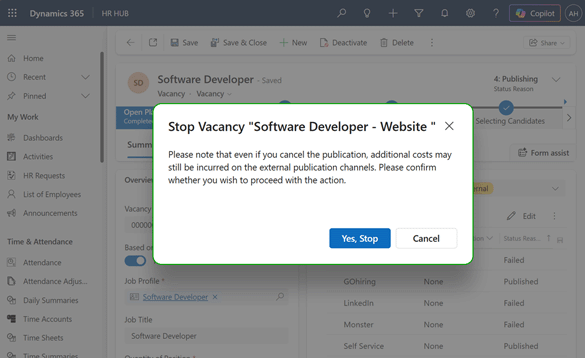
When a job posting is withdrawn from a job portal, a notice now appears stating that costs may still apply.

Benefits

  • Save costs by, for example, canceling the contract with the job portal at the same time
  • More transparency

Technical requirements

The new features are available from RU51 without any additional configuration.
Update Hubdrive HR

Add-ons

Extended integration with the Bundesagentur für Arbeit job portal

Features

More data can now be transferred from Hubdrive HR to the Bundesagentur für Arbeit job portal, and the expanded job list is available.

Benefits

  • Job postings can be found faster by candidates
  • Higher application likelihood through more detailed job postings

Technical requirements

The new features are available from RU51 without any additional configuration.
Update Hubdrive HR

Extended integration with Microsoft Teams Shifts

Features

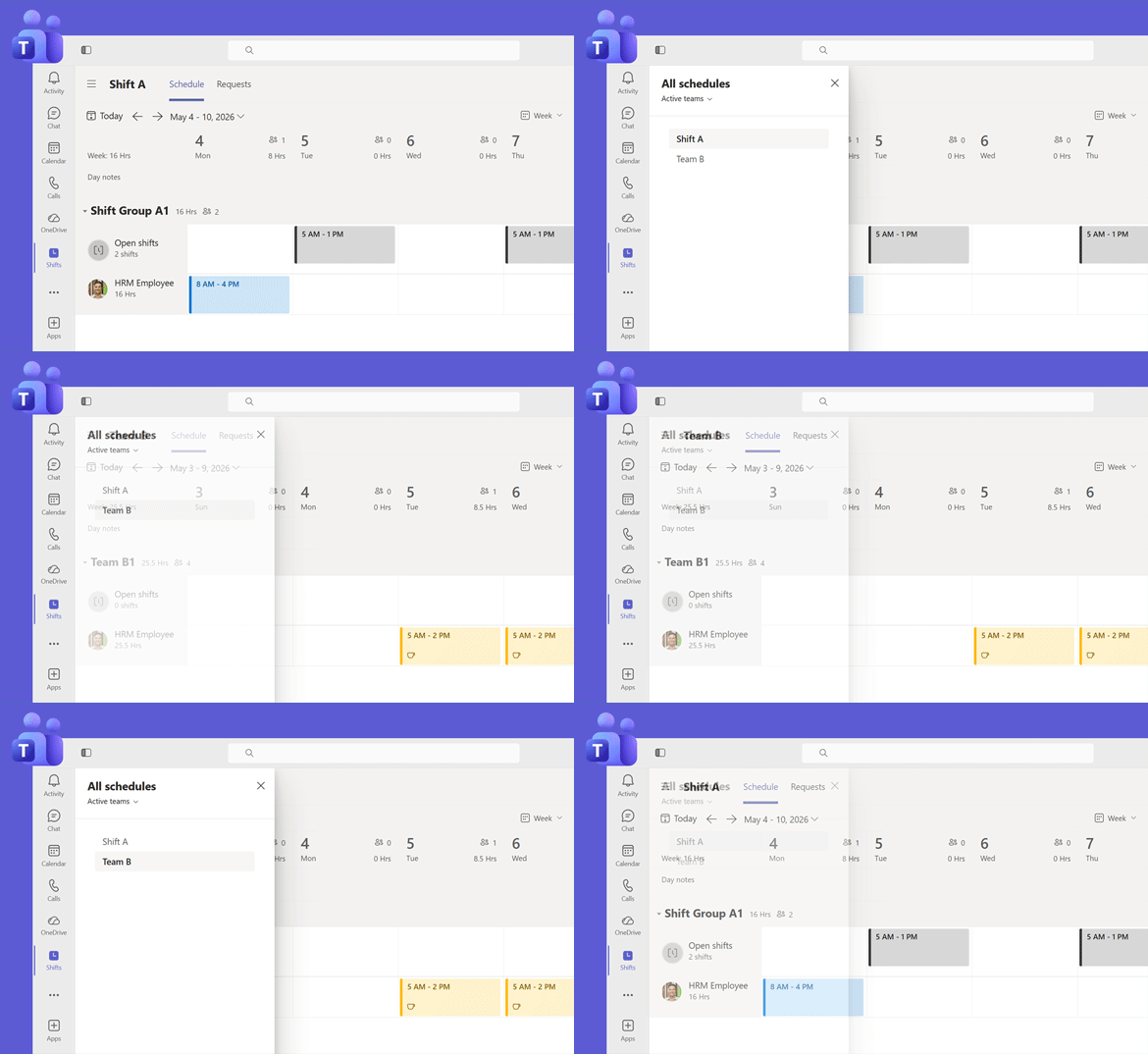
The integration with Microsoft Teams Shifts now also supports users assigned to multiple shift groups.

Benefits

  • Save time as manual follow-up work is no longer required
  • Fewer incorrect records for users with multiple shift groups
  • More reliable reporting

Technical requirements

The new features are available from RU51 without any additional configuration.
Update Hubdrive HR

Employee Self-Services

Visualization update in Employee Self-Services

Features

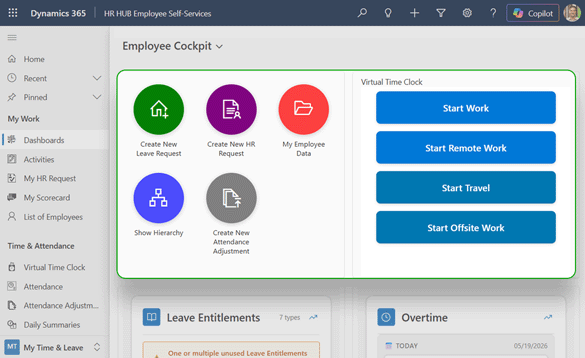
Improved view for employees in the employee cockpit and the virtual time clock dashboard.

Benefits

  • Improved orientation for employees
  • Optimization for use on mobile devices

Technical requirements

The new features are available from RU51 without any additional configuration.

Update Hubdrive HR

Tickets & Bugfixes

Solved tickets & bugfixes

  • The mapping changes made by the BfA are now reflected in the interface.
    CAS-26506-T2W1X
  • The publication of Vacancies has been affected by changes made by the BfA regarding job classifications. These have now been updated.
    CAS-26533-F2B3Q
  • Publishing to BfA results in an error message because BfA has made changes to the mapping. This has now been updated.
    CAS-26918-Z8K6H
  • New filter in WF "BFA Validate Profession" has been added, to only run when "Show required fields for BFA" is selected. This prevents users from accidentally filling in these fields.
    CAS-26962-J0G3Z
  • Managers were previously able to modify their own (previously approved and past) leave requests (without approval). This is no longer possible.
    CAS-26101-K8C4B
  • The Work Accident was not created when the work-related accident was entered, even though the field "Employee unable to work" is set to YES.
    CAS-26861-T4P9G
  • Field "Record Date" could be changed by the employee, when making an attendance correction, leading to broken attendance.
    CAS-26978-G8X2B
  • AI CV Parsing was skipping the gender and email address fields. These fields are now being mapped.
    CAS-26811-L2Y7G
  • The hierachy view on "Active Employees" was missing from the entity "Employees". It has been restored.
    CAS-26877-N3J1N
  • An email regarding attendance corrections was being sent even though the user had “Self-Approval” status. This is no longer the case.
    CAS-26935-W7C7R
  • Night shift hours were calculated incorrectly if the start or end of the work shift fell outside the defined night shift hours.
    CAS-27168-D0Z0K
  • The time registered by Start Travel and End Travel were not included in the calculation of Night Time.
    CAS-27580-T4F9N
  • When there are many employees or long time periods, rows and columns in the absence calendar may be misaligned.
    CAS-27189-F3B3V
  • When the system was under heavy load, some daily overviews were not updated after absences were approved. This has been prevented through process optimization and self-healing mechanisms.
    CAS-27113-Z6D3H
  • Improved Data Protection in Recruiting module as part of GDPR Processes.
    CAS-27411-G8H2Q
  • When replacing the Employment Term, in some cases the end date of the old contract had to be set manually before the new contract could be made effective.
    CAS-27579-C1F0X, CAS-27329-T9W5J
  • The real-time attendance display on the virtual time clock shows times rounded to the nearest minute, while after clocking out, the time is displayed according to the attendance type setting. There may still be discrepancies of up to one minute, as the time clock only updates the time every 15 seconds.
    CAS-27604-F7S8L
  • For Mandatory Break Rules, time tracking for exactly 6 hours of work is only possible if the “Ignore seconds” option is selected in the absence type settings.
    CAS-27578-Y6C8B
  • The visual component on the Employee Dashboard displays incorrect values when calculating vacation in hours (rather than days). This has now been corrected, so the component now correctly displays absences in hours.
    CAS-27778-W8B2V
  • Time clock entries by staff members at the terminal are recorded as Correction Required
    CAS-27694-M0Y3Q
  • When using the physical Datafox terminal, duplicate entries were recorded. This has now been automatically corrected.
    CAS-27815-G2N1X
  • Clicking various buttons on the virtual time clock resulted in duplicate attendance records. This is prevented by the improved virtual time clock.
    CAS-26299-B2G2M
  • When using the Hubdrive hierarchy, security measures prevented supervisors from entering absences for their employees.
    CAS-26373-D1M6V
  • The Hubdrive Field Security Configuration slows down the virtual time clocks. This feature has been disabled and replaced.
    CAS-26442-J5W1L
  • When entering Maternity Leave information, incorrect fields or fields from the wrong phase were displayed (including: “Medical certificate received” and “Employee returned to work”).
    CAS-26424-S7K8S
  • The button to upload license didn´t work if the "Natural Language Grid" was active.
    CAS-26439-K4T0D
  • Employee could cancel a Vacancy .
    CAS-26553-D1B4Z
  • The WF "Notify HR on employee Data Submission" didn´t work properly for employees that had Languages that were not German or English.
    CAS-25805-W0F7D
  • The “Supervisor Recruiting only” role did not have sufficient permissions to view employee HR requests; this has now been corrected.
    CAS-26814-S3B9P
  • When there are 2 Vacancies that have the same Vacancy ID, the job posting won´t work in Broadbean. Duplicates are now prevented.
    CAS-26965-Z6J8D
  • The html editor box, inside the Job Profile was too small and has now been expanded
    CAS-27224-M5K2M
  • Duplicate Calendar Entries were removed.
    CAS-27236-P2G3T
  • The Workflow "HR Request - Mark as Completed - [Multilingual]" was generating duplicate emails. This has now been fixed.
    CAS-27200-W7R4X
  • When tasks and appointments were added to an active On/Off/Cross board, they were set to “Usage” rather than “Template.” This has now been corrected.
    CAS-27350-Y3Y7K
  • Due to a change made by Microsoft, new security permissions are required for using Excel (export and online). These permissions have been added to the HR Manager.
    CAS-27382-Q2W0R
  • Translation error into German: When setting the absence type, “Berechnungsart” should be used instead of “Urlaubsanspruch” or “Abwesenheitsanspruch.”
    CAS-27390-T3Y7Y
  • Attendance Adjustment - Duplicate Detection was previously only available when creating an adjustment. It is now also active when updating the entry date.
    CAS-27566-R8R5P
  • The AI CV parsing feature used to return an error if the CV owner was the “SYSTEM” user. Now, parsing works regardless of the owner.
    CAS-27444-Q8D6T
  • The side Panel Forms for "Add Leave Entitlement" is not closing after pressing the "Submit" Button
    CAS-27562-B7V2Q
  • Absences classified as “Parental Leave” require a doctor's note, even though this is not required for this type of absence. This is no longer necessary.
    CAS-27582-V0Z6G
  • The Virtual Time Clock was unreadable at certain resolutions (especially on smaller mobile phone displays). This display has been optimized.
    CAS-27556-Y4K8T

Contact

Do you have any questions or need further assistance?

If you have any questions or need further assistance, please don’t hesitate to reach out to us. Contact us anytime!

Partners, please contact your Partner Manager for any specific inquiries.