
10 simple steps to successfully use Hubdrive HR
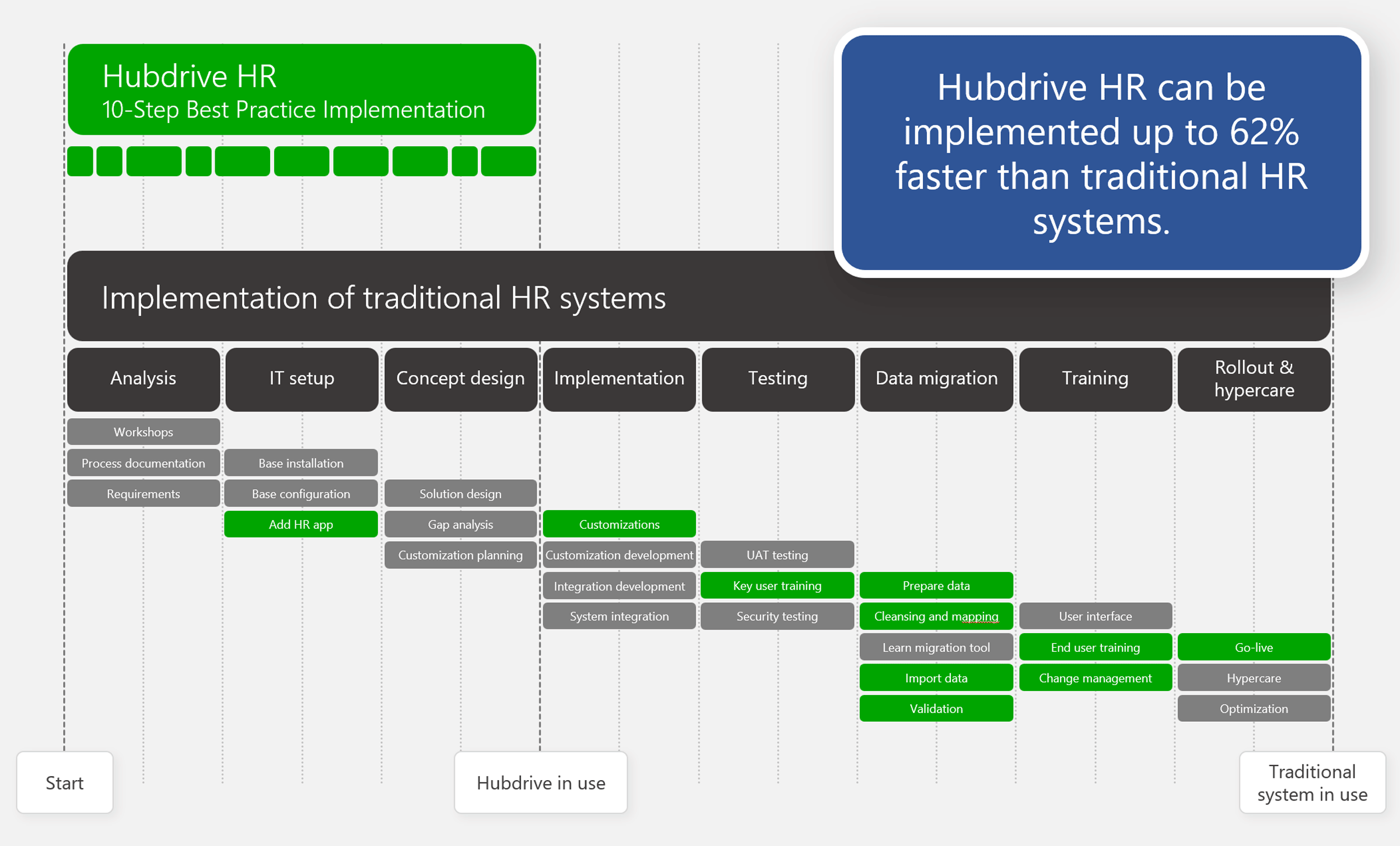
The implementation of Hubdrive HR is 62% faster
The implementation of Hubdrive HR is up to 62% faster and much easier than with traditional HR systems – mainly for two reasons:
- Reason for HR: Hubdrive deliberately skips initial process analyses. Key users get to know the Hubdrive HR standard right at the start of the implementation. They define a few precise adjustments and then roll out the solution quickly, staying close to the standard – Excel lists and former HR silo solutions become obsolete fast.
- Reason for IT: Hubdrive HR is fully based on the Microsoft Power Platform, requires only a few extensions to your existing infrastructure and uses already deployed Microsoft 365 apps like Teams, Outlook, OneDrive and Copilot without additional installation or rollout effort.
3779 | Kunde | |

For HR: Best practice instead of months of analysis
- Hubdrive includes proven best-practice workflows and features from hundreds of implementation projects, ready to use out of the box.
- In the Best Practice approach, a key user group starts by getting to know Hubdrive HR in the standard setup.
- The group identifies which small adjustments to the Hubdrive standard are needed for the company’s individual needs.
- Internal IT can implement these quickly with existing Microsoft know-how.
- After that, rollout can begin. Previously used IT silos and countless Excel files are replaced step by step.
- Templates are available for every step. HR teams can use them directly and adapt them to the company in a few clicks.
Learn more about the benefits of Hubdrive for HR here
3781 | | |

For IT: Maximum use of existing Microsoft technology
- Hubdrive HR is built on the Microsoft Power Platform. IT teams only need to add small extensions to the existing Microsoft infrastructure.
- With Hubdrive HR, all employees complete HR tasks not only in the browser but also directly in familiar Microsoft 365 apps like Teams, Outlook, OneDrive and Copilot.
- Customers using Microsoft technology usually already have the required Microsoft apps in place – installation, configuration, security and rollout aren’t needed.
Learn more about the benefits of Hubdrive HR for IT here
3780 | | |

Two paths to successful implementation
You can implement your Hubdrive HR best-practice setup in two ways:
- You implement Hubdrive HR using internal resources. You simply use your existing Microsoft know-how in IT and extend it with Hubdrive e-learning. The e-learning provides all required content, including checklists, project plans, presentation and import templates and much more.
Implement with internal resources - You implement Hubdrive HR with external support. To do so, you purchase a fixed-price best-practice implementation package. An experienced Hubdrive partner guides you step by step through the rollout.
Implement with external support
In both cases, your Hubdrive Success Manager guides you personally at no extra cost
3782 | | |

Schedule a personal meeting
Interested in learning how your HR department can benefit from Microsoft & Hubdrive HR? Book a personal consultation with us to explore your options.
3655 | Kunde | |