Release Notes Rollup Update 52

September 01, 2026

Attendance Adjustment Table Improvement

Features

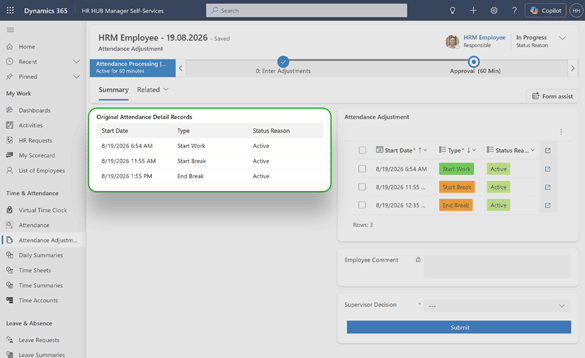
Clean view for employees, HR managers and supervisors to work with attendance adjustments. The table on the left hand side is now only available for reading, and not editing data

Benefits

  • Avoid confusion when creating adjustments
  • Easy to read and understand
  • Original record is kept

Technical requirements

The new features can be used from RU52 without further configuration.

Revised Time and Attendance Tab within all Digital Personal File Forms

Features

The forms within the Digital Personal File received a more modern and cleaner look within the Time and Attendance tab. The employee time accounts are now showing and only the most important information are visually presented.

Benefits

  • Cleaner looks makes the tab easier to navigate and use within the Digital Personal File
  • Employee time accounts are now prominently displayed with only essential information for quick overview
  • Improved visual hierarchy helps users focus on the most important data at a glance

Technical requirements

The new features can be used from RU52 without further configuration.

Configuration Options for Absences after Attendances

Features

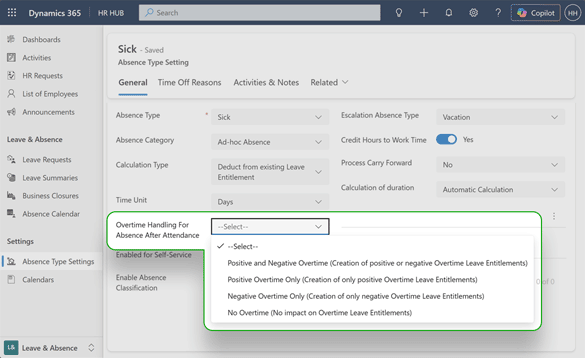
When an employee clocks in and then leaves sick partway through the day, you can now configure how the system should automatically split worked hours and sick leave correctly — eliminating accidental overtime.

Benefits

  • Eliminates errors by accurately separating worked hours from sick leave
  • Saves HR time by automating calculations instead of requiring manual record corrections
  • Gives employees confidence their hours are calculated fairly, even on unexpected sick days

Technical requirements

The new feature can be used starting with RU52 after the following configuration:

Improved Absence Calendar

Features

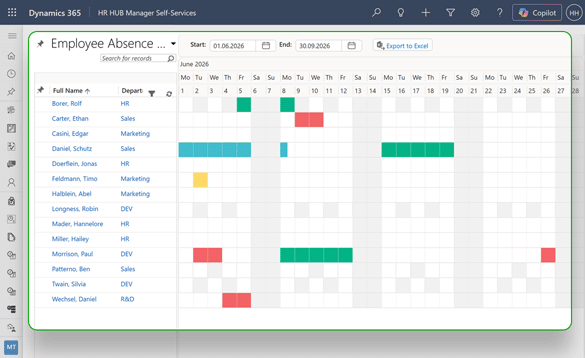
The absence calendar received a more modern look, with new icons and improved performance.

Benefits

  • Faster loading calendar with modern visual design for absence entries
  • Extended calendar range now displays up to 2 years of absence data
  • No configuration required

Technical requirements

The new features can be used from RU52 without further configuration

Tickets & Bugfixes

Solved tickets & bugfixes

  • If the leave request is modified, the Status Reason will ch ange accordingly, respecting the phase of the business process flow.
    CAS-28174-B4F3Q
  • The absence calendar was improved, being able to handle larger amount of data without any interface disruptions or HTTP errors.
    CAS-26238-L1W6Z
  • Rework of Employment Terms now allows creation of multiple Leave Entitlements, without compromising performance.
    CAS-26666-S3D4K
  • Attendance details were adjusted, preventing employees to modify their attendance once they were already saved.
    CAS-27386-Y6S0S
  • The position assignment process was reworked, so now HR Managers and Supervisor can complete the process without running into system warnings.
    CAS-26521-J7X1R
  • Receipt Parsing with AI was improved, now able to ready any currency and adding the value to the Value field.
    CAS-27466-W9V4T
  • When using the recruiting module, it's possible to accurately measure the application status through the fields RRA, RAA and RQA, which shows the current processing stage of each application.
    CAS-27483-J1D6N
  • Absence Calendar can now display a larger amount of employees, without running into loading issues.
    CAS-27639-W2Q5G
  • Attachments are part of the timeline, and also showed in Documents. When the button for parsing with AI is triggered, the option shows all the attachments and you can select the correct one to be parsed.
    CAS-27219-W9H3B
  • If the HR Manager uses the option to "Overwrite the Allocated Hours" button in the daily summaries, the new value won´t be replaced by the original allocated hours value, that comes from the Employment Terms, whenever an employee has a leave request for the same day.
    CAS-27770-D8J0Y
  • The settings for the Virtual Time Clock were adjusted, now allowing the users to hide buttons, even if the base language of the system is not English.
    CAS-28016-J8S7J

Contact

Do you have any questions or need further assistance?

If you have any questions or need further assistance, please don’t hesitate to reach out to us. Contact us anytime!

Partners, please contact your Partner Manager for any specific inquiries.