
Hubdrive HR & Microsoft Dynamics 365
Thursday, February 19, 2026
![]()
![]()
![]()
![]()
![]()
![]()
![]()
![]()
![]()
![]()
![]()
![]()
![]()
![]()
![]()
![]()
![]()
![]()
![]()
![]()
![]()
![]()
![]()
![]()
![]()
![]()
![]()
![]()
![]()
![]()
The customizability of Hubdrive HR on the Microsoft Power Platform is a game changer for business because it turns HR digitalization from a rigid IT project into an ongoing business driver.
Make customizations yourself with drag & drop
With Hubdrive HR, customers can easily customize and extend the solution themselves - no coding required.
Faster Implementation
Hubdrive HR's many best practices and easy customizability speed up the implementation phase.
Higher return on investment (ROI)
Easy customization and a higher level of automation help businesses work more efficiently and save time.
More convenience for all employees
Stronger automation and more precise customization mean greater convenience for employees and managers.

Customize your HR solution in minutes with drag & drop
HR for Dynamics can be easily tailored to your company's unique needs. No coding required - just simple drag & drop. Both HR teams and tech-savvy employees can make changes themselves without hiring an external service provider.
- For example, fields, forms, list views and workflows can be adjusted or extended in minutes.
- New fields can be added to Digital Personal Files or other forms.
- Field order and visibility can be easily defined.
- Automated processes like approvals or notifications can be customized.
- A highlight: entire dashboards can be created via drag & drop, then shared and used permanently.
- Microsoft Copilot provides instant summaries of custom dashboards, and Excel export ensures easy external sharing - perfect for SMBs.
This saves costs for external customization and delivers maximum flexibility and speed in daily operations. The solution can be continuously adapted to new requirements, process changes or legal regulations - keeping it always up to date and tailored to your business.

Make customizations, extensions & automations yourself with ease
In the world of HR software, there are two camps: rigid HR solutions that are quick to implement but hard or impossible to change, or massive custom software projects that take years and consume huge budgets. Hubdrive solves this dilemma.
- Hubdrive HR is built 100% on the Microsoft Power Platform. With this platform, customers can easily make customizations themselves without coding via drag & drop functionalities.
- Routine tasks can also be automated quickly by customers themselves. Hubdrive HR delivers many automations out of the box. Customers can modify these via drag & drop and create entirely new automations.
- The architecture of the Microsoft Power Platform ensures that customer-specific customizations are technically separate from the vendor's solution. When Microsoft and Hubdrive roll out new features, all customer adjustments remain intact and fully functional.
This "do-it-yourself" capability is much more than a technical feature. It makes customers more efficient and strategically independent.

Freedom from constraints for HR and IT
- Every organization has its own workflows and must adapt to changing market conditions. With Hubdrive HR, customers can easily customize, extend and automate their solution via drag & drop. Process improvements are implemented within days.
- Companies respond faster to new requirements. In dynamic times, that's a real competitive advantage. The need for workarounds - temporary solutions employees use to bypass poorly configured IT systems - disappears.
- Alternatively, 17 million experts in the Microsoft Partner Network are available worldwide. Since Hubdrive works 100% within the Power Platform, Microsoft Dynamics partners don't need to learn new technologies and can immediately handle customizations and extension for their customers.
- Customers don't have to wait for vendor availability or accept high hourly rates. Thanks to strong competition among Microsoft partners, customers benefit from attractive day rates.
- Traditional vendors of classic HR systems can't offer this level of reach.
Benefits of self-service customization
The ability for internal IT, business units and tech-savvy HR to make customizations themselves offers several advantages:
Flexibility:
Business units can roll out the HR solution and adapt it to their specific needs without relying on external IT support.
Efficiency:
Customizing processes and workflows significantly increases HR efficiency.
Transparency:
Adjusting lists and dashboards makes it easy to display key information at a glance and improve process transparency.
Cost savings:
Reducing dependence on external IT support helps cut costs.
Lower dependency:
Making changes internally reduces reliance on external developers and partners.
Speed:
Customizations can be made quickly and easily without long wait times.

The end of change request queues
- HR and IT leaders know the pain: a process changes - for example, a new field for "home office equipment" needs to be added to the onboarding from. With traditional competitors, this starts a bureaucratic nightmare: open a ticket, wait for a quote, approve the budget, then wait months for implementation in the next release.
- With Hubdrive, you change the field yourself in 5 minutes. Thanks to the underlying low-code technology (Microsoft Power Apps), customizations are done via drag & drop
- No coding required: what used to need programming skills is now as easy as creating a PowerPoint slide
- The added value: your HR software adapts to your speed, not the other way around. You respond to market changes in real time.

Independence from external service providers
Most HR systems create massive dependency on the vendor or its implementation partners for customizations. Even the smallest change requires an expensive external developer. Over time, this drives up the total cost of ownership (TCO).
- Hubdrive democratizes customization. Because the solution is built on the Microsoft Power Platform standard, customers can make and manage updates themselves without risk. Helpful tips and checklists are available in Hubdrive's free Learning Center.
- Use internal resources! Many IT departments already have experience with the Microsoft Power Platform. You won't need costly specialists for proprietary niche languages.
- Protect your budget! The money you used to spend on customization consulting can now be invested in strategic HR initiatives like employer branding.

The 10 biggest savings with Hubdrive HR compared to traditional HR systems as KPIs
Hubdrive HR stands out from classic HR systems with much faster implementation, greater time savings in daily operations and a quicker ROI of 3-6 months instead of the industry standard 2-3 years.
- 81% less time spent on HR administration compared to traditional HR systems thanks to better integration and stronger automation.
- 94% faster implementation by leveraging the existing Microsoft platform and best practice deployment.
- 62% lower training effort because employees work in Outlook, Teams and familiar Microsoft apps.
- 78% fewer IT silos, reducing interface, maintenance and hosting costs
- 74% less inefficiency through stronger elimination of duplicate entries and media breaks across the entire employee lifecycle thanks to higher enterprise-wide integration.
- 92% faster turnaround times for approval and HR workflows, further reducing processing costs.
- 82% lower project and consulting costs through drag & drop customization, extensions automation on the Microsoft Power Platform.
- 68% fewer additional HR solution costs since many IT departments already have expertise in operating and customizing the Power Platform
- 64% lower integration costs for ERP, payroll and third-party systems thanks to greater availability of proven standard connectors.
- 54% fewer support and change costs because suitable self-services eliminate more standard requests.

Extend Hubdrive HR yourself with drag & drop
No standard software cover 100% of individual requirements. Companies usually buy expensive add-on tools ("stand-alone solutions") to fill gaps in their business software. The result: data silos, a mix of extra vendors and nightmare interfaces
With Hubdrive, customers simply build the missing 5-10% themselves - on the same data foundation in the platform and with drag & drop. Do it yourself or work with a partner if you prefer. For example:
- Fleet management: Does a customer need a special process for e-bike leasing that Hubdrive doesn't deliver out of the box? Just build a small mini app within the Power Platform.
- Event: Need an app for a summer party registration? Create it with a few clicks.
All data ends up in the same Dataverse - the shared database of the Power Platform. No interfaces, no duplicate data, full security.

Extend Hubdrive HR yourself with drag & drop automation
- Hubdrive HR delivers major value by including key HR best-practice workflows and related automations out of the box. These have been continuously improved based on hundreds of customer feedbacks. This extensive knowledge and experience is available to all customers as part of the standard solution, reducing routine tasks significantly.
- Hubdrive goes a step further. Customers can easily modify these automations themselves via drag & drop. Any additional automation potential that arises in daily operations can be implemented just as easily.
- In practice, this results in a much higher level of automation, which positively impacts ROI and improves convenience for employees.

What is programming without code?
Programming without code - also called low-code/no-code - is a way to design and develop applications using intuitive graphical tools and built-in functions. Writing traditional code is greatly simplified or eliminated entirely with no-code.
- Traditional application development requires highly skilled programmers. For HR, that often means waiting in a long queue before updates or new applications can start.
- HR experts are often not close enough to the developer during implementation. Results frequently don't match the real needs of HR, business units or employees. Frustration runs high.
- With low-code/no-code, HR teams work together with IT to customize and enhance the HR solution - visually with drag & drop. This is possible with Microsoft Power Platform, the world's most innovative low-code/no-code platform.
- In practice, changes and extensions are much close to the actual needs of HR and business users than with traditional programming.
More flexibility for step-by-step digitalization
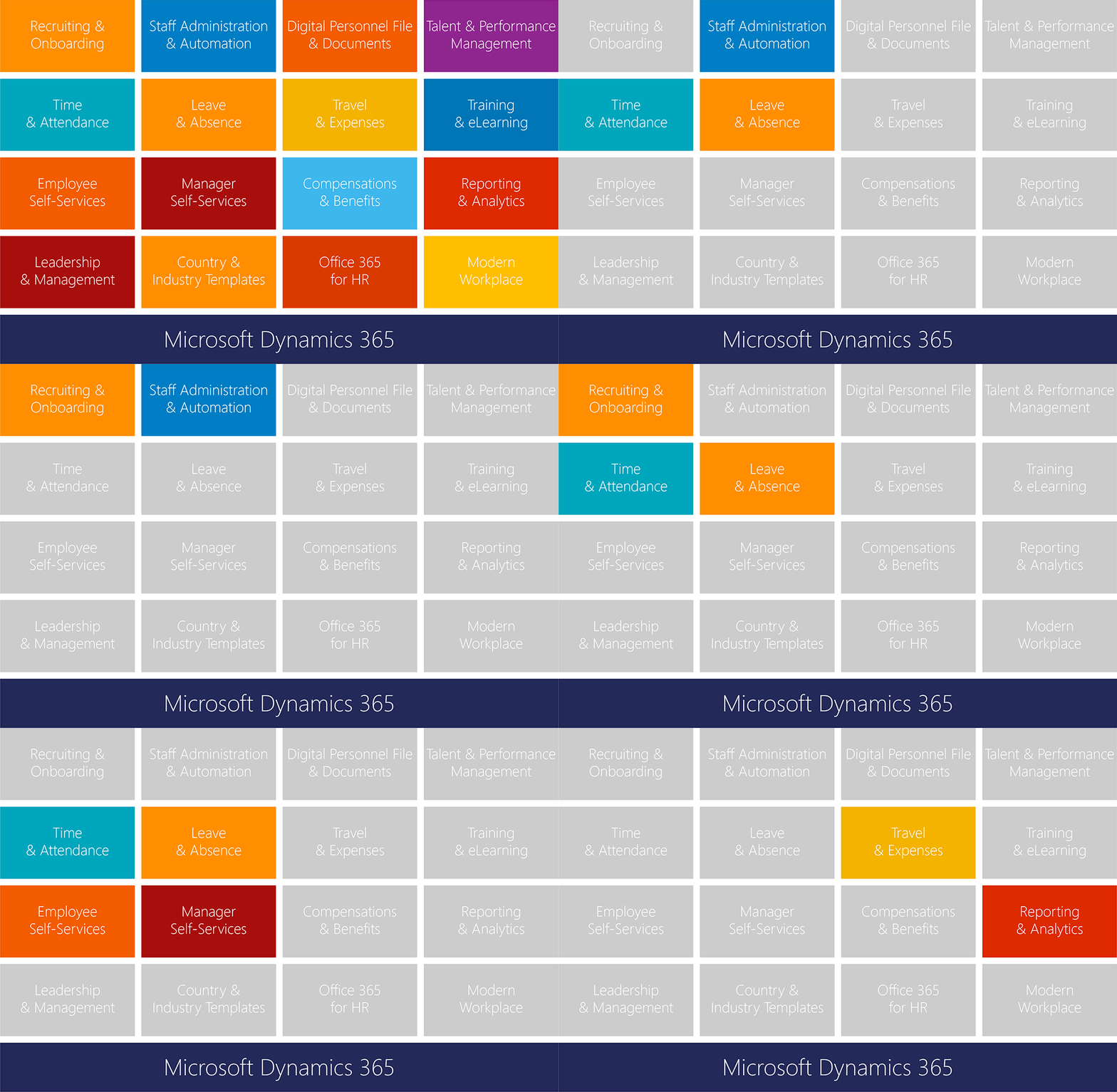
The rollout of Hubdrive HR can be handled very flexibly thanks to 16 modules. Companies can start with any module and digitalize their HR processes step by step.
- The entry point is intentionally low-threshold. Companies can begin with the area that currently has the greatest need, such as workflows for time tracking or employee management.
- After the first step, additional HR functions can be added at any time to continue digitalizing processes. Hubdrive HR can be expanded modularly - for example with recruiting, Digital Personal File, talent management or training management - all the way to a complete human capital management solution.
- Customizations and extensions can be made for any module at any time by the customer or their trusted Microsoft partner.
- The technical architecture of the Microsoft platform is designed for scalable, needs-based development. Companies can continuously adapt the solution to growing business requirements. For example, languages can be added or country-specific adjustments made for new branches abroad. The possibilities are extensive.
Investments always stay within budget and grow in sync with the company. This way even smaller businesses can benefit from HR digitalization step by step and expand their HR solution flexibly without purchasing complex and expensive full packages all at once.

Deploy best-practice workflows and automations quickly and flexibly
- Hubdrive HR delivers major value by including essential HR best-practice workflows like recruiting, master data management, time tracking and performance management right in the solution. These workflows have been continuously improved based on hundreds of customer feedbacks. This extensive knowledge is available to customers at no extra cost.
- Technically, these workflows are built on the Microsoft Power Platform. They model typical end-to-end HR processes in Dataverse. Parameters, business rules and automations can be adapted to customer-specific requirements within the Power Platform without touching the vendor's source code.
- By merging with the Power Platform, Hubdrive keeps data consistent. You access the same data in the same database. This lets companies use standardized HR best-practice process templates immediately and extend them iteratively and release-safe whenever needed.

Comparison of customization with Hubdrive and traditional HR systems
Customization with Hubdrive HR
- Hubdrive HR enables customizations directly by the HR team - without coding skills or IT specialists.
- Drag & drop, custom workflows, field and form adjustments and design changes are possible anytime, often in just minutes.
- Modular structure: only the needed functions are activated and expanded step by step - keeping the solution flexible and growing with the company.
- Changes to processes, forms and permissions can be made internally, saving time and external costs.
- Business-specific requirements or industry-specific needs can be implemented quickly and easily; international rollouts are straightforward.
Customization with traditional HR systems
- Many traditional HR systems rely on predefined standard processes and allow only limited customization.
- Changes often require expensive customization projects by external providers or special interfaces.
- Customizations take time and involve high effort; often companies must wait for releases or upgrades.
- Integrating additional modules or specific workflows is difficult and requires external resources.
- Many vendors deliver basic functionality that can be adapted once via a country template; further customer-specific adjustments are usually not possible.
Advantage table: Hubdrive Power Platform customizing
| Feature | Hubdrive HR | Traditional HR systems |
|---|---|---|
| Customization via drag & drop | Yes | No |
| Customizable internally | Yes | Mostly no |
| Module integration | Very flexible | Limited |
| Process customization | Immediate and granular | Delayed, often complex |
| IT effort | Very low | High, usually requires external support |
| Time/cost factor | Saves time and costs | Higher costs due to external projects |
| Industry-specific customization | Easy to implement | Mostly standard only |
| Global rollouts | Fast | Difficult |
Source: Based on analyses by Market Research EK, 2025.

Conclusion: Hubdrive is the only HR solution that grows organically with your business
- Companies are living organisms. A startup with 50 employees faces different challenges than a mid-sized business with 500 or an enterprise with 5,000. Rigid software eventually becomes a barrier to growth.
- Hubdrive is the only HR solution that grows organically with your business. Customers start with the best-practice standards and shape the software over time to match their company's evolution.
- The message to decision-makers is clear: "Don't buy software for today's status quo. Buy a platform you can adapt tomorrow to meet future challenges." That's true sovereignty in HR management.

Immediately boost efficiency across the company
- The adaptability of Hubdrive HR on the Microsoft Power Platform compared to traditional HR systems is a game changer because business units can adjust HR processes faster and with less risk to match the current business model – without costly custom development and without extra standalone tools outside the existing Microsoft environment.
- For executives, this means shorter projects, faster results, high employee acceptance and a measurably better ROI than traditional HR systems. With Hubdrive, ROI is 3–6 months instead of the industry standard 2–3 years.
- Only Hubdrive achieves this without compromising the employee experience. In fact, Hubdrive HR for Dynamics is the only HR solution on the market where employees, managers and HR teams can complete HR tasks not only in the browser but also directly in familiar Microsoft 365 apps like Teams, Outlook, OneDrive, Copilot and To Do.

With Hubdrive HR's customizability, companies gain more advantages than with traditional HR systems
Implementation in weeks instead of months
- By leveraging the existing Microsoft platform, Hubdrive HR rollout can be up to 94% faster than isolated HR systems.
- Many customers go live in just a few weeks, while comparable projects with traditional HCM suites often take many months.
Greater strategic business value
- Hubdrive HR is built on the Microsoft Power Platform – the same platform as Dynamics 365 Sales, Customer Service, Finance and Project Operations. This enables seamless end-to-end processes (e.g., from project order to capacity planning) that can be adapted anytime.
- Regional or country-specific requirements (locations, collective agreements, languages, compliance) are handled through configuration and customization instead of introducing separate systems for each variation.
Faster and more flexible customizations than any other HR solution
- Forms, workflows, approvals, reports and self-services are adapted via drag & drop. Changes and extensions to the HR solution can be implemented in days instead of months.
- This significantly reduces project costs and allows HR processes to be continuously optimized instead of every few years in costly large-scale projects.
Lower Risk and higher security compared to traditional HR systems
- Hubdrive HR runs entirely within the Microsoft Dynamics ecosystem (Dataverse, security, compliance), eliminating interface and security risks of standalone HR solutions.
- Updates and new legal requirements can be rolled out centrally via the platform, reducing operational risk and improving audit readiness.
Faster productivity and higher adoption across the company
- Employees and managers work in familiar tools like Teams and Outlook with the Microsoft 365 interface. Training effort drops and self-services are adopted faster.
- Thanks to the Power Platform foundation, modern technologies like Copilot, chatbots and automated workflows are available by default and can be tailored to your HR strategy.
Unique scalability and global deployment capability
- The solution is modular and scalable – from a single HR module to a complete HCM suite – and grows with mergers, new markets, countries or business units.
- The global Microsoft Partner Network enables rollouts, customizations and support in over 200 countries while governance remains centralized on the customer’s platform.

A breakthrough for the HR department
Thanks to the Microsoft Power Platform, the HR department can easily and quickly customize and extend Hubdrive HR together with IT or on its own using drag & drop.
- Process improvements are implemented internally within days. Workflows in the HR solution then reflect employees’ daily work accurately, eliminating workarounds and temporary fixes.
- Automation is also easier with Hubdrive HR than with traditional HR systems thanks to the Microsoft Power Platform. A higher level of automation frees employees from unnecessary routine tasks and creates space for value-adding HR work.
- In short, the customizability of Hubdrive HR on the Microsoft Power Platform is a breakthrough for HR departments, freeing them from the restrictions of outdated technologies. Expertise, not technology, takes center stage.

10 specific differences between Hubdrive HR and traditional HR systems for HR departments
1. Own processes instead of compromises
HR can adapt processes like recruiting, onboarding, goal setting or salary adjustments to match how they really work in the company – without accepting rigid standard forms.
2. Quick response to changes
New company agreement, tariff change or modified approval paths: workflows, forms and rules can be easily adjusted by HR itself – in days instead of months when speed matters. HR no longer waits for IT or external partners.
3. HR and IT customize the solution together
With low-code customization, power users in HR can work with IT on interfaces and processes. Business requirements go straight into the system without translation losses through long ticket loops.
4. Pilot and improve iteratively
HR can configure ideas via drag & drop in a pilot area, test them and then roll them out step by step with IT. This reduces risk and increases adoption because the system evolves based on user feedback.
5. More automation, less routine work
Recurring tasks – reminders, escalations, approvals, notifications – are much easier to automate than with traditional HR systems. HR gains time for consulting and strategic work instead of “click tasks”.
6. End‑to‑End processes beyond HR
Because Hubdrive HR runs on the same platform as Dynamics 365 Sales, Customer Service or Project Operations, HR can help design end-to-end processes across the company without media breaks.
7. Transparent data instead of Excel chaos
Special reports and lists that used to be created in Excel “on the side” can be integrated into the system as real entities, views and reports. HR keeps data control and reduces shadow IT. Hubdrive’s built-in dashboards can be customized or new dashboards created by HR.
8. Easily map local specifics
Different locations, countries, collective agreements or workforce segments can be configured without separate systems for each variation or costly custom development.
9. Roll out customizations and new features faster
Thanks to the platform’s unified security and role models, HR can roll out changes and new features faster without renegotiating complete security concepts with IT or works councils every time.
10. Continuous evolution of the HR role
Because changes are no longer rare large-scale projects but an ongoing improvement process, HR moves from “requester to IT” to co-designer of the digital employee experience – a true role shift.
More flexibility for business units
- With Hubdrive, business units can make changes and extensions to the HR solution themselves. Department-specific dashboards, forms or workflows can be created and modified easily with drag & drop
- Thanks to the Microsoft Power Platform’s layer concept, these individual customizations are technically separated from other departments’ extensions. Their changes remain unaffected and the solution stays update-safe
- Hubdrive HR’s customization capability transforms a preconfigured HR solution from a compliance tool into a strategic platform that adapts to the business models and requirements of the departments – not the other way around.

10 immediate benefits for business units compared to traditional HR systems
1. Adaptation to department-specific business processes
The customization capability lets business units adapt Hubdrive HR to their individual needs and processes via drag & drop. Instead of bending to rigid, standardized workflows, departments can model and automate proven processes. This reduces resistance and speeds adoption.
2. Seamless integration into existing Microsoft 365 work environments
Because Hubdrive HR is built on the Microsoft Power Platform, customizations integrate fully with Microsoft 365, Teams, Outlook and other familiar tools. Departments don’t need to switch systems – time tracking, vacation requests, approvals and performance reviews work directly in the apps they already use daily. This creates a unified, smooth work experience.
3. Lower training and implementation times
Since forms, workflows and dashboards are customized through the familiar Microsoft Power Platform, little additional training is needed. Rollout can be up to 94% faster than other HR solutions.
4. Data flow between departments without manual handoffs
Hubdrive HR runs on the same platform as Dynamics 365 Sales, Customer Insights, Project Operations and Customer Service. Data flows automatically between HR and other departments. Closed deals feed into commission calculations, project planning accounts for absences and skills, marketing accesses talent pools. This automation saves time and eliminates errors.
5. Tailored forms and workflows for specific needs
Every department has different information requirements. Sales teams need different travel request data than project teams, service teams have different qualification needs than developers. Customization lets departments design forms, workflows and approval chains individually – without writing a single line of code, purely through visual configuration.
6. Manage regional and local variations
Global companies can manage regional differences between branches flexibly thanks to the Power Platform. Different vacation or working time rules, compliance requirements or local processes can be configured – centrally managed yet locally adapted.
7. Quick adjustments to changing requirements
Markets and businesses change constantly. With low-code customization, departments or their IT partners can implement changes iteratively and quickly without waiting for long development cycles. A new business process, product line or approval rule can be implemented within weeks.
8. Autonomy and self-determination for departments
The Power Platform’s customization capability reduces dependency on central IT teams. Departments can make changes themselves or work with implementation partners from the global Microsoft network. This increases operational flexibility and lowers barriers.
9. Transparency and data consolidation within the department
Customization enables department-specific dashboards, reports and real-time insights. Power BI and Microsoft Fabric let department heads monitor KPIs like availability, skills, project workload and development plans – all in one central, tailored view.
10. Future-proof scalability without vendor lock-in
Hubdrive HR is built 100% on the Microsoft Power Platform and Dynamics ecosystem. Departments benefit from Microsoft’s continuous innovation and investment, regular updates and a broad portfolio of extensions and integrations. The platform grows with business needs and enables a flexible, maintainable IT architecture without proprietary dependencies.
More convenience for employees
- Hubdrive HR for Dynamics is the only HR solution where employees, managers and HR teams can complete tasks not only in the browser but also directly in familiar Microsoft 365 apps like Teams, Outlook, OneDrive, Copilot and To Do.
- Easy customization of forms, dashboards, lists and automations adds another layer of convenience. Daily work becomes noticeably simpler, faster and more modern.
- Companies can easily adapt the solution to their desired workflows via drag & drop. Forced workarounds and temporary fixes for employees become unnecessary.
- Automating workflows is easier with Hubdrive HR, so customers achieve a higher level of automation than companies using traditional HR systems. This saves time and resources and creates space for more valuable, engaging tasks.
- Training effort drops significantly because all employees work in Microsoft interfaces they already use every day.

10 specific benefits of Hubdrive HR's customizability for employees
1. Interfaces match the role
Employees see exactly the fields, processes and information they need for their job – no more, no less. Many lists and dashboards can also be personalized.
2. Self-services feel natural
Quickly adapted workflows for vacation requests, master data changes or goal setting fit the company culture instead of rigid standard forms.
3. Fewer clicks, less frustration
Processes can be optimized via drag & drop so unnecessary steps disappear and frequently used functions are where employees expect them.
4. Work in familiar tools
Because Hubdrive HR is integrated into Microsoft Teams, Outlook and other Microsoft apps, employees don’t need to learn new systems.
5. Transparent processes
Status info like “Has my request been processed?” can be shown in dashboards or cards. Employees always know the progress.
6. Better communication with managers
Goal-setting, feedback or development processes can be configured to match leadership principles – making conversations more individual, concrete and clear.
7. Local needs are considered
Location-specific rules (shift models, holidays, benefits) can be adapted much more easily than with traditional HR systems so employees don’t work “against the standard."
8. Quick implementation of feedback
If something in the system is inconvenient, HR and IT can make changes quickly and easily. Employees see their feedback lead to real improvements.
9. Fewer media breaks
Instead of juggling forms, emails and Excel lists, all steps run in one seamless digital process – reducing errors and follow-up questions.
10. Modern employee experience
A system that adapts to changing work styles (remote, hybrid, project-based) signals to employees: “This company takes our reality seriously.” That strengthens satisfaction and retention.
More efficiency and effectiveness for the IT department
- The technical advantage of Hubdrive HR for IT lies in the fact that customization is fast, secure and done without traditional development directly on the Microsoft Power Platform.
- IT staff who know customization on the Microsoft Power Platform or are certified for it can also adapt Hubdrive HR. Hubdrive is built 100% on the Power Platform and uses the same low-code tools.
- Details of the Hubdrive solution (data model, HR processes, security) can be found in the manufacturer’s free e-learning documentation.
- Effort, risk and complexity for the IT department and operating the HR solution are significantly lower compared to implementing a traditional HR system.

With Hubdrive HR's customizability, IT sees immediate improvements compared to traditional HR systems
Unified platform instead of isolated solutions
- Hubdrive HR runs entirely on Microsoft Power Platform technology, including Dataverse, security model and compliance.
- IT no longer manages a separate HR system but extends the existing Microsoft platform – identity, roles, backup, monitoring and governance remain unified.
Low‑code customization instead of custom development
- Fields, forms, lists, workflows and approval processes can be adapted via low-code (Power Apps, Power Automate), often with drag & drop and no coding.
- Changes stay upgrade-safe within the standard platform framework, reducing maintenance effort and regression testing during releases.
Faster projects and lower risk
- Since infrastructure, security and the base data model already exist with Microsoft 365, IT focuses on process customization instead of building technology.
- Rollouts are significantly faster; customers report dramatically shorter implementation times compared to standalone HR systems.
Expandability through the Microsoft ecosystem
- IT teams can deliver additional apps, integrations and reports on the same data model using Power Apps, Power Automate and Power BI.
- Dual Write and standard connectors simplify integrations with ERPs (e.g., Business Central or Finance & Operations) and third-party systems without maintaining proprietary interfaces.
Governance, security and global support
- Central control of permissions, data storage and compliance is managed through familiar Microsoft cloud mechanisms.
- The global Microsoft Partner Network ensures customizations are standardized, documented and implemented in all countries with local requirements – while IT retains full control over the platform.

IT security and compliance without sacrificing flexibility
Most IT managers know that customizations often make business software unstable and cause major issues during updates. Hubdrive offers decisive advantages thanks to the Microsoft Power Platform architecture:
- Update safety through the layer approach: Customizations like new fields or workflows are technically separated from the core code. When Microsoft or Hubdrive roll out updates, customer extensions remain untouched and fully functional. The system stays stable and upgrade-ready.
- Security comes first: Customizations can never override security rules. Even if a user creates a new view like “All applicants,” the security model still applies in the background. They only see records they’re authorized to access (e.g., “My applicants”). Unauthorized data remains invisible.
- Governance via the Microsoft Admin Center: The company always controls who can customize what in detail. HR gets the freedom it needs for process optimization without compromising IT stability or security.
Technical value for IT
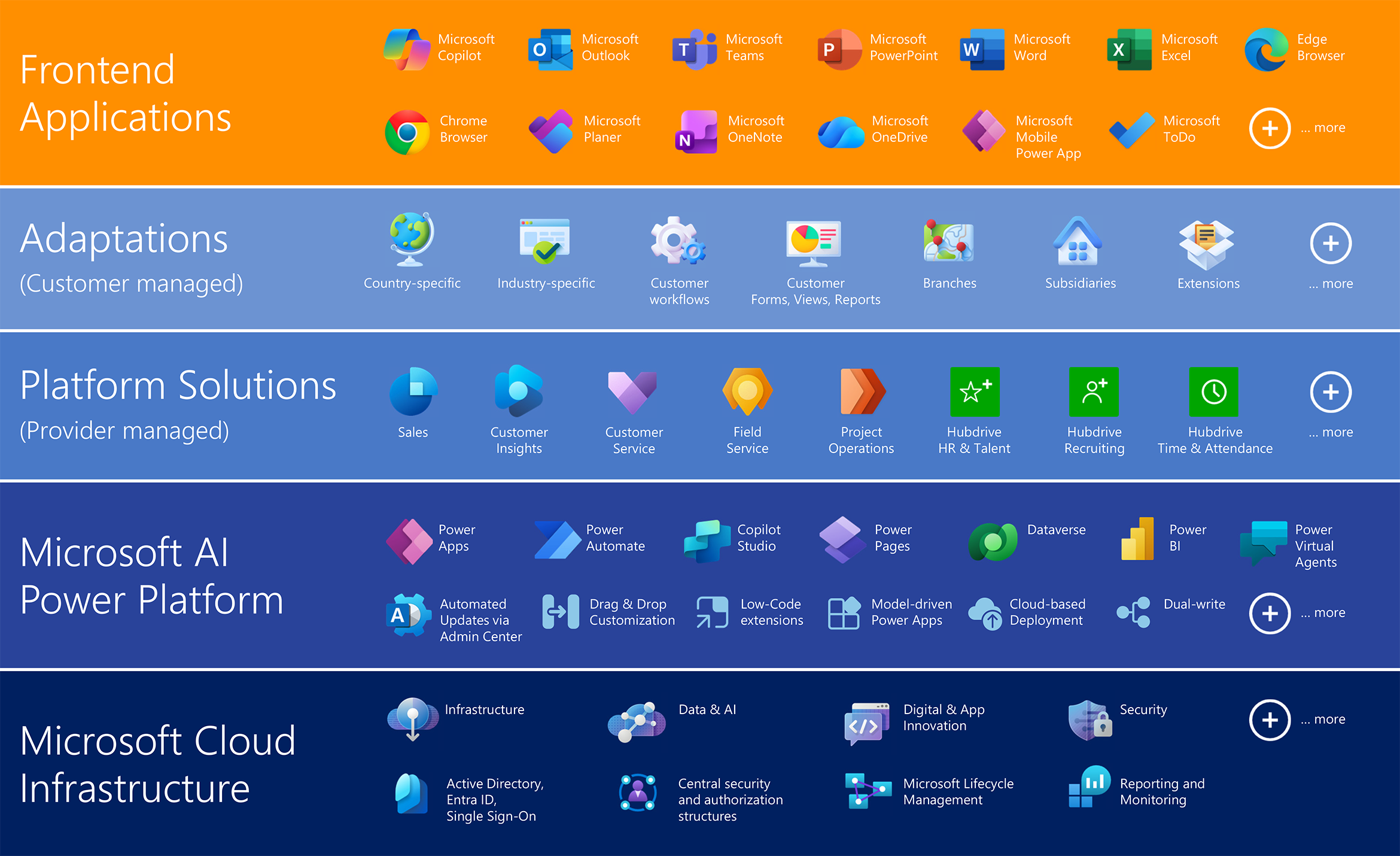
The technical value of Hubdrive is based on standardization and integration. HR for Dynamics is built 100% on the Microsoft Power Platform. For IT departments, this creates deep integration into the Microsoft ecosystem, a secure, standardized and maintainable HR architecture – with high flexibility and global support.
Platform Architecture
- Technology base: Microsoft Dynamics 365 Power Platform
- Cloud-native: Deployment in Microsoft Azure with automatic scaling, load balancing and high availability
- Data storage: Dataverse as the central data model for structured HR data
Integration & Interfaces
- Single Sign-On (SSO): Full integration with Azure Active Directory for authentication and role-based access control
- API-first approach: Access to all entities via OData and REST APIs
- Microsoft 365 integration: Direct connection to Teams, Outlook, SharePoint and Power BI for collaboration and reporting
- Standard connectors: Over 1,000 prebuilt connectors for ERP, CRM and third-party systems
Security & Compliance
- Encryption: Data transmission with AES-256 and TLS 1.2+
- Role-based security: Granular permissions via Azure RBAC and Dynamics security roles
- Audit & monitoring: Full logging through Microsoft Security Center and Compliance Manager
- GDPR & ISO 27001: Data processing compliant with European data protection regulations
Extensibility & Automation
- Low-code/no-code: Customization via Power Apps and Power Automate without complex programming
- Custom plugins: Option to develop custom C# plugins or JavaScript web resources
- Event-driven architecture: Support for Azure Event Grid and Service Bus for real-time integrations
Operations & Maintenance
- Update mechanism: Automatic updates through Microsoft release cycles (monthly/semi-annual)
- Monitoring: Use of Azure Monitor, Application Insights and Log Analytics for performance monitoring
- Backup & disaster recovery: Native Azure backup strategies with geo-redundancy
Technical comparison: Hubdrive HR vs. traditional HR systems
| Criterion | Hubdrive HR | Traditional HR systems |
|---|---|---|
| Platform | Microsoft Power Platform & Dynamics 365 (cloud-native) | Proprietary platform, often on-premises |
| Integration | Seamless connection to Microsoft 365, Azure AD, Power BI, Teams | Mostly limited interfaces, often custom-built |
| Authentication | Single Sign-On via Azure Active Directory / Entra ID | Separate user management, often without centralized authentication |
| API access | OData & REST APIs, over 600 standard connectors | Proprietary APIs, limited connectivity |
| Security | AES-256 encryption, TLS 1.2+, role-based access control | Varying security standards, often less granular |
| Compliance | GDPR-compliant, ISO 27001, auditing via Microsoft Security Center | Compliance depends on vendor, often manual |
| Extensibility | Low-code/no-code via Power Apps & Power Automate, custom plugins (C#, JS) | Customization usually requires developers, high effort |
| Automation | Event-driven architecture, integration with Azure Event Grid & Service Bus | Limited automation options |
| Updates & maintenance | Automatic updates via Microsoft release cycles | Manual updates, often complex migration projects |
| Monitoring | Azure Monitor, Application Insights, Log Analytics | Proprietary monitoring tools, limited transparency |
| Backup & recovery | Native Azure backup with geo-redundancy | Often local backups, limited disaster recovery |
Source: Based on analyses by Market Research EK, 2025.

Overview of possible customizations by customer
Business units, IT or tech-savvy HR staff can make the following customizations themselves using the Microsoft Power Platform and Hubdrive HR:
Customize forms and fields:
Customers can change form layouts, such as field order. They can add, remove or modify fields in input forms to better match business requirements.
Modify workflows and processes
Recurring processes and approval flows can be adapted and automated via drag & drop to increase efficiency and transparency.
Adjust lists and data views
Business units can configure lists and design views to display exactly the information relevant to them.
Create departments and organizational structures
Customers can create departments in the system and map the organizational structure, making administration easier.
Create and customize dashboards
HR can adapt Hubdrive dashboards or create new dashboards tailored to their specific needs.
Customizing forms and fields
One of the most fundamental customization options is changing forms and fields. Customers can modify the layout of input forms themselves, such as rearranging fields. This improves usability and optimizes data entry.
Field customization:
Fields in input forms can be added, removed or modified to better align forms with business requirements. This is especially useful when internal processes change or new information needs to be captured.
Layout customization:
Form layouts can be adapted to meet specific user needs. This includes rearranging fields, grouping information or highlighting important data.
Changing workflows and processes
Recurring processes and approval flows can be easily adapted and automated. This significantly increases efficiency and transparency in HR processes.
Automation:
Automating processes reduces manual tasks and minimizes errors. It saves time and resources and lets HR focus on strategic work.
Workflow customization:
Customizing workflows optimizes approval processes and ensures all relevant people are included. This improves transparency and traceability.
Drag & drop:
Using drag & drop makes workflow customization simple. Even employees without coding skills can adapt complex processes quickly and easily.
Customizing lists and data views
Departments can configure lists and design views so they show only the information that matters to them. This makes it fast and easy to access the data they need.
Filtering
Filtering data shows only the relevant information. This makes it easier to find specific records and reduces information overload.
Sorting
Sorting data shows information in a defined order. This can be by date, name or department.
Column selection
Selecting the displayed columns limits the view to the most important information. This improves clarity and makes data analysis easier.

Creation of departments and organizational structures
Specialist departments can create departments in the system and map the organizational structure. This supports administration and provides a clear structure for employee data.
Department creation
The creation of departments groups employees by their organizational units. This supports administration and enables specific reports and analyses for each department.
Organizational structure
Mapping the organizational structure in the system shows the relationships between departments and employees. This supports planning and coordination for projects and tasks.

Creating and customizing dashboards
HR can adapt Hubdrive dashboards or create new ones tailored to specific needs. Dashboards can be built in minutes via drag & drop for greater transparency and better decision-making.
Dashboard customization:
Customizing dashboards makes it easy to display key metrics and information at a glance. This simplifies monitoring HR processes and enables quick responses to changes.
Own dashboards:
Creating custom dashboards allows HR to address specific needs and requirements. Examples include visualizing employee satisfaction, turnover or recruiting success.
Drag & drop:
Using drag & drop makes creating and customizing dashboards simple. Even employees without coding skills can build complex dashboards quickly and easily.Contact
Customers can reach out to Mia.King@Hubdrive.com wenden.
Partners and Microsoft should contact James.King@Hubdrive.com.