HR Managers may be required to enroll an employee on to benefit of their choosing for reasons such as availability or access to the solution during an Open Enrollment period, or a new employee joining the company outside of an Open Enrollment period.
HR Manager/Supervisor: Benefit Enrollment For Employee
Objective
Process
HR Manager
Catalogues benefits for organization
HR Manager
Enters Benefit Management area to enroll employees on to benefits on their behalf as required
Prerequisites
- Benefits should be created
Click Through
- Start in HR HUB
- Under Benefit Management, select Benefits
- Enter Benefit record as required
- Under Enrolled Employees select + New
- Enter a descriptive name under the Name field
- Enter the Employee as required
- Enter a Coverage Start Date
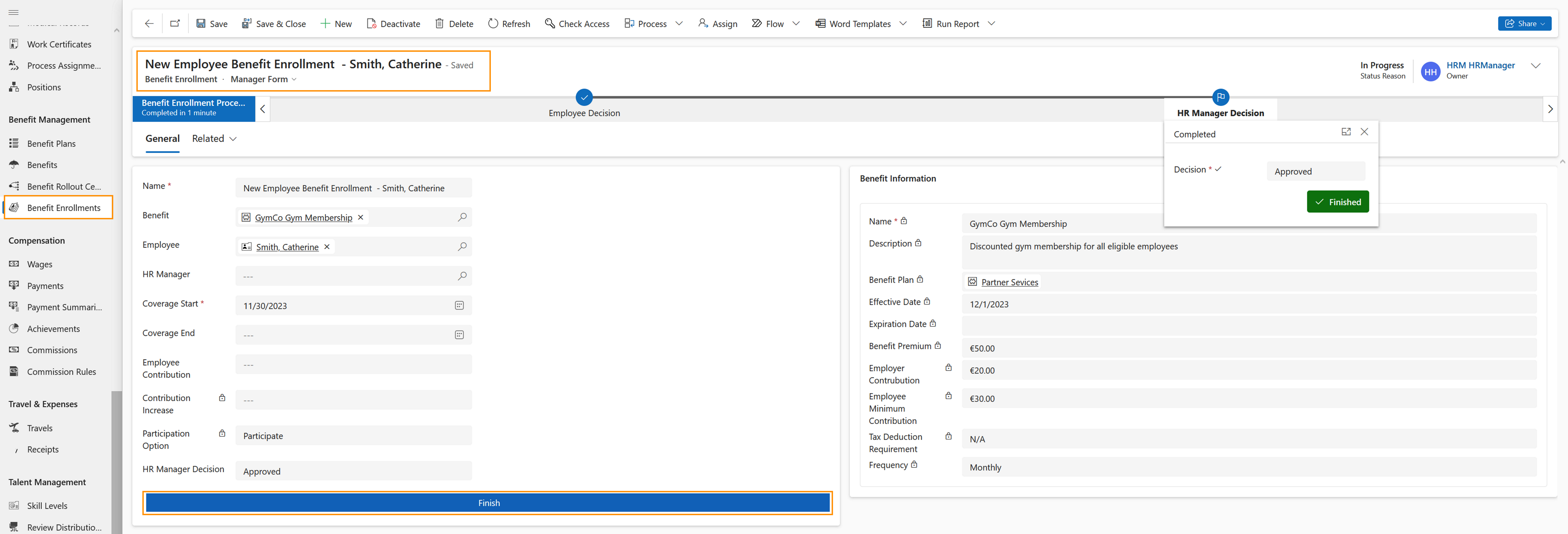
- Select Employee Decision on the Business Process Flow and choose the appropriate option
- Under HR Manager Decision choose the appropriate option
- Save
- Using Employee Decision in the Business Process Flow, select Next Stage
- Under HR Manager Decision in the Business Process Flow, ensure the appropriate decision is populated and select Finish at the bottom
Result
The Business Process Flow looks like this: