In Hubdrive, HR Managers can create vacancies which are only published internally. That means, as an Employee, you can apply to internal vacancies just by using the out-of-the-box functionality of Employee Self-Services.
Apply to internal job ads
Objective
Prerequisites
- Your access to Hubdrive has been configured by your company
Click Through
- Start in HR HUB Employee Self-Services
- Change the area from My Time & Leave to Employee Self Service
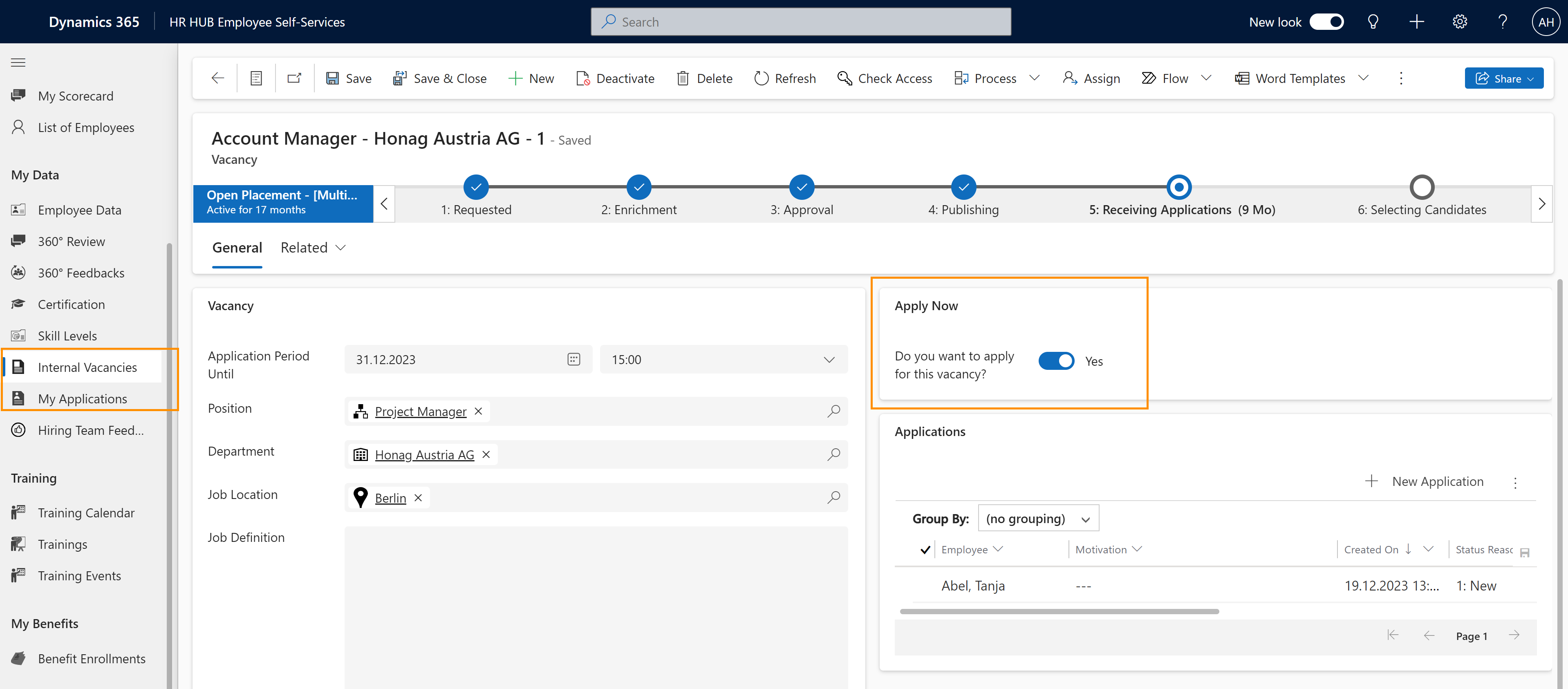
- Under My Data, navigate to Internal Vacancies
- A list with all available internal vacancies appears
- Open the vacancy you want to apply for by double-clicking on it
- On the right side in the Section Apply Now you find a Switch called Do you want to apply for this vacancy
- Switch the button to Yes, then you applied automatically for this job
- Now the Application process for HR starts
- You find your Application by navigating to My Applications under My Data in the Sitemap
- Here, you can see the Status of your Application
Result
Here, you can see where to apply internally:
Tips & Tricks
If you were not able to apply to internal job ads as described above, please contact your HR department and have them check the following settings: