Hubdrive allows employees to check their overtime balance, no matter if they are positive or negative, helping them to better plan their work time.
Employees: How to look up your Time Account balance
Objective
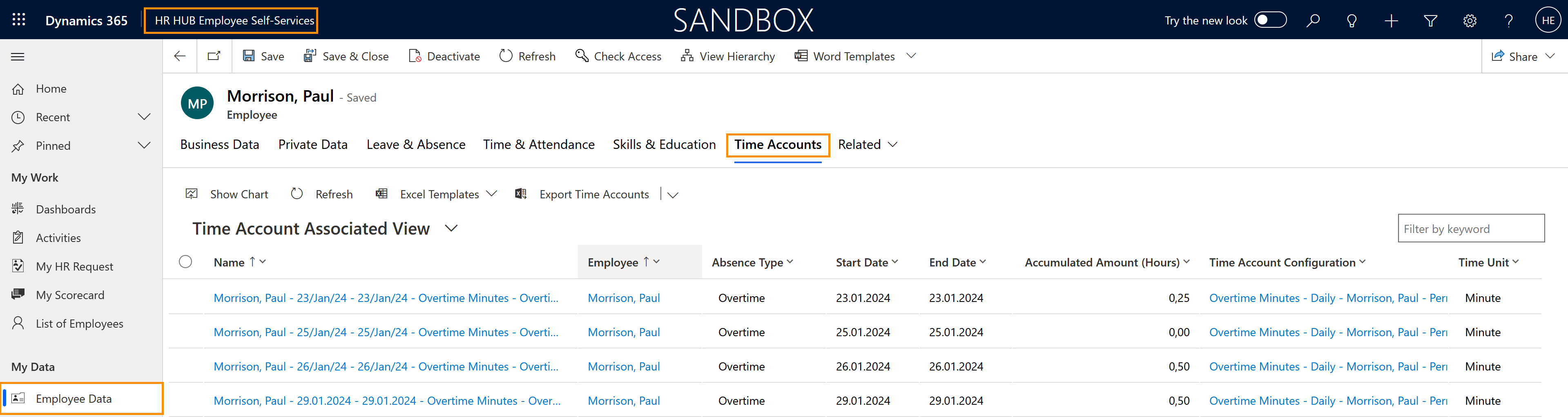
Click Through
- Start in HR HUB Employee Self-Services
- In the Employee Cockpit
- Click on My Employee Data
- Click on the tab Related
- Select Time Accounts
- Select the view Active Time Accounts via the drop-down menu
Result
Here, you can see a view of the accumulated overtime.
Tips & Tricks
If you were not able to look up your Time Account balance as described above, please contact your HR department and have them check the following settings:
- Time summaries must have been created
- The time account should be configured and added to the Employment Term of the employee
- In case a Time Account ever shows a wrong value, try to manually recalculate